1672/1673 FC/1674 FC
Users Manual
42
4. Select RCD current setting: 10 mA, 30 mA, 100 mA, 300 mA, 500 mA or Var.
5. Tap
H.
6. Select the RCD current setting (10, 30, 100, 300, 500, or 1000 mA).
7. Select a test current multiplier (x ½, x 1, x 5, or Auto). Normally you will use x 1 for this test.
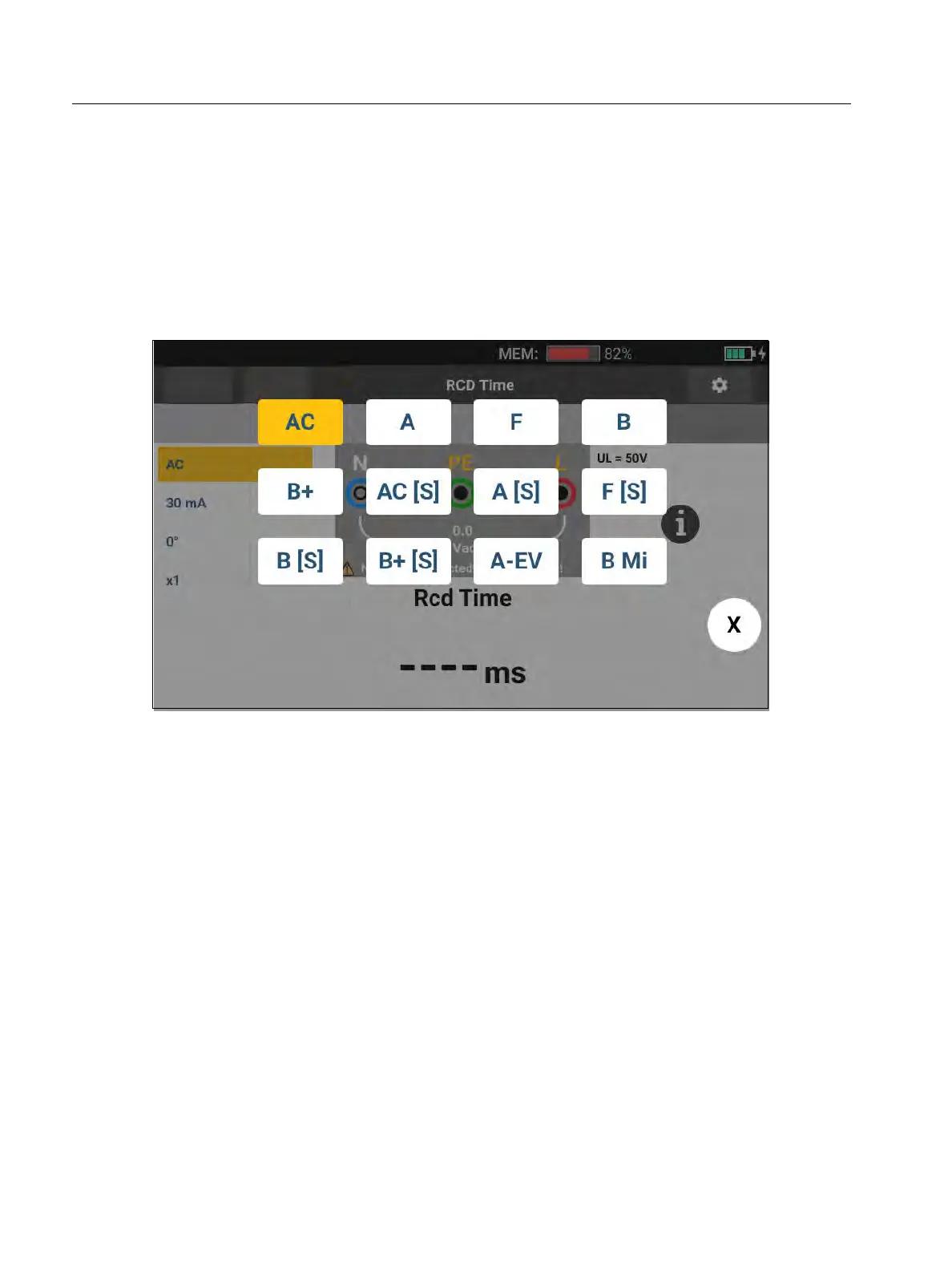
8. Select the RCD type. See Figure 16.
Figure 16. RCD Type Selection
AC current to test type AC (standard AC RCD) and type A (pulse-DC sensitive RCD)
Half-wave current to test type A (pulse-DC sensitive RCD)
Delayed response to test S-type AC (time delayed AC RCD)
Delayed response to S-type A (time delayed pulse-DC sensitive RCD)
1673 FC/1674 FC
Smooth-DC current to test type B RCD
Delayed response to S-type B (time delayed smooth-DC current RCD)
Note
For type G, K or R RCDs, choose type A (half-wave current). Pass is not triggered on the
short delay of 10 ms of the G, K, and R types. These types need a trip time of at least
10 ms.
Type B+ RCDs are tested with type B smooth dc-current.
Form
Functions
No limit
No project selected



 To Next Page