QUANTUM
™
LX EVAPORATOR CONTROL PANEL
COMMUNICATIONS SETUP
090.610-CS (MAY 2016)
Page 14
NOTE: This screen has no affect on Ethernet communi-
cations.
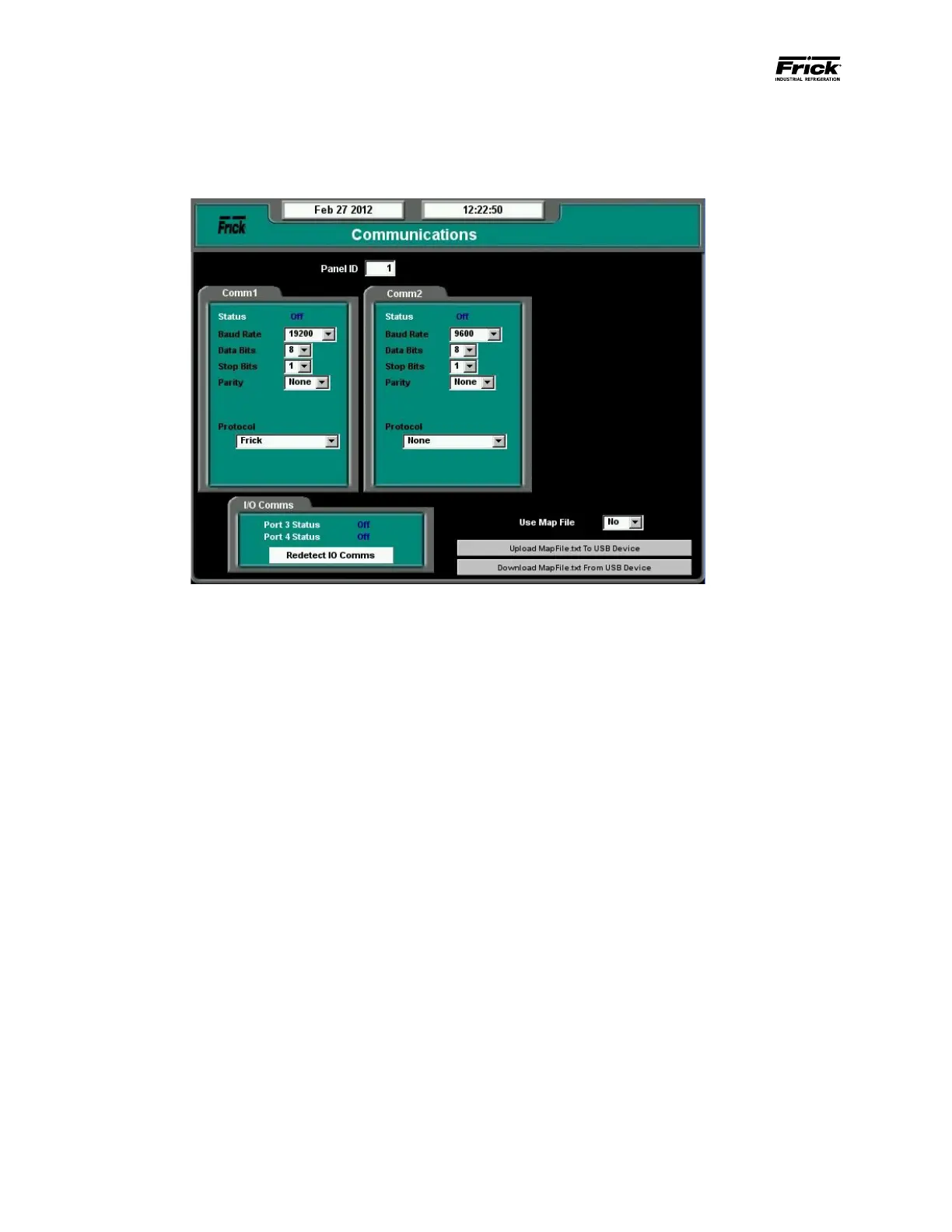
The following setpoints are provided:
Panel ID - A number that is used by an external com-
munications application, to converse to individual
Evaporators. On interconnected systems, this number
must be unique. Valid values are from 1 – 99.
Comm1 - (Setup parameter denitions for Com-1 and
Com-2 are identical) Communications related informa-
tion for the communications ports:
Status - Shows the current communications sta-
tus of the port. The possible messages are:
• Off - No communications are currently
taking place. NOTE: A delay of 15 sec-
onds or more of inactive communica-
tions (time between valid responses) will
cause this message to display.
• Active - Valid communications are ac-
tively occurring.
• Failed - An invalid command was re-
ceived by the port. This could be due to
a bad checksum value, a wiring issue, or
hardware problem at either the transmit-
ting (host) or receiving (Quantum™ LX)
end.
Baud Rate - The baud rate denes the speed at which
external communications can occur. The higher the
baud rate, the faster the communications. It is best to
start out using a lower baud rate, and increasing the
value only after verifying that communications errors
do not occur. If errors start to occur, drop the baud
rate back down. A pull down menu is provided to se-
lect from the following:
• 1200
• 2400
• 4800
• 9600
• 19200
• 38400
• 57600
• 115200
Data Bits - Determines the number of bits in a trans-
mitted data package. A pull down menu is provided to
select from the following:
• 7
• 8
Stop Bits - A bit(s) which signals the end of a unit of
transmission on a serial line. A pull down menu is pro-
vided to select from the following:
• 1
• 2
Parity - In communications, parity checking refers
to the use of parity bits to check that data has been
transmitted accurately. The parity bit is added to every
SERIAL COMMUNICATIONS SETUP
After the serial communications wiring has been connected, and jumpers correctly set, the LX software needs to be setup to
match that of the device(s) that it is to communicate with. The following screen is where this information can be found:





 To Next Page