QUANTUM
™
LX EVAPORATOR CONTROL PANEL
COMMUNICATIONS SETUP
090.610-CS (MAY 2016)
Page 10
ETHERNET SETUP
Once all of the cabling has been run and all connec-
tions have been made, it is now necessary to setup the
Quantum™ LX software to recognize and handle the
Ethernet connection.
The following section describes the suggested panel setup
for connecting the Quantum™ LX panel to an existing Eth-
ernet connection:
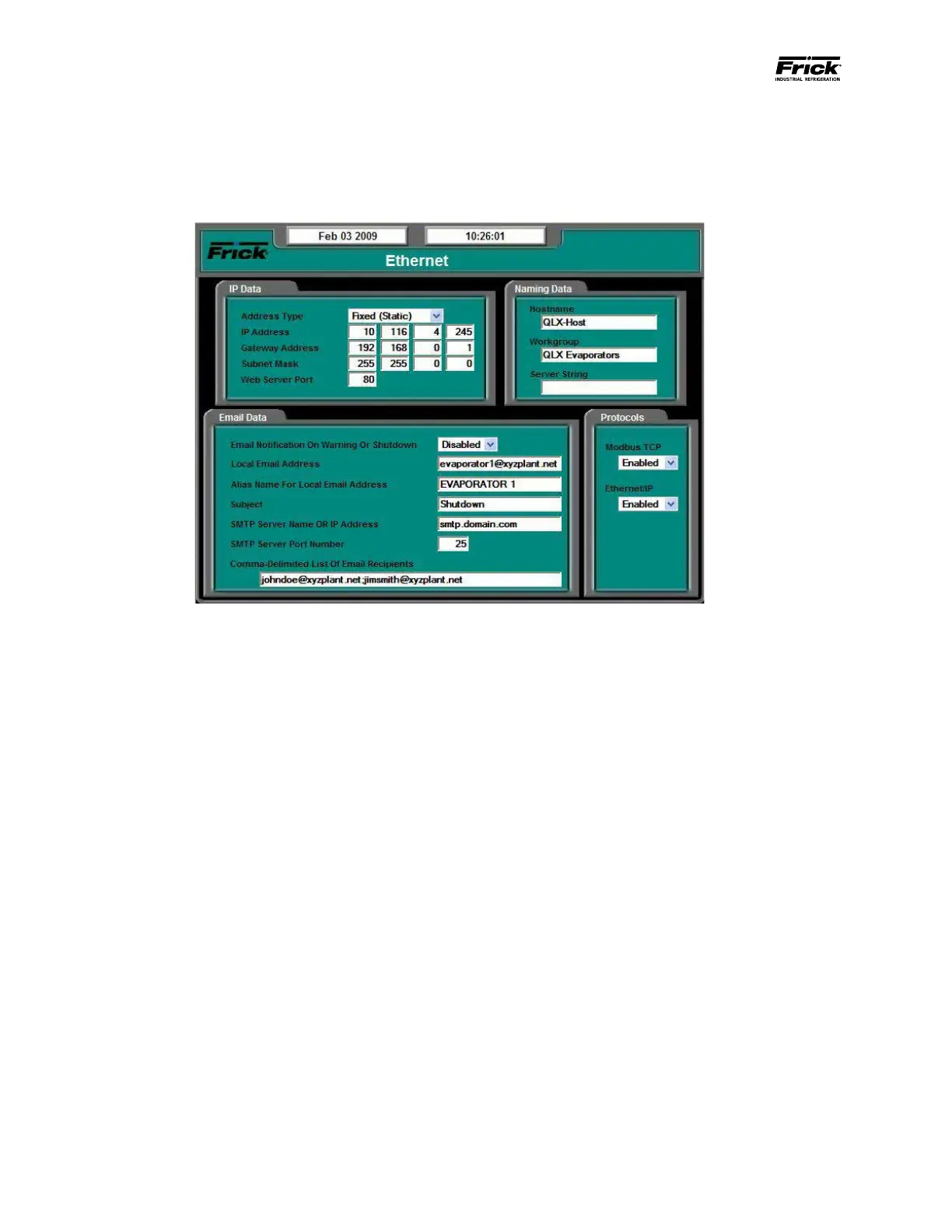
IP DATA
Address Type - The following drop-down menu is pro-
vided:
• Fixed (Static) – A xed address is usually as-
signed by the network (LAN) administrator,
and is normally always the same.
• DHCP (Dynamic) – Dynamic Host Congu-
ration Protocol permits auto-assignment of
temporary IP addresses for new devices con-
necting to the network.
IP Address – (Internet Protocol) Four setpoint boxes
are provided here. Every device on an Internet or Eth-
ernet network must be assigned a unique identifying
number, called an IP Address (this is similar in concept
to the Quantum™ LX panel ID number). The IP address
is how the network identies each device that is at-
tached. A typical IP address would look like this:
• 216.27.61.137
Gateway Address – Four setpoint boxes are provided
here. This is the IP address for the computer or de-
vice onto which your local network is connected to.
This gateway device is how all of the devices attached
to your local network are routed to other gateways
and networks. A router is a Gateway device that routes
packets between different physical networks. A gate-
way is a network point that acts as an entrance to an-
other network.
Subnet Mask - A TCP/IP number used to determine to
which TCP/IP subnet a device belongs. Devices in the
same subnet can be communicated with locally with-
out going through a router When a TCP/IP device tries
to communicate with another device the bits of the
TCP/IP destination address are “ANDed” with the sub-
net mask to determine whether the address is a local
address (broadcastable) or must be reached through a
router. A subnet mask of 255.255.255.0 used by a com-
puter with a TCP/IP address of 10.10.10.1 would include
the addresses 10.10.10.0 through 10.10.10.255 in the
local network basically telling the computer to try a
router if it’s transmitting to any other IP address. This
is all part of the TCP/IP protocol
Web Server Port – This is the port, or channel, that
a web server uses to communicate through. Just as
a computer sends data to a printer through a printer
port, a web server sends and receives data through
the Web Server Port. By default, the port number for a
Web server is 80.
NAMING DATA
NOTE: The IP Address Type must be set to DHCP
(Dynamic) for this section to work.
Host Name – Enter a distinct name that you wish to
be able to identify this particular Evaporator by (for
example; Unit1). The Host Name must be fteen char-
acters or less in length, use no spaces and use only





 To Next Page