QUANTUM
™
LX EVAPORATOR CONTROL PANEL
COMMUNICATIONS SETUP
090.610-CS (MAY 2016)
Page 33
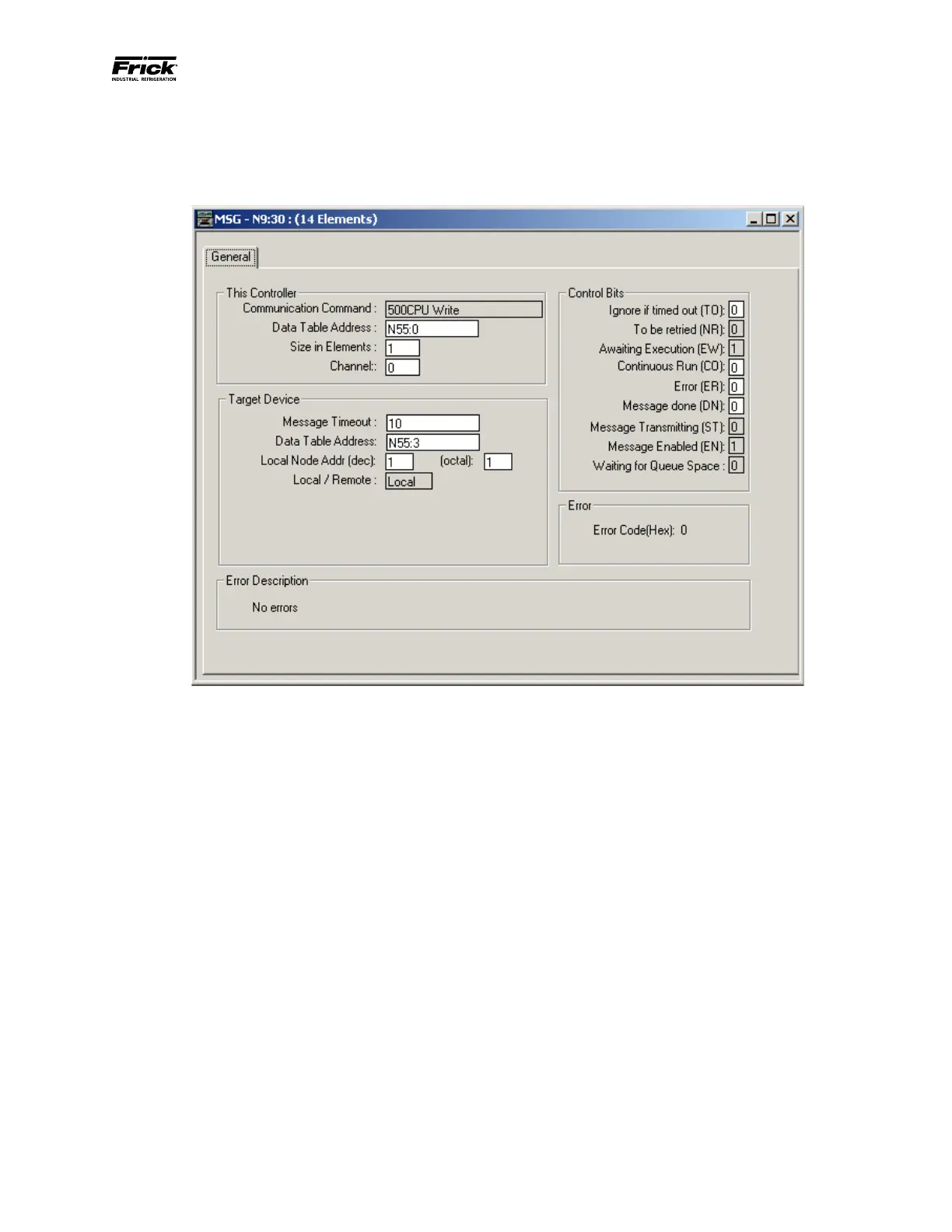
MESSAGE WRITE SETUP SCREEN
The following setup screen is programmed to write the Evaporator mode to the Quantum™ LX (ID#1) N55:3 data le from
the SLC500’s N55:3 data le. The target address must be changed to for the Quantum™ LX.
• This Controller: SLC500
• Data Table Address: Data le location in the
SLC500
• Size in Elements: # of data le to read
• Channel: Port location on the SLC processor
(Channel 0 is the RS232 port)
• Target Device: Quantum™ Panel
• Data Table Address: Data le location in the
Quantum™ controller.
• Local Node: Quantum™ ID# (Octal)
Allen-Bradley Data Access
Data passed to and from the Quantum™ are integer
values with one decimal eld assumed unless shown
otherwise or the command is sent to select two deci-
mal elds. For example, if the data’s value is 25.5 then
the value 255 is sent. All temperatures are in degree
C and all pressures are in PSIA unless the command
is sent to select the units of the panel. A mode such
as Slide Valve mode is sent as an integer value that
represents the mode it is in. For example, a 0 is sent
if it is in manual, or a 10 is sent if it is in automatic, or
a 20 is sent if it is in Remote Communications.
The value zero (0) is used to represent an OFF status
and a DISABLED option. The value one (1), which is
received as a 10, is used to represent an ON status
and an ENABLED option. Only data values that are
designated as setpoints are modiable. Read Only is
used to help identify what data is not modiable. The
setpoint range is checked to see if it is an allowed
setting. If it is not allowed, the setting is not changed.
Reference the Quantum™ Data Tables in this manual
for the address listing and description of data.
A command has been provided that selects whether
data to and from the Quantum™ will be returned in
the units that are the default (pressure in PSIA and
temperature in Degree C) or in the units that are se-
lected to display at the panel.
EtherNet/IP
Frick Controls supports the use of EtherNet/IP (as
described on the ab.com website, under the Ether-
Net/IP heading) with LX software 6.06 and later. Ad-
dress mapping follows the Allen-Bradley N: format,
as shown in the Data Tables under the heading of AB
Address.




 To Next Page