EasyManua.ls Logo

Fuji Electric Micro-controller X Series - User Manual

Fuji Electric Micro-controller X Series
83 pages
Print Icon
To Next Page IconTo Next Page
Loading...
Micro-controller X
Model: PXR4/5/9
Operation Manual
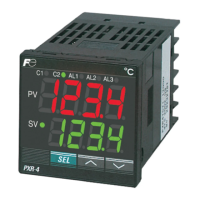
C1 C2 AL1 AL2 AL3
PV
SV
°C
PXR
SEL
ECNO:406e

Table of Contents

Questions and Answers

  • K
    Kevin AndersonAug 12, 2025
    What to do if the SV cannot be changed on Fuji Electric Micro-controller X Microcontrollers?
    • B
      bdanielsAug 12, 2025
      If you are unable to change the SV, it might be due to the parameter setting. If “1” or “4” is set in the parameter , change it to “0”, “2”, “3” or “5.” Alternatively, you may be trying to set a value outside the SV limiter; widen the range of to. Lastly, attempting to change the SV during ramp-soak operation will prevent modification; set the parameter of to.
  • V
    Vanessa CoxAug 16, 2025
    What to do if output changes between ON and OFF, but the reading does not change on Fuji Electric Microcontrollers?
    • D
      Daniel EricksonAug 17, 2025
      If the output alternates between ON and OFF without any change in the reading, first check for short-circuited input terminals and remove them. Ensure that the connecting cable for the device being controlled is properly connected. Verify that the device to be controlled is powered on. Lastly, confirm that the output signals of the Micro-controller match the input signals required by the device being controlled; adjust the Micro-controller settings to suit the device.
  • S
    steven68Aug 20, 2025
    Why is the response too slow on my Fuji Electric Micro-controller X Microcontrollers?
    • T
      Thomas SimpsonAug 21, 2025
      If the response is too slow, and the measured value changes sluggishly, it could be due to an excessively large input filter constant. Try decreasing the set value of the parameter of.
  • T
    Tina SnowAug 26, 2025
    What to do if the keys do not operate on Fuji Electric Micro-controller X Microcontrollers?
    • K
      kirbymitchellAug 26, 2025
      If the keys are unresponsive and you cannot change the parameter values, check the parameter . If it is set to “1”, “2”, “4”, or “5”, change it to “0” or “3.”
  • M
    Michael SnowAug 29, 2025
    What to do if the parameters are not displayed on Fuji Electric Micro-controller X?
    • S
      Stephanie Stevens DVMAug 29, 2025
      If certain parameters are not displayed, it's possible they are set to skip in the parameters of to . To resolve this, change the set value of the concerned dSP.
  • W
    Wesley WeberSep 2, 2025
    What causes an excessive over-shoot during auto-tuning operation in Fuji Electric Microcontrollers?
    • T
      Thomas HarperSep 3, 2025
      To address excessive overshoot during auto-tuning, perform the auto-tuning with the parameter of being set to “2” (Low PV type). If the issue persists, manual tuning may be necessary.
  • C
    careyjessicaNov 7, 2025
    Why is auto-tuning not working properly on my Fuji Electric Micro-controller X Microcontrollers?
    • E
      elijah90Nov 7, 2025
      Several factors can prevent auto-tuning from functioning correctly. If the display shows or after starting auto-tuning, adjust the parameters to increase the difference between the set values and then retry auto-tuning. Avoid changing the SV after initiating auto-tuning; instead, set the desired SV and restart the process. If the controlled device responds too quickly, consider using a controller with a faster control cycle, such as PYH. Ensure you are not attempting auto-tuning during ramp-soak operation; if so, set the parameter to and try again. Verify that all peripheral devices are properly connected and functioning correctly. Also, confirm that the direct/reverse actions are suitable for the device being controlled by setting the parameter appropriately. Finally, if the controlled de...

Fuji Electric Micro-controller X Series Specifications

General IconGeneral
BrandFuji Electric
ModelMicro-controller X Series
CategoryMicrocontrollers
LanguageEnglish

Related product manuals