8G093X01 R5
VR Programming Guide
August 2022 Page 56 of 144
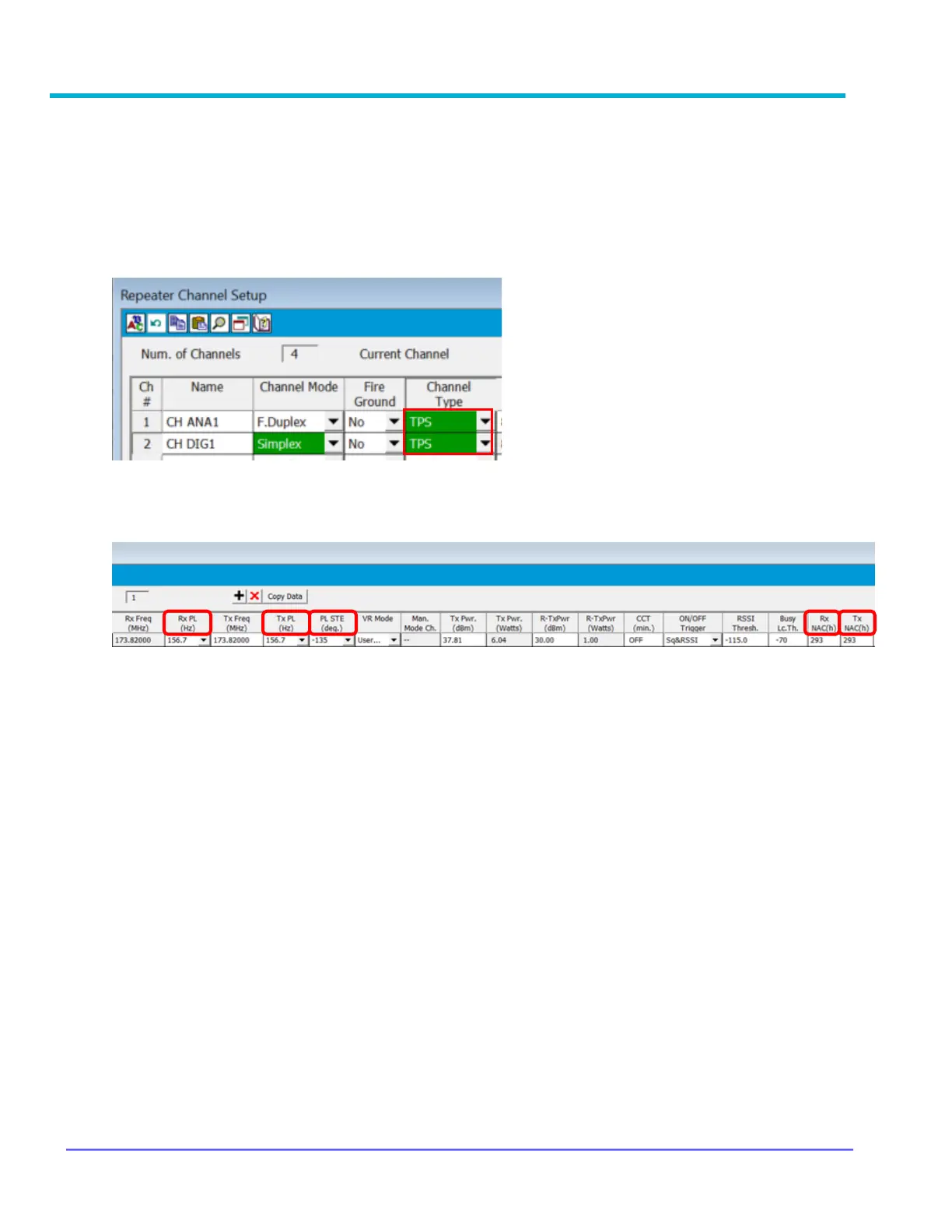
How to Program TPS Signaling
FRC – VR Programming
Step 1: Open Repeater Channel Setup window
Step 2: Set Channel Type to TPS
Step 3: Set PL and NAC values to match with PSU programming: Rx PL(Hz), Tx PL(Hz), PL
STE(deg.), Rx NAC(h), Tx NAC(h)
CPS – MSU and PSU Programming for TPS Signaling
Step 1: Under Conventional Configuration → Conventional Personality
a) General → DVRS Profile Selection → DVRS Profile
b) RX Options → RX Voice/Signal Type → Mixed Mode
c) TX Options → TX Voice/Signal Type → ASTRO
d) Signaling → Non-ASTRO → Signaling Type → None
e) ASTRO Talkgroup → Talkgroup → Unchecked
f) Features → Incident Signaling Type → Tactical Public Safety
g) Tactical Public Safety UI Enable → Checked
Step 2: Under Radio Wide → Tactical Public Safety there are additional parameters that may be
configured as per user preference. Refer to Motorola documentation for further
information.
Note: Portable must be programmed as a Generic P25 portable to be compatible with TPS
Signaling.



 To Next Page