GPSMAP
®
585 Plus
13
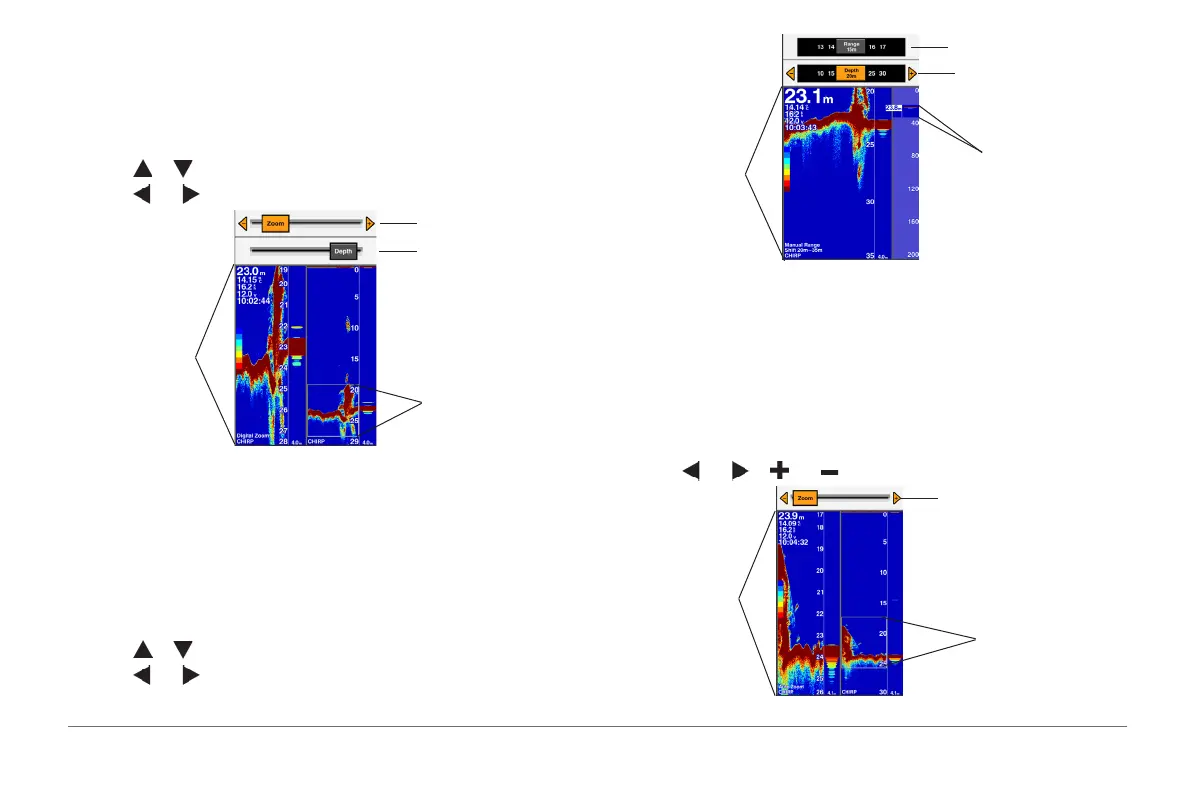
Digital Zoom
Digital zoom magnies the image after it is captured by sonar. It expands a
chosen area of the sonar picture to vertically ll the left-side of the screen.
You can set the zoom manually.
1 From a sonar screen select RANGE/ZOOM > Digital Zoom.
2 Select or to select between Zoom and Depth.
3 Select and to adjust the value.
Adjust the zoom ratio
Digital Zoom range
Adjust the depth level
Magnied view
Shift Zoom
This is a unique sonar zoom technology from Garmin. It displays the selected
depth and range of sonar to ll the left-side of the screen in more accuracy
and detail. In the Shift Zoom mode the shnder CPU only processes the
sonar signals received from the selected depth range. You can set the zoom
manually.
1 From a sonar screen select RANGE/ZOOM > Shift Zoom.
2 Select or to select Range or Depth.
3 Select and to adjust the value.
Adjust the zoom range
Shift Zoom range
Adjust the depth level
Magnied view
Auto
Auto zoom is similar to Bottom Lock but displays a magnied view on the
left-side of the screen of the bottom and bottom sh in the set zoom range.
The Auto mode is good for determining the bottom contour. It allows you to
change the depth range above the bottom and the zoom ratio while always
showing the water bottom.
1 From a sonar screen select RANGE/ZOOM > Auto.
2 Select and or and to adjust the zoom range.
Selected zoom range
Adjust the zoom range
Magnied View



 To Next Page