GPSMAP
®
585 Plus
37
resolution interval is recommended for the most efcient use of memory.
1 Select User Data > Tracks > Active Track Options > Record Interval >
Interval.
2 Select an option:
• To record the track based on a distance between points, select
Distance > Change, and enter the distance.
• To record the track based on a time interval, select Time > Change,
and enter the time interval.
• To record the track plot based on a variance from your course, select
Resolution > Change, and enter the maximum error allowed from the
true course before recording a track point.
Deleting All Saved Waypoints, Routes, and Tracks
Select User Data > Manage Data > Clear User Data > All > OK.
AIS Radar
The Automatic Identication System (AIS) enables you to identify and track
other vessels, and alerts you to area trafc.
When connected to an external AIS device, the chartplotter can show some
AIS information about other vessels that are within range, equipped with a
transponder, and are actively transmitting AIS information. The information
reported for each vessel includes the Maritime Mobile Service Identity
(MMSI), location, GPS speed, GPS heading, time that has elapsed since the
last position of the vessel was reported, nearest approach, and time to the
nearest approach.
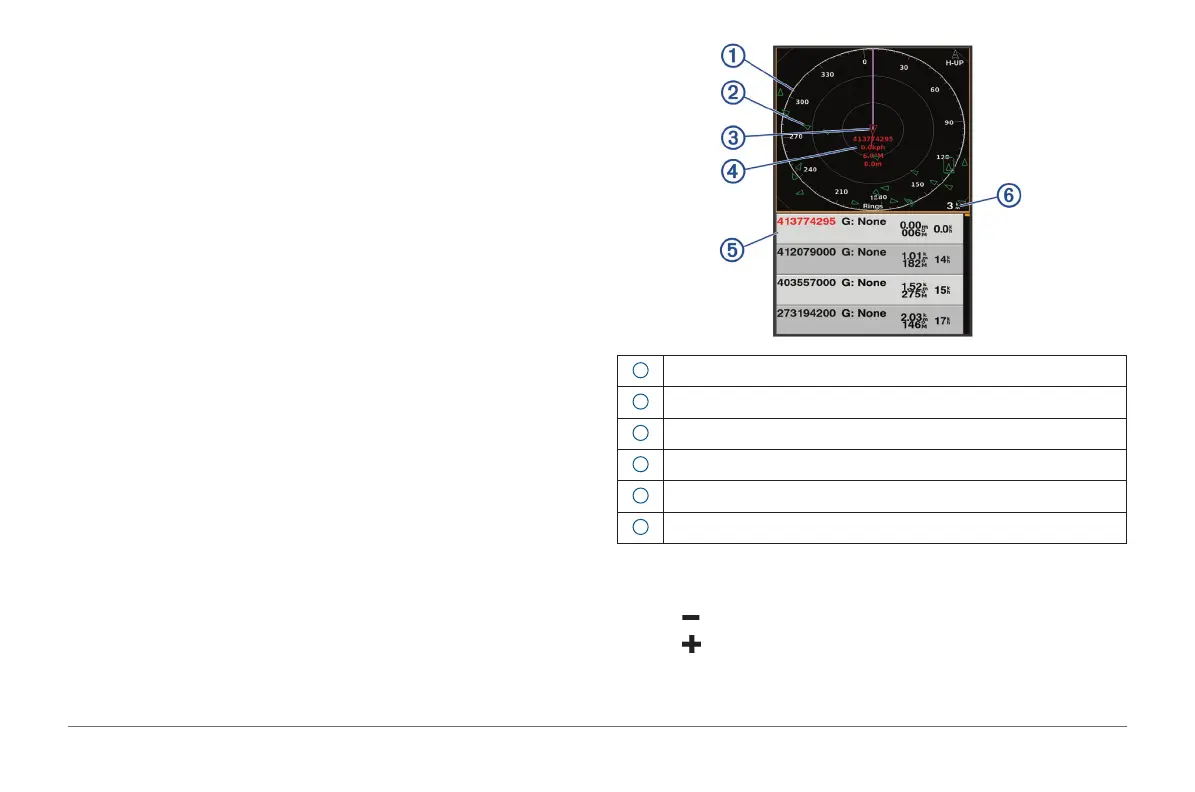
The AIS Radar screen provides a pictorial representation of the AIS vessels
around you, similar to a radar display, and a list of those vessels.
1
Bearing ring
2
Target in the safe range
3
Active target
4
Active target Maritime Mobile Service Identity (MMSI) and details
5
AIS targets list
6
Range
Adjusting the AIS Radar Range
• Select to decrease the range.
• Select to increase the range.



 To Next Page