14
GPSMAP
®
585 Plus
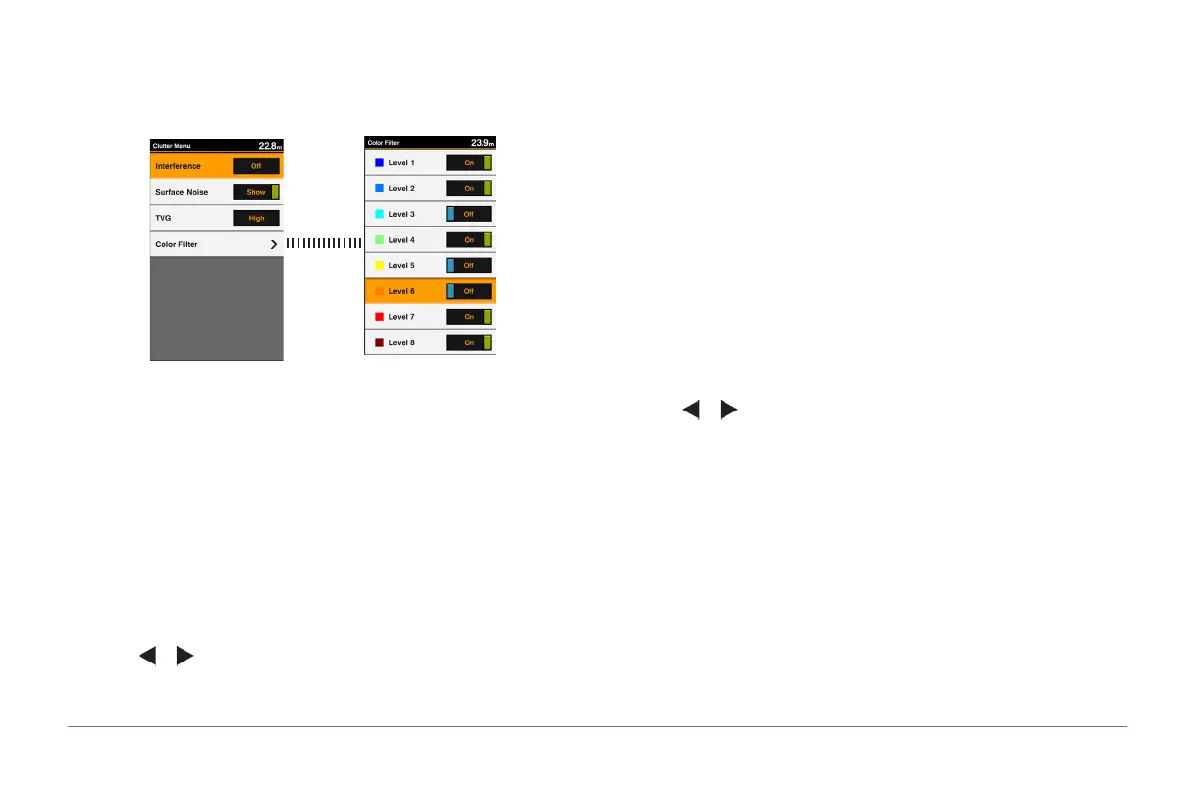
Reducing the Clutter
You can quickly change the settings to reduce noise and clutter on the sonar
screen.
1 From a sonar view, hold GAIN/CLUTTER to open the Clutter Menu.
2 Select one or more options:
• To adjust the sensitivity to reduce the effects of interference from nearby
sources of noise, select Interference.
• To hide sonar returns near the surface of the water, select Surface
Noise.
• To adjust the time varying gain, which can reduce noise, select TVG.
• To lter specied colors representing different sonar signal’s strengths
and identify targets of interests, select Color Filter.
Pausing the Sonar Display
You can pause the sonar to create a mark or a waypoint.
Select or .
Creating a Mark or Waypoint on a Sonar Screen Using
Your Present Location
1 Pause the sonar.
2 Select an option:
• To create a mark at the cursor, select MARK/WPT.
• To create a waypoint at the cursor, hold MARK/WPT.
• To create a mark at your boat position, with the cursor invisible and no
menu shown, select MARK/WPT.
• To create a waypoint at your boat position, with the cursor invisible and
no menu shown, select MARK/WPT.
3 If necessary, edit the mark or waypoint information.
Creating a Waypoint on a Sonar Screen Using a
Different Location
1 Select or to pause the sonar.
2 Using the arrow keys, select a location.
3 Select an option:
• To create a mark, select MARK.
• To create a waypoint, hold MARK.
4 If necessary, edit the mark or waypoint information.
Sonar Frequencies
NOTE: The frequencies that are available depend on the transducer being
used. Adjusting the frequency helps adapt the sonar for your particular goals
and the present depth of the water.
Lower frequencies scans a wider area, and are thus suitable for general



 To Next Page