50
GPSMAP
®
585 Plus
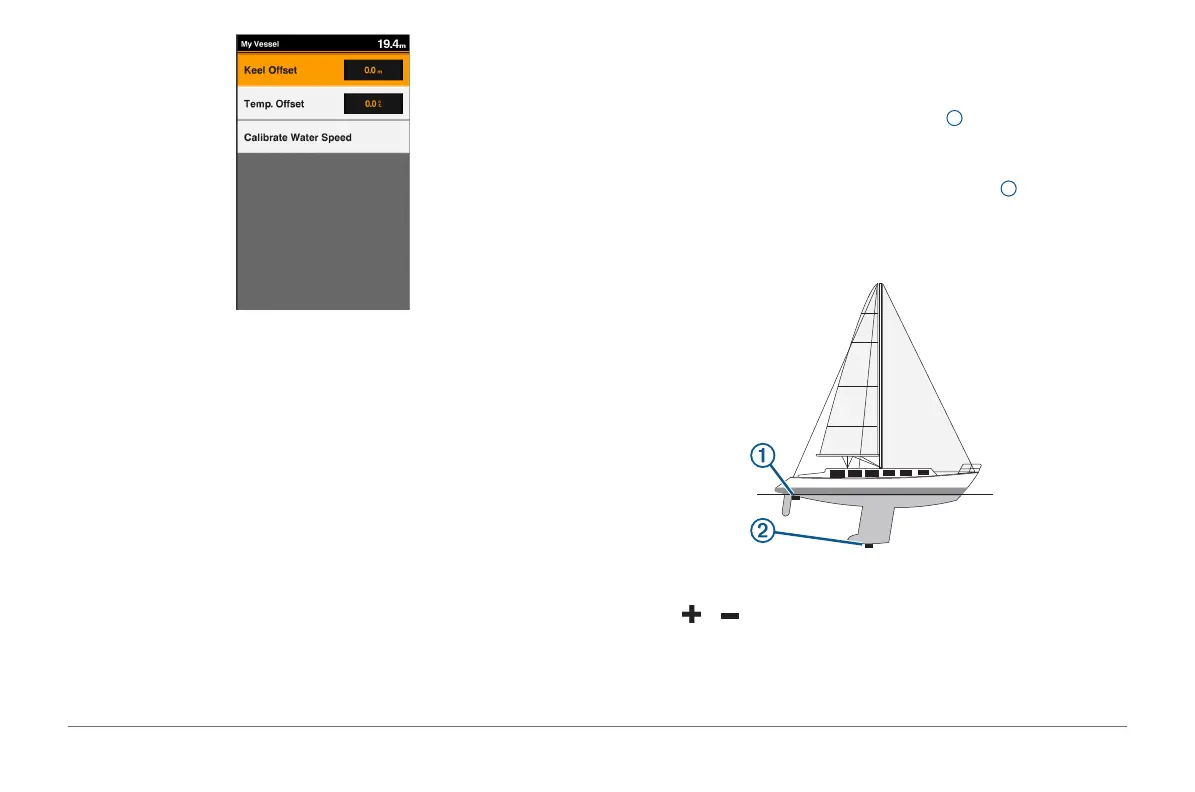
Keel Offset: Offsets the surface reading for the depth of a keel, making it
possible to measure depth from the bottom of the keel instead of from the
transducer location (page 40).
Temp. Offset: Compensates for the water temperature reading from a
temperature-capable transducer (page 40).
Calibrate Water Speed: Calibrates the speed-sensing transducer or sensor
page 41.
Transducer Type: Displays the type of transducer connected to the device
(page 3).
Setting the Keel Offset
You can enter a keel offset to compensate the surface reading for the depth
of a keel, making it possible to measure water depth or depth below the keel
instead of depth below the transducer. Enter a positive number to offset for a
keel. You can enter a negative number to compensate for a large vessel that
may draw several feet of water.
NOTE: A buffer of 2 to 3 feet from the bottom of the keel is recommended to
ensure a safe distance from the keel to the bottom.
1 Complete an action, based on the location of the transducer:
• If the transducer is installed at the water line
1
, measure the distance
from the transducer location to the keel of the boat. Enter this value in
steps 3 and 4 as a positive number to display depth below keel.
• If the transducer is installed at the bottom of the keel
2
, measure the
distance from the transducer to the water line. Enter this value in steps
3 and 4 as a negative number to display water depth. Enter a 0 in this
value to display depth below keel and depth below transducer.
2 Select Settings > My Vessel > Keel Offset.
3 Select or based on the location of the transducer.
4 Enter the distance measured in step 1.



 To Next Page