GPSMAP
®
585 Plus
15
search and judging the bottom conditions.
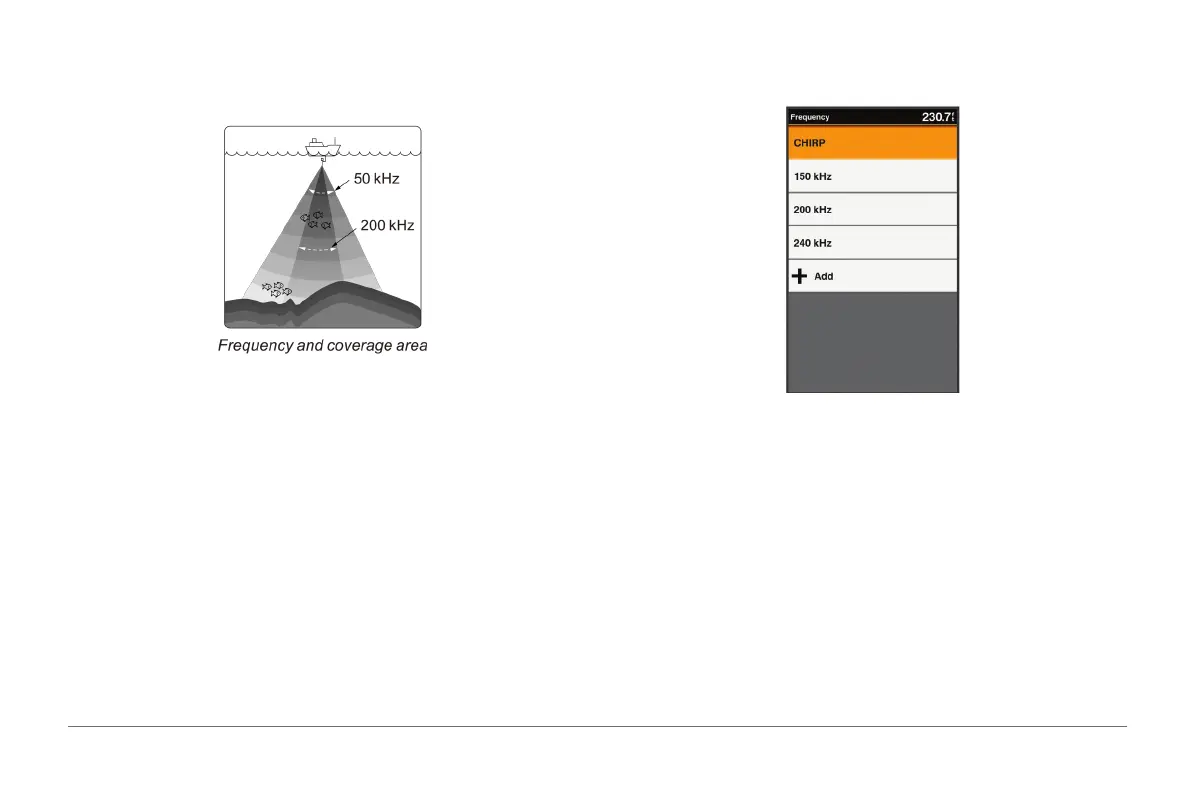
Higher frequencies results in better resolutions, and are thus more useful for
detailed observations of sh echoes.
Selecting Frequencies
50 kHz
The shnder uses ultrasonic signals to detect bottom. The lower the
frequency, the wider and deeper the detection area. The 50 kHz frequency is
useful for general detection and judging the bottom condition.
77 kHz
The 77 kHz is shnder’s mid-frequency with a wider beam angle for
detecting schools of sh at the bottom on the edges.
200 kHz
The higher the frequency, the narrower the beam and the higher the
resolution. The 200 kHz frequency is ideal for detailed observations.
NOTE: You cannot adjust the frequency for all sonar views and transducers.
You can indicate which frequencies appear on the sonar screen.
1 From a sonar view, select MENU > Frequency.
2 Select a frequency suited to your needs and water depth.
Creating a Frequency Preset
NOTE: Not available with all transducers.
You can create a preset to save a specic sonar frequency, which allows you
to change frequencies quickly.
1 From a sonar view, select MENU > Frequency.
2 Select Add.
3 Enter a frequency.



 To Next Page