18 Sensors and Accessories
or in your Garmin Connect account.
1 Hold MENU.
2 Select Appearance > Morning Report.
3 Select an option:
• Select Show Report to enable or disable the
morning report.
• Select Edit Report to customize the order and
type of data that appears in your morning report.
Sensors and Accessories
The Instinct E watch has several internal sensors,
and you can pair additional wireless sensors for your
activities.
Wrist Heart Rate
Your watch has a wrist-based heart rate monitor, and
you can view your heart rate data on the heart rate
glance (Viewing the Glance Loop, page14).
The watch is also compatible with chest heart rate
monitors. If both wrist-based heart rate and chest heart
rate data are available when you start an activity, your
watch uses the chest heart rate data.
Wearing the Watch
CAUTION
Some users may experience skin irritation after
prolonged use of the watch, especially if the user
has sensitive skin or allergies. If you notice any skin
irritation, remove the watch and give your skin time to
heal. To help prevent skin irritation, ensure the watch
is clean and dry, and do not overtighten the watch on
your wrist. For more information, go to Garmin.com/
fitandcare.
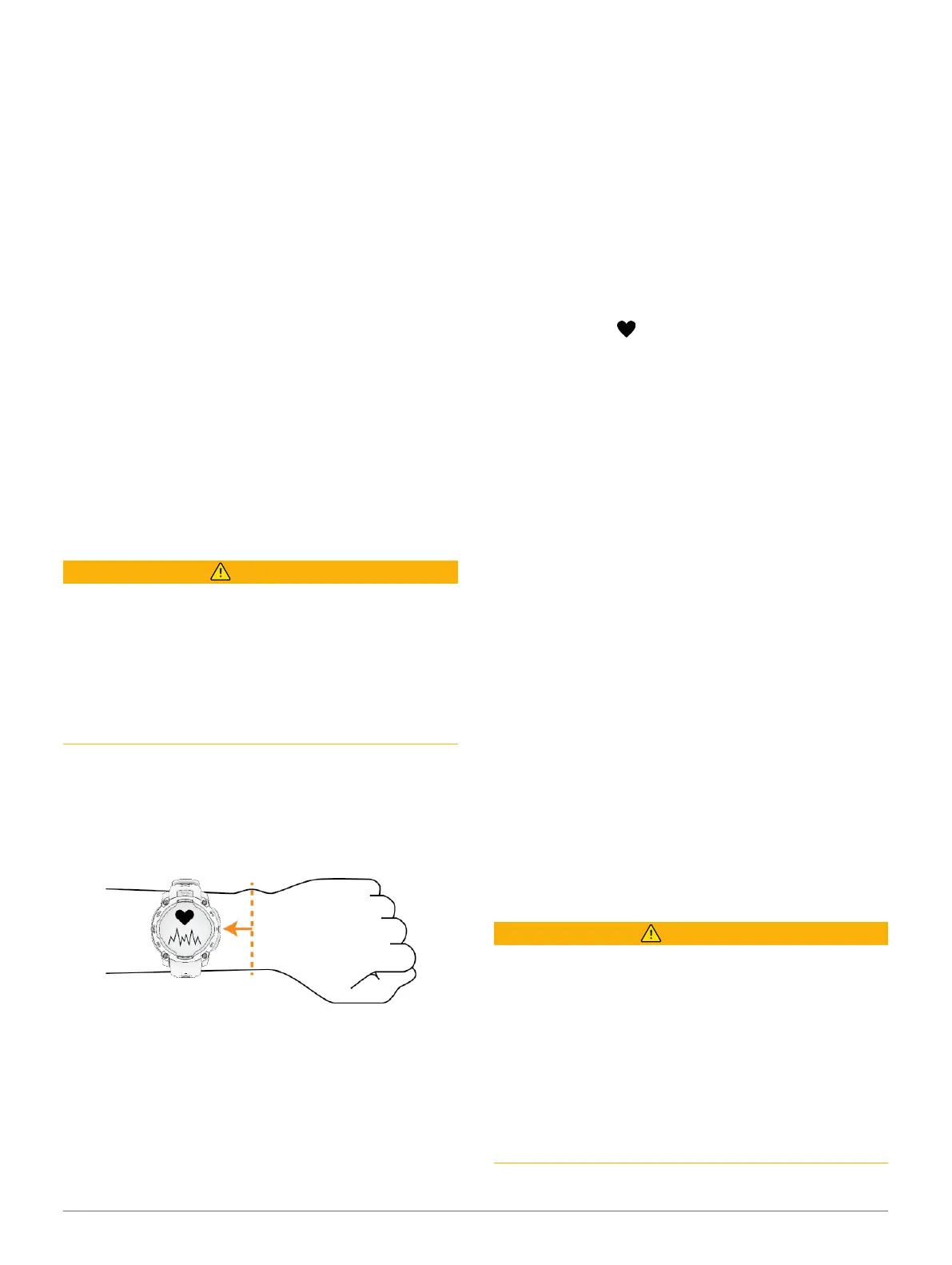
y Wear the watch above your wrist bone.
NOTE: The watch should be snug but comfortable.
For more accurate heart rate readings, the watch
should not shift while running or exercising.
For pulse oximeter readings, you should remain
motionless.
NOTE: The optical sensor is located on the back of
the watch.
y See Tips for Erratic Heart Rate Data, page18 for
more information about wrist-based heart rate.
y See Tips for Erratic Pulse Oximeter Data, page19
for more information about the pulse oximeter
sensor.
y For more information about accuracy, go to Garmin.
com/ataccuracy.
y For more information about watch wear and care,
go to Garmin.com/fitandcare.
Tips for Erratic Heart Rate Data
If the heart rate data is erratic or does not appear, you
can try these tips.
y Clean and dry your arm before putting on the watch.
y Avoid wearing sunscreen, lotion, and insect
repellent under the watch.
y Avoid scratching the heart rate sensor on the back
of the watch.
y Wear the watch above your wrist bone. The watch
should be snug but comfortable.
y Wait until the icon is solid before starting your
activity.
y Warm up for 5 to 10 minutes and get a heart rate
reading before starting your activity.
NOTE: In cold environments, warm up indoors.
y Rinse the watch with fresh water after each
workout.
Wrist Heart Rate Monitor Settings
Hold MENU, and select Sensors & Accessories > Wrist
Heart Rate.
Status: Enables or disables the wrist heart rate monitor.
The default value is Auto, which automatically uses
the wrist heart rate monitor unless you pair an
external heart rate monitor.
NOTE: Disabling the wrist heart rate monitor also
disables the wrist-based pulse oximeter sensor.
You can perform a manual reading from the pulse
oximeter glance.
While Swimming: Enables or disables the wrist heart
rate monitor during swimming activities.
Abnormal Heart Rate Alerts: Allows you to set the
watch to alert you when your heart rate exceeds
or drops below a target value (Setting an Abnormal
Heart Rate Alert, page18).
Broadcast Heart Rate: Allows you to begin
broadcasting your heart rate data to a paired device
(Broadcasting Heart Rate Data, page19).
Setting an Abnormal Heart Rate Alert
CAUTION
This feature only alerts you when your heart rate
exceeds or drops below a certain number of beats
per minute, as selected by the user, after a period of
inactivity. This feature does not notify you when your
heart rate drops below the selected threshold during
your chosen sleep window configured in the Garmin
Connect app. This feature does not notify you of any
potential heart condition and is not intended to treat
or diagnose any medical condition or disease. Always
defer to your health care provider for any heart-related
issues.
You can set the heart rate threshold value.













 To Next Page