22 Sensors and Accessories
Connected. Sensor data appears in the data screen
loop or a custom data field. You can customize the
optional data fields (Customizing the Data Screens,
page8).
Heart Rate Accessory Running Pace and Distance
The HRM-Fit and HRM-Pro series accessories calculate
your running pace and distance based on your user
profile and the motion measured by the sensor on every
stride. The heart rate monitor provides running pace
and distance when GPS is not available, such as during
treadmill running. You can view your running pace and
distance on your compatible Instinct E watch when
connected using ANT+ technology. You can also view it
on compatible third-party training apps when connected
using Bluetooth technology.
The pace and distance accuracy improves with
calibration.
Automatic calibration: The default setting for your
watch is Auto Calibrate. The heart rate accessory
calibrates each time you run outside with it
connected to your compatible Instinct E watch.
NOTE: Automatic calibration does not work for
indoor, trail, or ultra run activity profiles (Tips for
Recording Running Pace and Distance, page22).
Manual calibration: You can select Calibrate & Save
after a treadmill run with your connected heart
rate accessory (Calibrating the Treadmill Distance,
page3).
Tips for Recording Running Pace and Distance
y Update your Instinct E watch software (Product
Updates, page37).
y Complete several outdoor runs with GPS and your
connected HRM-Fit or HRM-Pro series accessory.
It’s important that your outdoor range of paces
matches your range of paces on the treadmill.
y If your run includes sand or deep snow, go to the
sensor settings, and turn off Auto Calibrate.
y If you previously connected a compatible foot pod
using ANT+ technology, set the foot pod status to
Off, or remove it from the list of connected sensors.
y Complete a treadmill run with manual calibration
(Calibrating the Treadmill Distance, page3).
y If automatic and manual calibrations don’t seem
accurate, go to the sensor settings, and select HRM
Pace & Distance > Reset Calibration Data.
NOTE: You can try turning off Auto Calibrate, and
then manually calibrate again (Calibrating the
Treadmill Distance, page3).
Running Dynamics
Running dynamics is real-time feedback about
your running form. Your Instinct E watch has an
accelerometer to calculate five running form metrics.
For all six running form metrics, you must pair your
Instinct E watch with the HRM-Fit, HRM-Pro series
accessory, or other running dynamics accessory that
measures torso movement. For more information, go to
Garmin.com/performance-data/running.
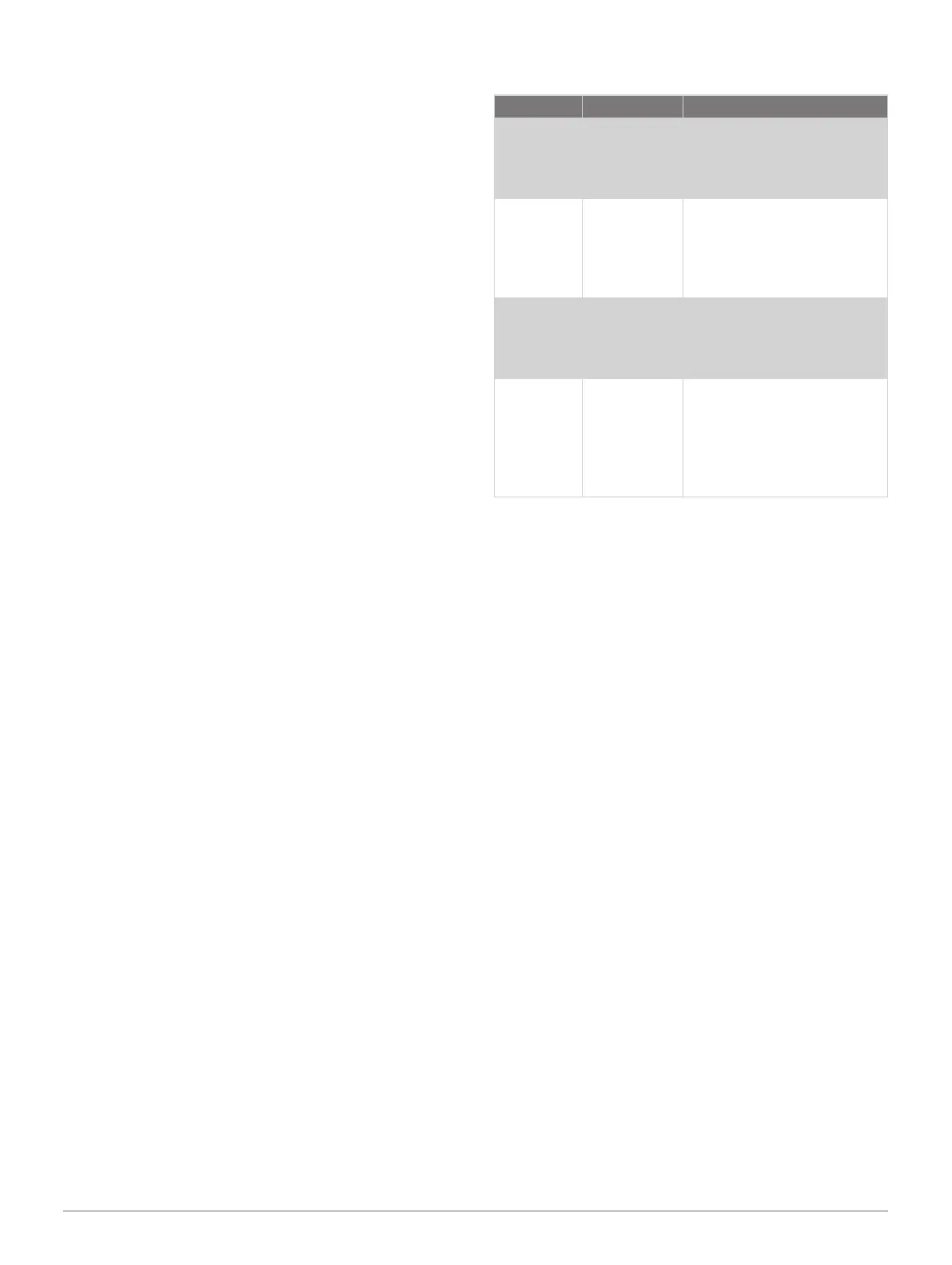
Metric Sensor Type Description
Cadence
Watch or
compatible
accessory
Cadence is the number
of steps per minute. It
displays the total steps
(right and left combined).
Vertical
oscillation
Watch or
compatible
accessory
Vertical oscillation is your
bounce while running. It
displays the vertical motion
of your torso, measured in
centimeters.
Stride
length
Watch or
compatible
accessory
Stride length is the length
of your stride from one
footfall to the next. It is
measured in meters.
Vertical
ratio
Watch or
compatible
accessory
Vertical ratio is the ratio
of vertical oscillation to
stride length. It displays
a percentage. A lower
number typically indicates
better running form.
Tips for Missing Running Dynamics Data
This topic provides tips for using a compatible running
dynamics accessory. If the accessory is not connected
to your watch, the watch automatically switches to
wrist-based running dynamics.
y Make sure you have a running dynamics accessory,
such as the HRM-Fit or HRM-Pro series accessory.
y Pair the running dynamics accessory with your
watch again, according to the instructions.
y If you are using an HRM-Fit or HRM-Pro series
accessory, pair it with your watch using ANT+
technology, rather than Bluetooth technology.
y If the running dynamics data display shows only
zeros, make sure the accessory is worn right-side
up.
inReach Remote
The inReach remote function allows you to control your
inReach satellite communicator using your Instinct
watch. Go to Garmin.com.sg/buy for more information
about compatible devices.
Using the inReach Remote
Before you can use the inReach remote function,
you must add the inReach glance to the glance loop
(Customizing the Glance Loop, page15).
1 Turn on the inReach satellite communicator.
2 On your Instinct watch, press UP or DOWN from the
watch face to view the inReach glance.
3 Press GPS to search for your inReach satellite
communicator.
4 Press GPS to pair your inReach satellite
communicator.













 To Next Page