Troubleshooting 37
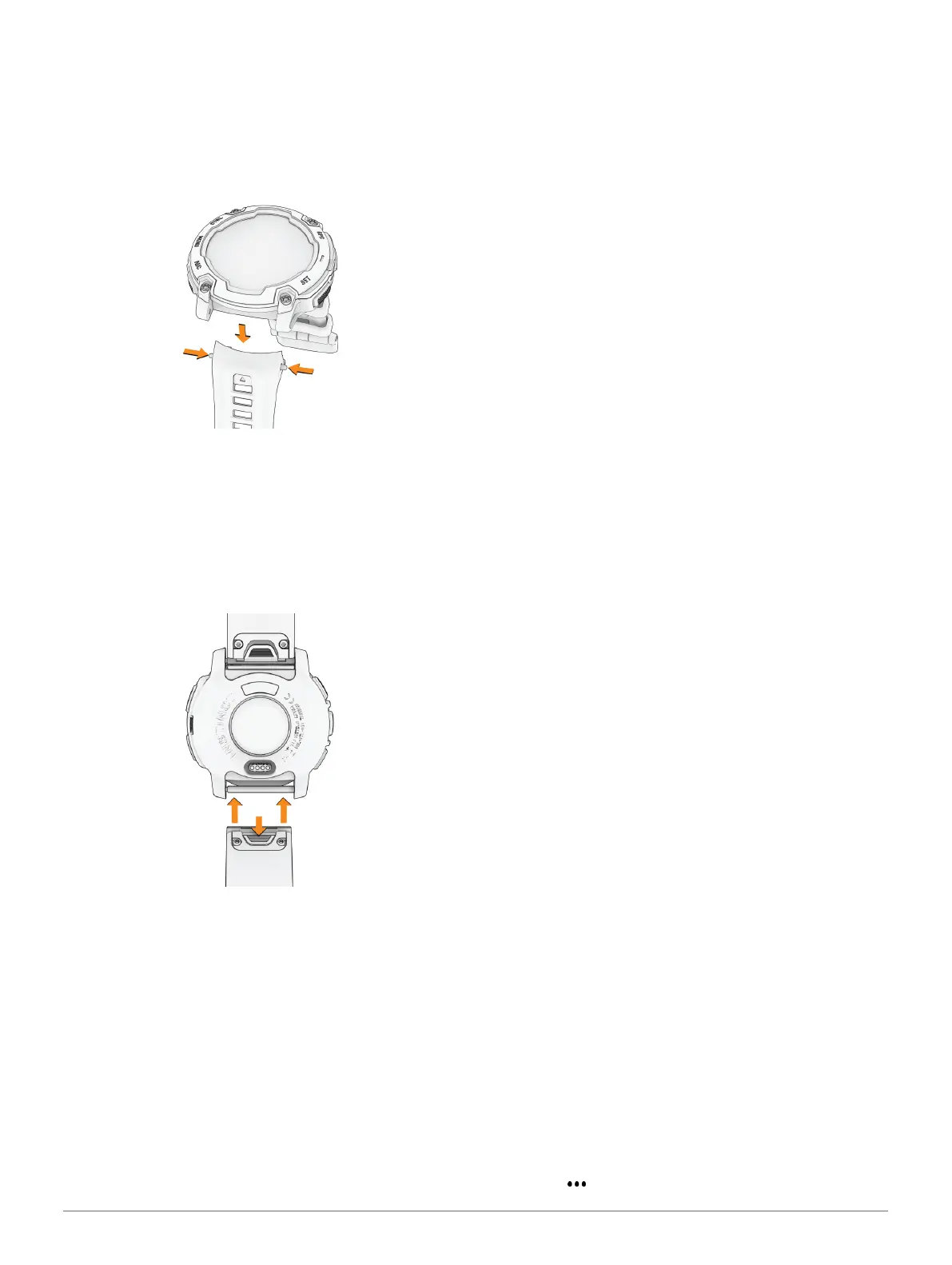
Changing the Spring Bar Bands
You can replace the bands with new Instinct E watch
bands or compatible QuickFit
®
bands. For information
about compatible watch bands and sizes, go to your
Instinct E watch product page at Garmin.com.sg/buy.
1 Push in the watch pin, and remove the band from
the watch.
2 Select an option:
• To install Instinct E bands, align the new band
with the holes on the watch, push in the watch
pin, and press the band into place.
NOTE: Make sure the band is secure. The watch
pin should align with the holes on the watch.
• To install compatible QuickFit bands, install a
compatible watch pin on the watch, and press
the new band into place.
NOTE: Make sure the band is secure. The latch
should close over the watch pin.
3 Repeat the steps to change the other band.
Troubleshooting
Product Updates
Your device automatically checks for updates when
connected to Bluetooth. You can manually check for
updates from the system settings (System Settings,
page34). On your computer, install Garmin Express
(Garmin.com/express). On your phone, install the
Garmin Connect app.
This provides easy access to these services for Garmin
devices:
y Software updates
y Course updates
y Data uploads to Garmin Connect
y Product registration
Getting More Information
You can find more information about this product on
the Garmin website.
y Go to support.Garmin.com for additional manuals,
articles, and software updates.
y Go to Garmin.com.sg/buy, or contact your Garmin
dealer for information about optional accessories
and replacement parts.
y Go to Garmin.com/ataccuracy for information about
feature accuracy.
This is not a medical device.
My device is in the wrong language
You can change the device language selection if you
have accidently selected the wrong language on the
device.
1 Hold MENU.
2 Scroll down to the last item in the list, and press
GPS.
3 Press GPS.
4 Select your language.
5 Press GPS.
Is my phone compatible with my watch?
The Instinct E watch is compatible with phones using
Bluetooth technology.
Go to Garmin.com/ble for Bluetooth compatibility
information.
My phone will not connect to the watch
If your phone will not connect to the watch, you can try
these tips.
y Turn off your phone and your watch, and turn them
back on again.
y Enable Bluetooth technology on your phone.
y Update the Garmin Connect app to the latest
version.
y Remove your watch from the Garmin Connect app
and the Bluetooth settings on your phone to retry
the pairing process.
y If you bought a new phone, remove your watch from
the Garmin Connect app on the phone you intend to
stop using.
y Bring your phone within 10 m (33 ft.) of the watch.
y On your phone, open the Garmin Connect app, and
select > Garmin Devices > Add Device to enter













 To Next Page