36 Device Information
1 Hold MENU.
2 From the system menu, select About.
Device Information
Charging the Watch
WARNING
This device contains a lithium-ion battery. See the
Important Safety and Product Information guide in the
product box for product warnings and other important
information.
NOTICE
To prevent corrosion, thoroughly clean and dry the
contacts and the surrounding area before charging
or connecting to a computer. Refer to the cleaning
instructions (Device Care, page36).
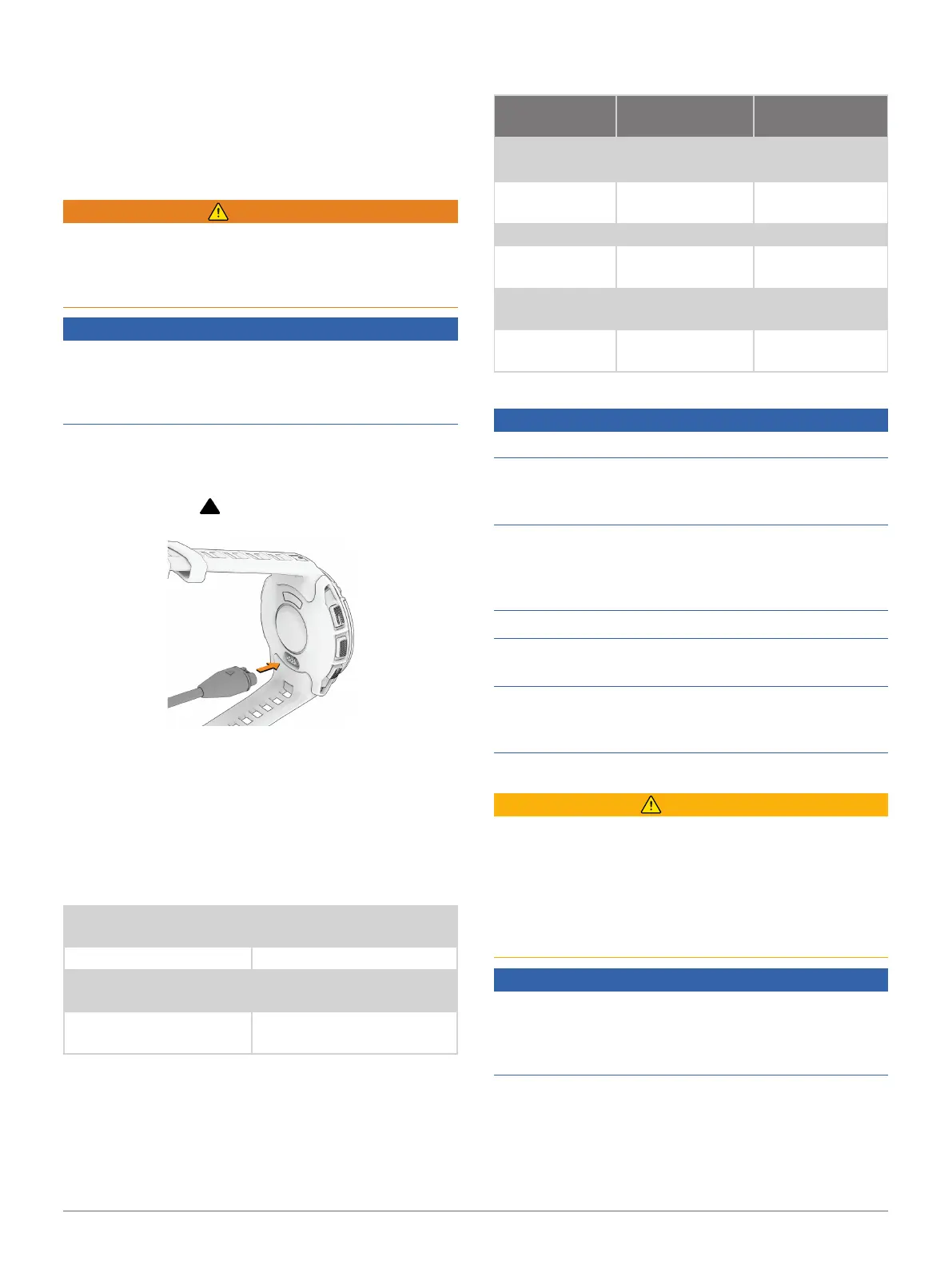
Your watch comes with a proprietary charging cable.
For optional accessories and replacement parts, go to
Garmin.com.sg/buy, or contact your Garmin dealer.
1 Plug the cable ( end) into the charging port on
your watch.
2 Plug the other end of the cable into a USB-C
®
computer port or AC adapter (15 W minimum
output power).
The watch displays the current battery charge level.
3 Disconnect the watch after the battery charge level
reaches 100%.
Specifications
Battery type
Rechargeable, built-in
lithium-ion battery
Water rating 10 ATM
1
Operating and storage
temperature range
From -20º to 60ºC (from -4º
to 140ºF)
USB charging
temperature range
From 0º to 45ºC (from 32º
to 113ºF)
1
The device withstands pressure equivalent to a depth of 100 m. For
more information, go to Garmin.com/waterrating.
Battery Life Information
The actual battery life depends on the features enabled
on your watch, such as activity tracking, wrist-based
heart rate, phone notifications, GPS, internal sensors,
and connected sensors (Tips for Maximizing the Battery
Life, page38).
Mode
Instinct E-40mm
Battery Life
Instinct E-45mm
Battery Life
Smartwatch
mode
Up to 14 days Up to 16 days
Battery saver
watch mode
Up to 35 days Up to 40 days
GPS only mode Up to 21 hours Up to 24 hours
All satellite
systems mode
Up to 14 hours Up to 16 hours
Max. battery
GPS mode
Up to 43 hours Up to 50 hours
Expedition GPS
activity mode
Up to 17 days Up to 20 days
Device Care
NOTICE
Do not use a sharp object to clean the device.
Avoid chemical cleaners, solvents, and insect
repellents that can damage plastic components and
finishes.
Thoroughly rinse the device with fresh water after
exposure to chlorine, salt water, sunscreen, cosmetics,
alcohol, or other harsh chemicals. Prolonged exposure
to these substances can damage the case.
Avoid pressing the buttons under water.
Avoid extreme shock and harsh treatment, because it
can degrade the life of the product.
Do not store the device where prolonged exposure to
extreme temperatures can occur, because it can cause
permanent damage.
Cleaning the Watch
CAUTION
Some users may experience skin irritation after
prolonged use of the watch, especially if the user
has sensitive skin or allergies. If you notice any skin
irritation, remove the watch and give your skin time to
heal. To help prevent skin irritation, ensure the watch
is clean and dry, and do not overtighten the watch on
your wrist.
NOTICE
Even small amounts of sweat or moisture can cause
corrosion of the electrical contacts when connected
to a charger. Corrosion can prevent charging and data
transfer.
TIP: For more information, go to Garmin.com/
fitandcare.
1 Rinse with water, or use a damp lint-free cloth.
2 Allow the watch to dry completely.













 To Next Page