Introduction Omnia Maintenance Through USB
MDE-5369G FlexPay™ IV (with Omnia V04.07) Programming and Service Manual · March 2021 Page 6-1
6 – Omnia Maintenance Through USB
This section guides the service technician through this feature, from the USB flash drive setup
to the LED glowing sequence and its significance.
Introduction
Omnia USB Maintenance is a functionality that allows the ASC to perform the following
operations using a well-formatted USB flash drive:
• Software Update/Media Content Upload
• Log Retrieval
• Configuration retrieval
• Network Restore
Requirements
The following items are required for Setup Via USB Flash Drive:
• USB Flash Drive (hereafter referred to as “U
SB drive”) with at least 2GB free
•PC/Laptop
• Text Editor tool (e.g. Notepad++)
USB Drive Preparation
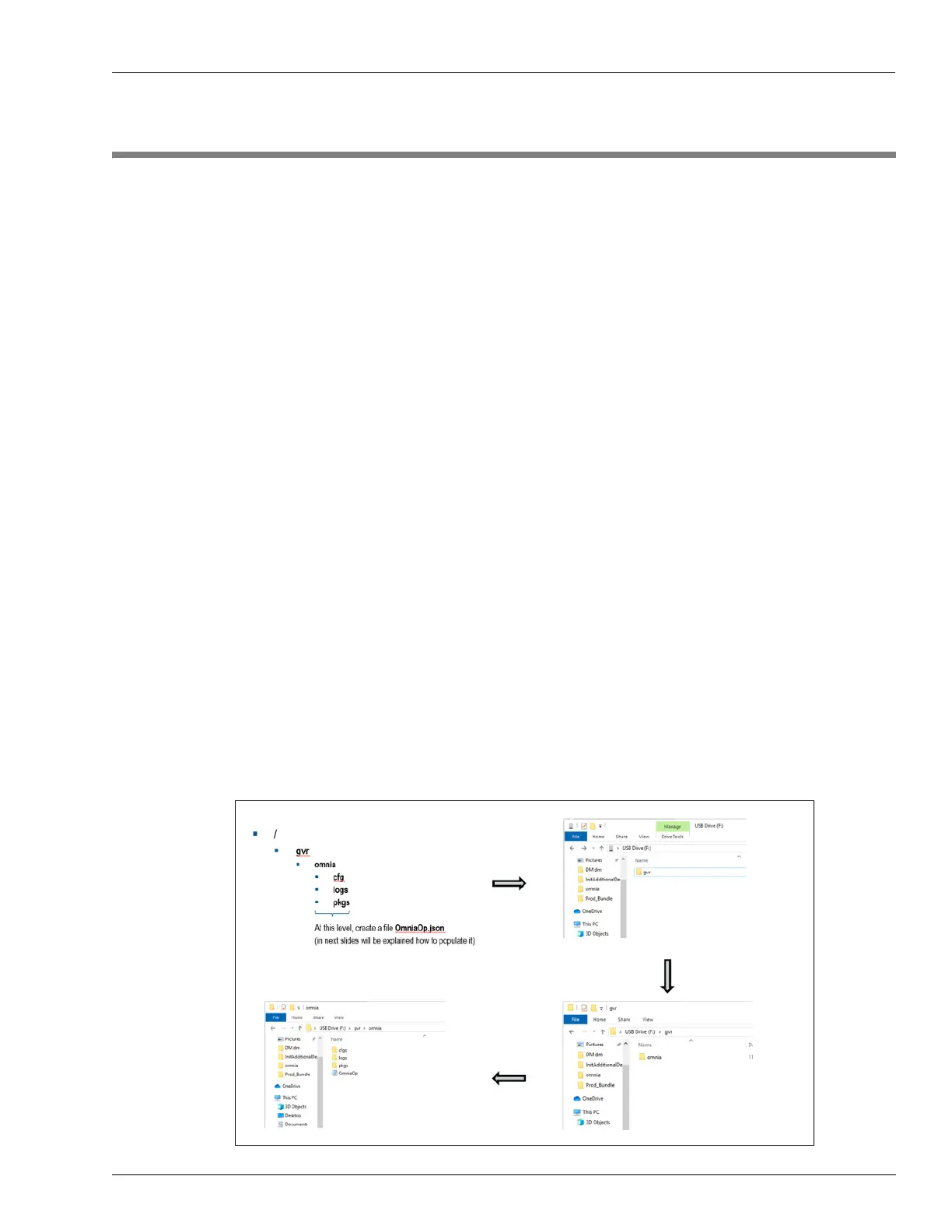
Plug USB drive into your PC/Laptop and create a folder tree as shown in the following figure:
Figure 6-1: Folder Structure



 To Next Page