Omnia Maintenance Through USB LEDs Glowing Sequence
Page 6-2 MDE-5369G FlexPay™ IV (with Omnia V04.07) Programming and Service Manual · March 2021
LEDs Glowing Sequence
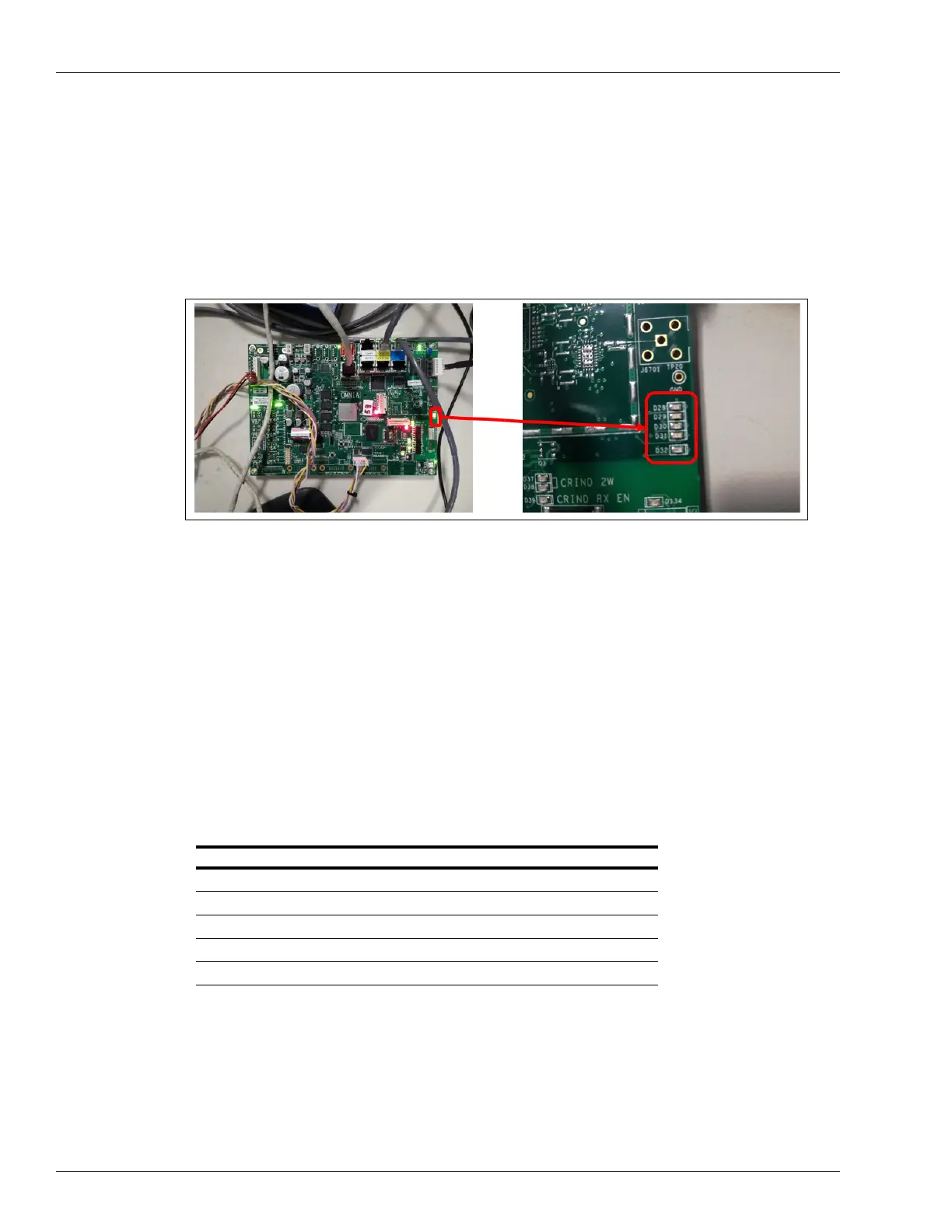
This section provides information about sequence in which the LEDs on Omnia board glow
and its significance. The sequence in which LEDs glow signify different USB Maintenance
operations.
Figure 6-2: LEDs (from D28 to D32)
The following are the LEDs involved:
D32 (Red)
• Solid Red: Indicates that maintenance operation in progress.
• Blink
ing: Indicates that Error on USB/JSON format or Error on operation.
• Off: Indica
tes that maintenance completed with No Errors.
Note: DO NOT REMOV
E USB drive when Solid Red Status.
D31 to D28 (Green)
• Slow Blinking: Indicates that related operation in Progress.
• Fast
Blinking: Indicates that related operation completed with Error.
• Solid Gr
een: Indicates that related operation completed with Success.
LED Operation
D28 Reboot
D29 Retrieve Configuration/Reset Network
D30 Log Retrieval
D31 Packages Installation
D32 Maintenance In Progress/Formal Checks/Final Result



 To Next Page