Verifying the UPM and Software Versions Configuring Omnia PCB
MDE-5369G FlexPay™ IV (with Omnia V04.07) Programming and Service Manual · March 2021 Page 5-1
5 – Configuring Omnia PCB
Verifying the UPM and Software Versions
Note: For the Omnia hardware and configuration to work properly, the UPM software must
be at the minimum required version, and the OMNIA parameter set in the UPM. Verify
all software versions in the UPM and pump. Minimum requirements are listed in this
manual. For more information on hardware installation, refer to MDE-5360 FlexPay IV
and Omnia Kit Installation Instructions.
Before configuring the
Omnia PCB, verify the software version and upgrade to the latest
approved version on the extranet. If this is the first time that an Omnia has been installed in
this dispenser, you must use the Service Port to access the Omnia Web page. After the Omnia
is configured, the Omnia Web page can be accessed from the back room via the external IP
address (for example, 10.5.55.71:3000).
Logging In to Omnia
To configure the Omnia PCB, proceed as follows:
1 Using a laptop, set laptop static IP address to 172.20.100.15 and the subnet mask to
255.255.255.0.
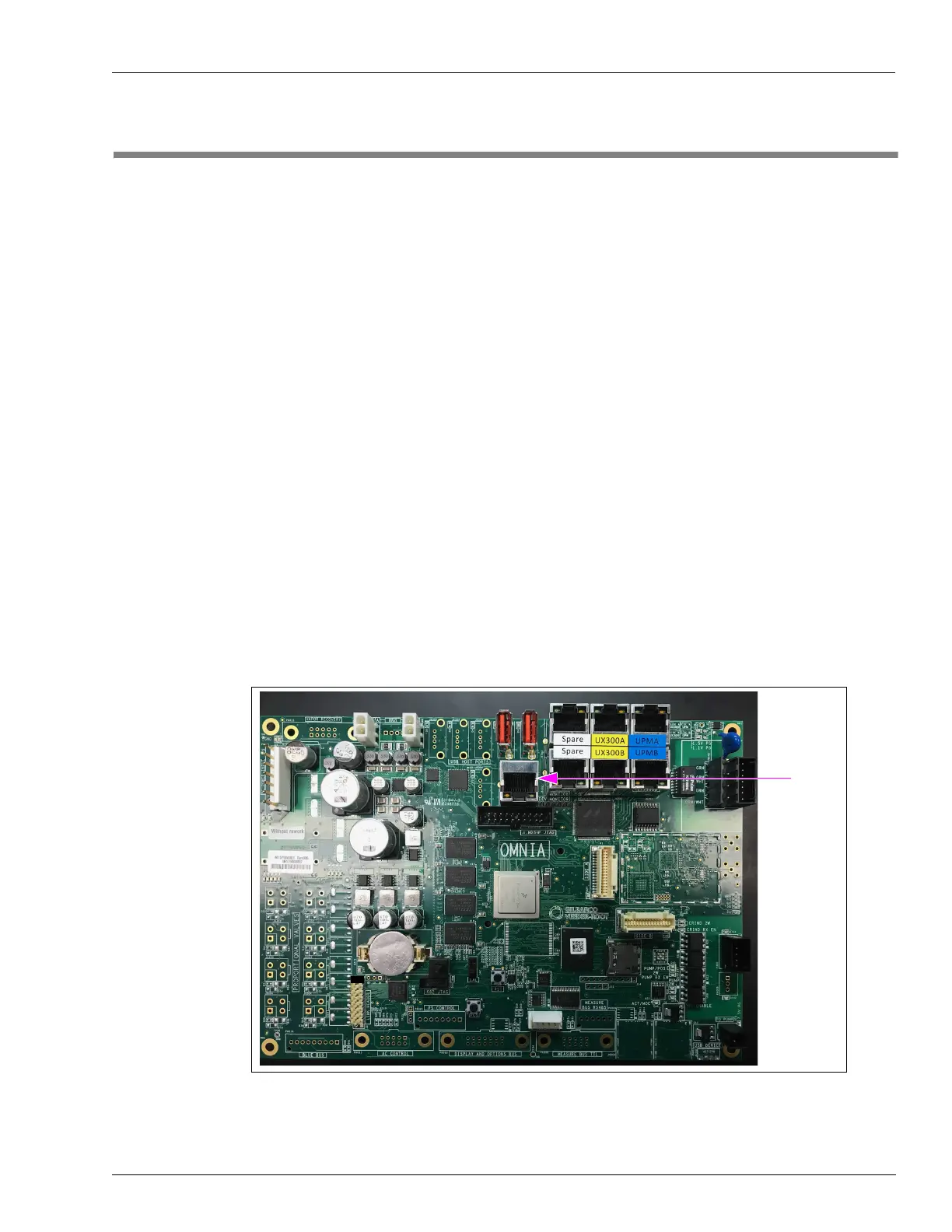
Figure 5-1: Service Port Location
2 Connect the laptop to the Service Port on the Omnia PCB using a standard CAT5 cable.



 To Next Page