Omnia Maintenance Through USB Installing Packages
Page 6-4 MDE-5369G FlexPay™ IV (with Omnia V04.07) Programming and Service Manual · March 2021
Installing Packages
To install packages, proceed as follows:
1 Open OmniaOp.json file with a text editor (e.g. Notepad++).
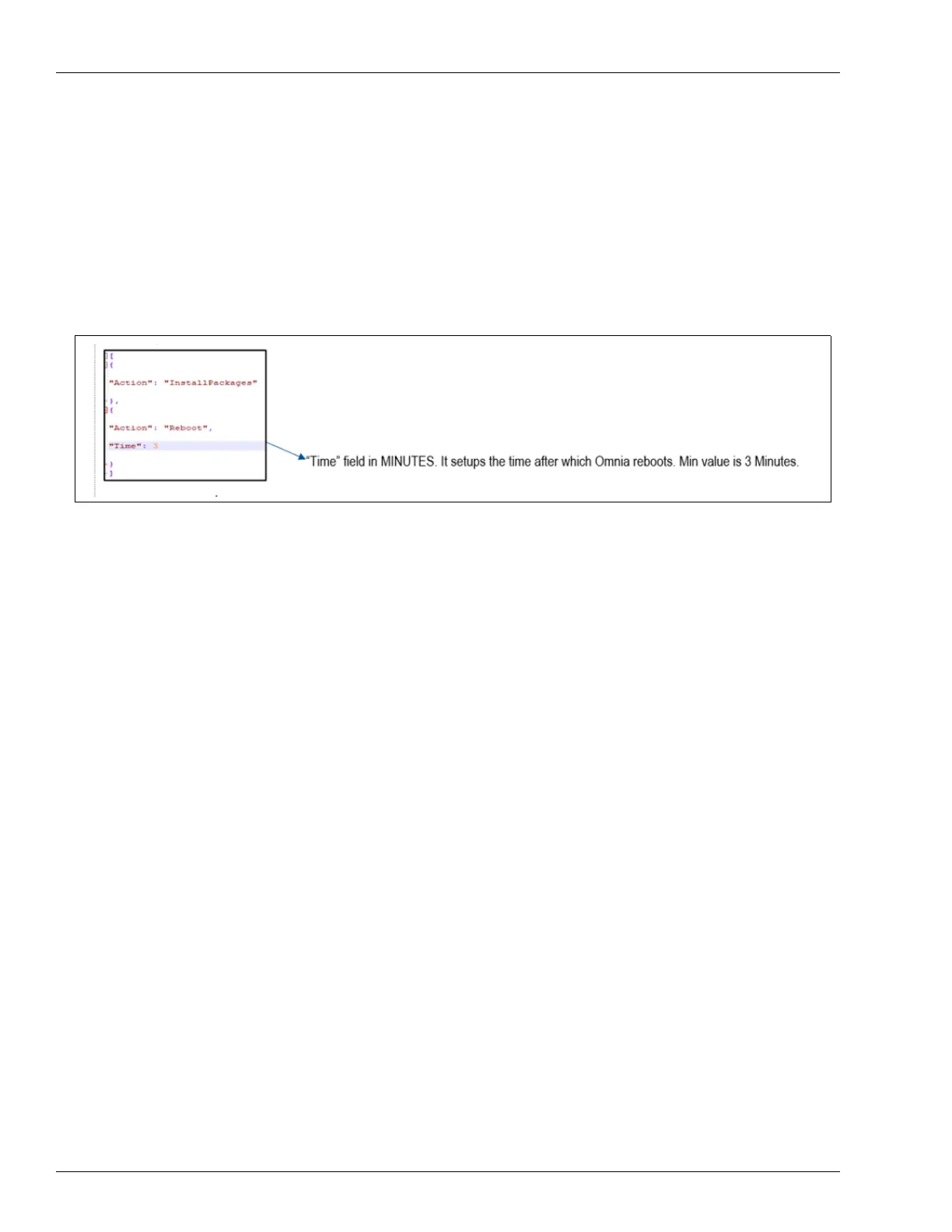
2 Enter the time after which Omnia must reboot as shown in the following figure:
Figure 6-5: Entering Time After which Omnia Reboots
Note: The minimum value to be entered is 3 minutes.
3 Save the file.
4 Go to gvr\omnia\pkgs and load the packages to be uploaded (debians, archives).
5 Plug USB drive into Omnia board. Depending on the success or failure of the operations,
LEDs start glowing as follows:
• LED D32 goes Solid RED and LED D3
1 starts blinking slow.
• LED D31 goes Solid GREEN, indicating that the operation is succe
ssfully completed.
• LED D31 will start blinking fast, indicating that the operati
on failed.
• LED D28 starts blinking slow and become
s Solid GREEN when the command is sent
successfully (almost immediately).
• LED D28 will start blinking fast, indicating that the operati
on failed.
If both operations are successful, LED D32 goes
OFF. If one or more of the operations fails,
LED D32 will start blinking together with the LED related to the failed operation.
6 Remove the USB drive.
7 Omnia will reboot in the time specified in step 2.



 To Next Page