Configuring FlexPay IV Configuring CRINDBIOS for Software Version 42.11.XX or Later
Page 4-6 MDE-5369G FlexPay™ IV (with Omnia V04.07) Programming and Service Manual · March 2021
Configuring CRINDBIOS for Software Version 42.11.XX or
Later
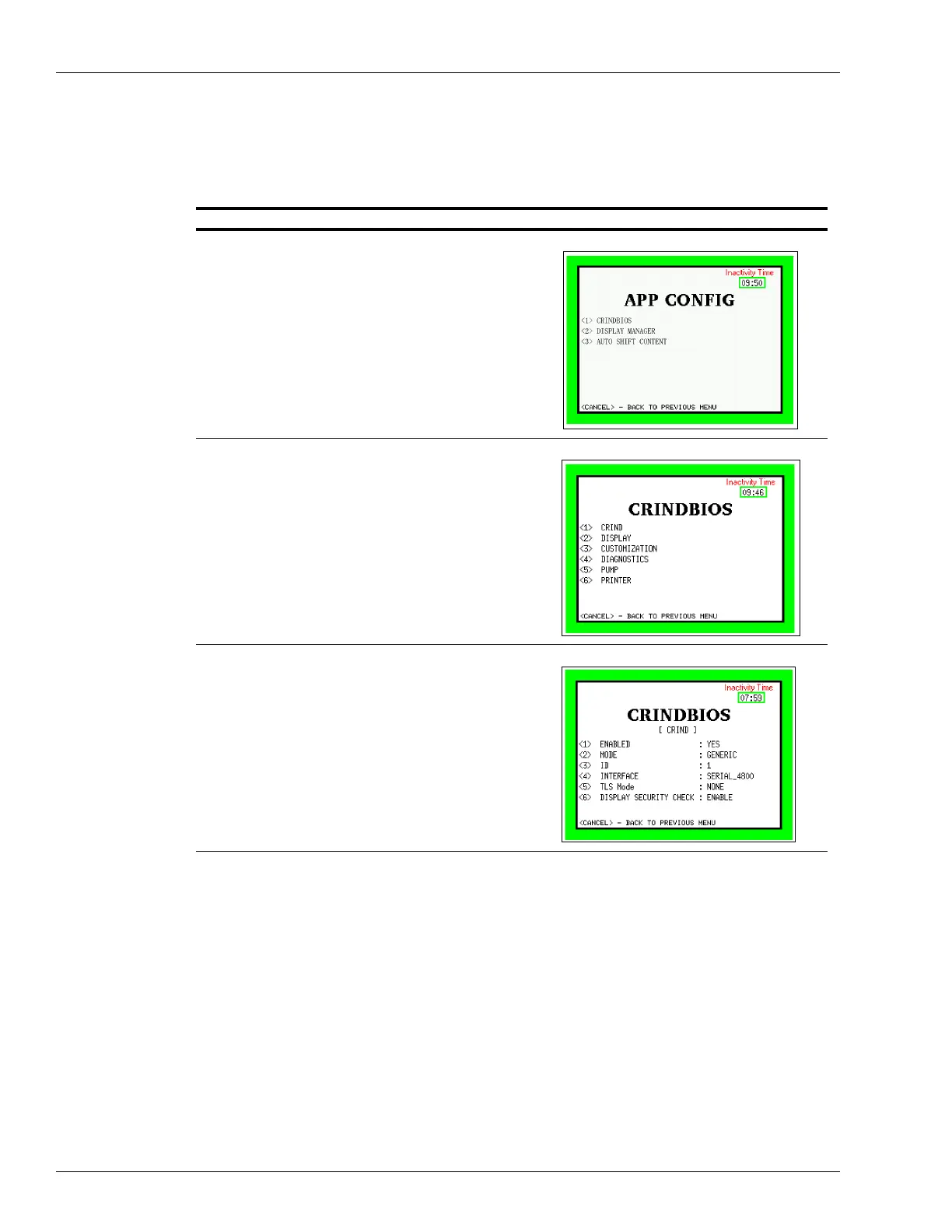
To configure CRINDBIOS settings, proceed as follows:
Description Screen
1 In the System Menu, press <3>
App Configuration.
2 For units with the 15.6-inch display option, optimize
se
ttings for the large display.
a In the App Config menu, press <2>
Display Manager,
and change the Display Template setting to None.
b Press <3>
Auto Shift Content and ensure that it is
set to Enabled.
c Press Ca
ncel to go back to the App Config menu.
3 In the App Config menu, press <1
> CRINDBIOS.
4 In the CRINDBIOS menu, press <1> CRIND and check
or set each of the following settings:
• CRIND
• DISPLAY
• CUSTOMIZATION
• DIAGNOSTICS
•PUMP
• PRINTER
5Press <1> and set to Yes.
6Press <2
> and set Generic or MOC based on the POS
type.
7Press <3
> and set the CRIND ID.
8Press <4
> and set Interface type: Serial_4800/9600/
19200 or IP (for EMV) or COIP.
Note: Must be set to 9600 Baud for Commander POS, if
the serial interface is used.
9Press <5> and set TLS mode if the IP interface mode
type depends on the POS configuration.
10 Press <6
> and set Display Security Check to Enable.
11 Press Ca
ncel to save and go back to the previous menu.



 To Next Page