Pre-requisites for Installing Omnia in FlexPay IV Configuring FlexPay IV
MDE-5369G FlexPay™ IV (with Omnia V04.07) Programming and Service Manual · March 2021 Page 4-5
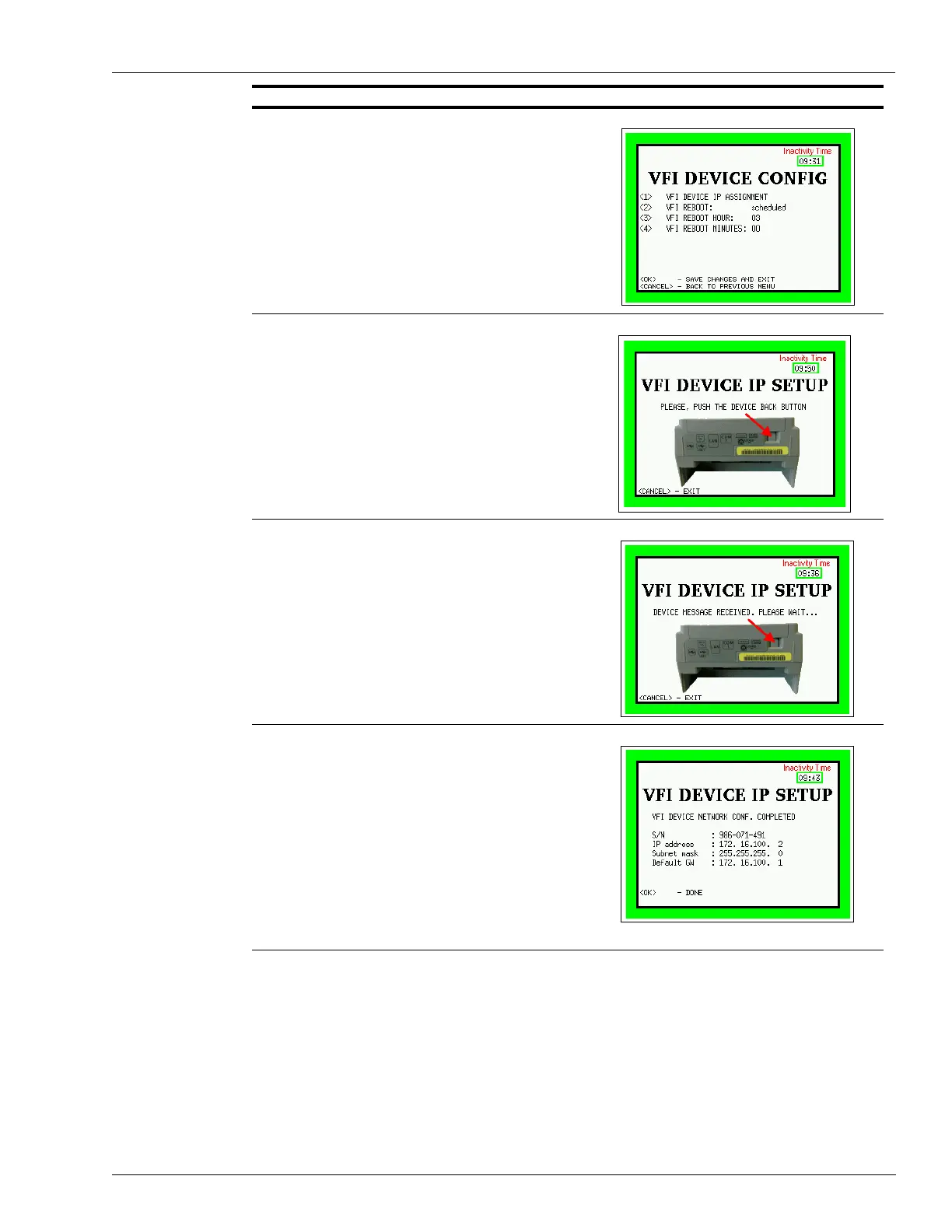
7 In the VFI Device Config, press <1> for VFI device IP
assignment.
8 Follow the wizard procedure and push the Device Back
button.
The message “Device message received. Please wait...” is
displayed on the screen.
After the procedure is complete, the system will report the
new IP address of the VFI device (default value from factory
is 172.16.100.2); then, proceed with the following:
9Press OK.
10 Reboot the system.
Note: The card reader will return to the default address.
Both Side A and Side B card readers will have the
same IP address of 172.16.100.2; therefore, any
replacement of a card reader during a future
service will come out of the box set properly (no
need to set IP). Omnia VLAN combined with the
location of CAT5 cables on Omnia associates the
card reader to the UPM for each side (card reader
A with UPM A; card reader B with UPM B).
Description Screen



 To Next Page