MDE-5369G FlexPay™ IV (with Omnia V04.07) Programming and Service Manual · March 2021 Page 7-3
Connection Board Light Emitting Diodes (LEDs) Troubleshooting
Connection Board Light Emitting Diodes (LEDs)
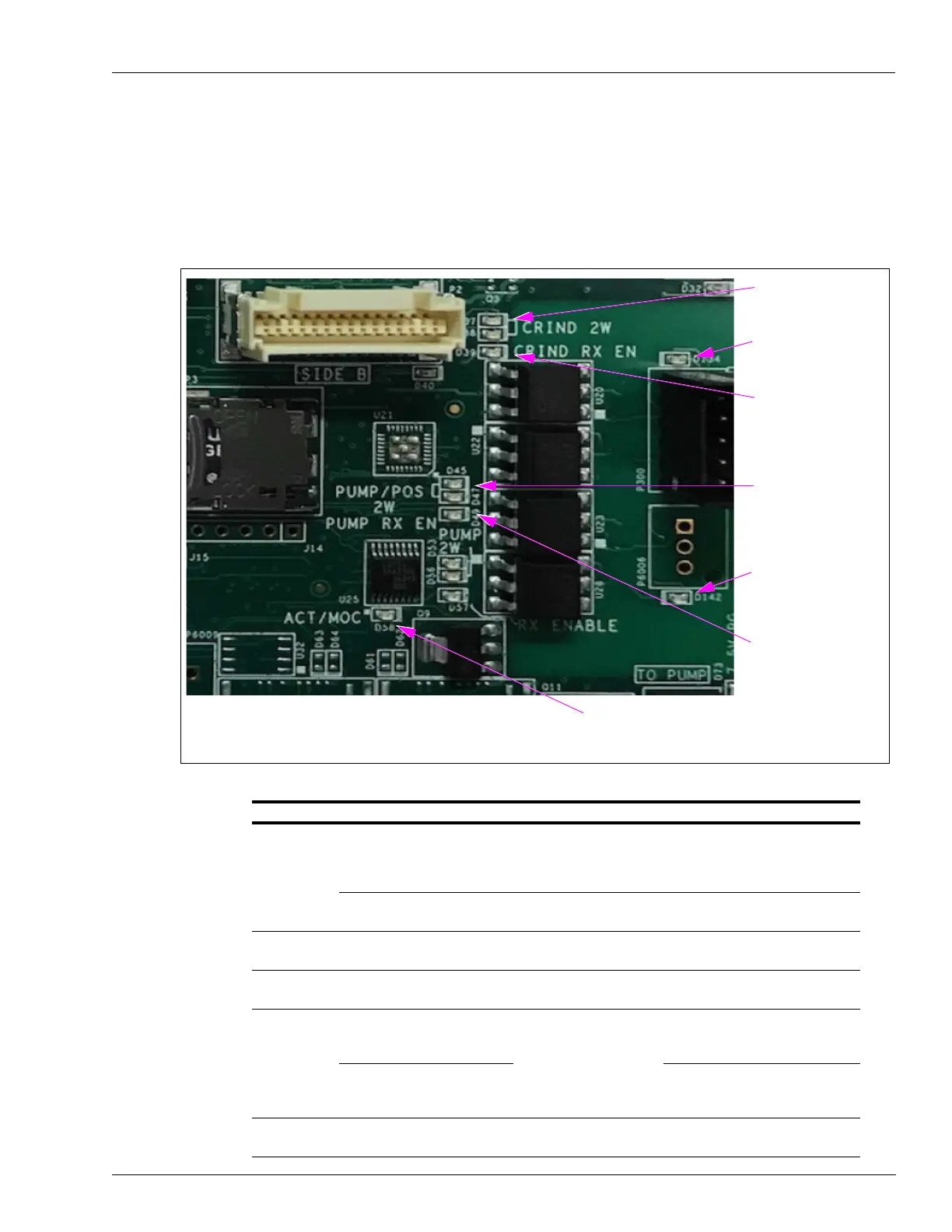
The following section of the board will help diagnose communication problems.
The Omnia intercepts POS-to-Pump communication for non-Passport POS.
Figure 7-4: Connection Board
POS to CRIND
communication
(Yellow)
CRIND two-wires
reversed (Red)
Pump two-wires
reversed (Red)
Lit if Omnia is
configured for MOC
(Yellow)
Must be green to
communicate to the
pump, even in generic
mode (Green)
Communication to the
pump (Yellow)
Must be green for the
POS to communicate
to the CRIND (Green)
LED Color Function Behaviour
CRIND 2W D37 Yellow POS to CRIND
communication
Not lit or solid if using CRIND over
IP (CoIP) or EMV. Blinks on when
POS transmits to any CRIND via
two-wire.
D38 Yellow CRIND to POS
communications
Blinks on when CRIND A or B
side replies to POS via two-wire.
CRIND RX EN (D39) Green CRIND receiver is
enabled
Green after boot cycle.
D134 Red CRIND two-wires
reversed
Lit if two-wire connection is
reversed.
PUMP/POS
2W
D45 Yellow Pump Data between
Omnia and POS.
Not lit or solid if POS is Passport.
Blinks on when POS transmits to
any pump via 2W.
D47 Yellow Not lit or solid if POS is Passport.
Blinks on when pump A or B side
replies to POS via 2W.
PUMP RX EN
(D49)
Green Enables POS-to-Pump
data on Omnia.
Green after boot cycle.



 To Next Page