MDE-5369G FlexPay™ IV (with Omnia V04.07) Programming and Service Manual · March 2021 Page 1-5
Physical Connectivity Introduction
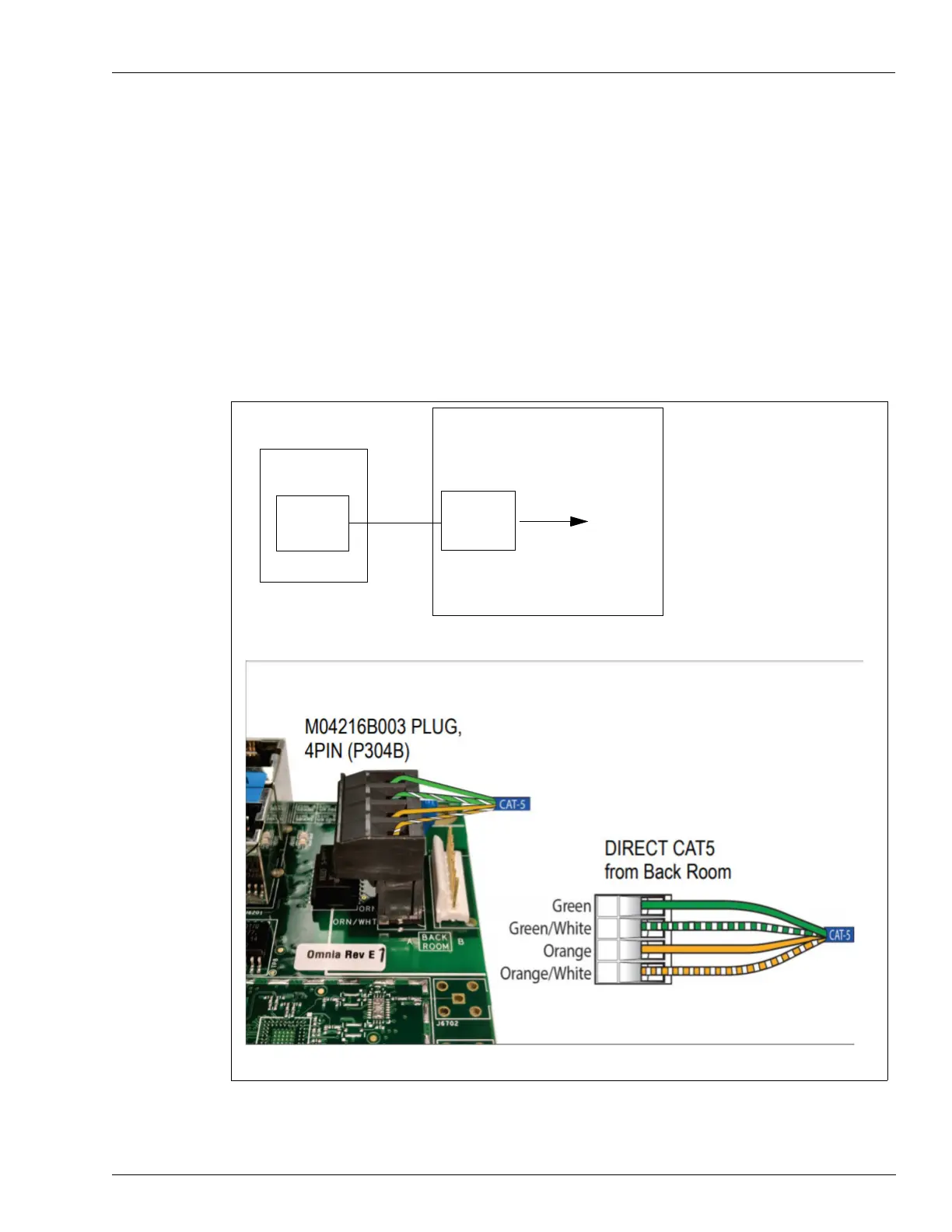
Using Direct Ethernet (CAT5/CAT6 or Equivalent) Connections
Sites where dispensers are connected directly to the backroom by Ethernet cables will require
a switch to connect cables from all the dispensers.
Note: Follow specific requirement
s when running direct CAT5 cable (for example, maximum
run of 280 feet). For more information on requirements for CAT5 runs, refer to
MDE-4246 Dispenser Network Connectivity Kit for Monochrome Encore 500,
Encore S and Eclipse
®
Installation Instructions.
When using a direct CAT5 connection from the backroom for high s
peed, ensure that the high
speed connection is disconnected from the DCM3. Do not connect P304 to the DCM3.
Figure 1-3: Using Direct Ethernet Connections - Backroom Hardware
Ethernet
Switch
CAT5
Dispenser
To Router
Backroom
CAT5
Omnia
(i)
(ii)
Note: Do not use CAT5 couplers in this connection; their use can result in loss of the high
speed connection.



 To Next Page