TX6600PRO INSTRUCTION MANUAL
8
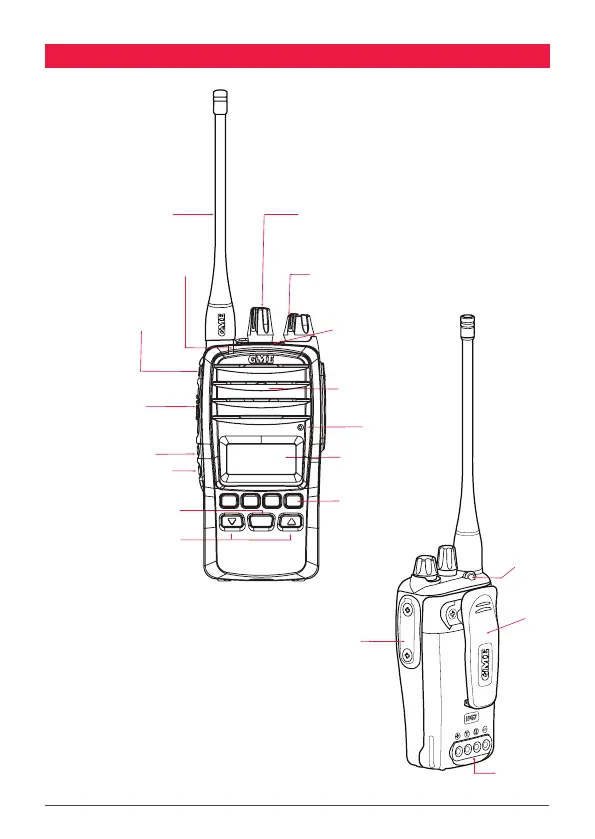
CONTROLS
Antenna
Channel Selector Knob
On-O / Volume Knob
Dual / Triple Watch Button
Status LED
LCD Screen
Up / Down Buttons
Menu Button
Speaker
SQL / Silent Button
PRI1 / Set PRI1 Button
Push-To-Talk (PTT) Button
Microphone
Lanyard Point
Belt Clip
Charger Port
Accessory Port
CALL
LOCK
MENU
F
SCAN
OS/GS
QUIET
PWR
PRO
DUP
PRI2 / Set PRI2 Button
User Programmable Button
Antenna
Channel Selector Knob
On-O / Volume Knob
Dual / Triple Watch Button
Status LED
LCD Screen
Up / Down Buttons
Menu Button
Speaker
SQL / Silent Button
PRI1 / Set PRI1 Button
Push-To-Talk (PTT) Button
Microphone
Lanyard Point
Belt Clip
Charger Port
Accessory Port
PRI2 / Set PRI2 Button
User Programmable Button
Note: For details on programmable keys that can
be congured using the Dealer Programmer see the
PROGRAMMABLE KEYS at the end of this manual.



 To Next Page