TX6600PRO INSTRUCTION MANUAL
20
DUPLEX
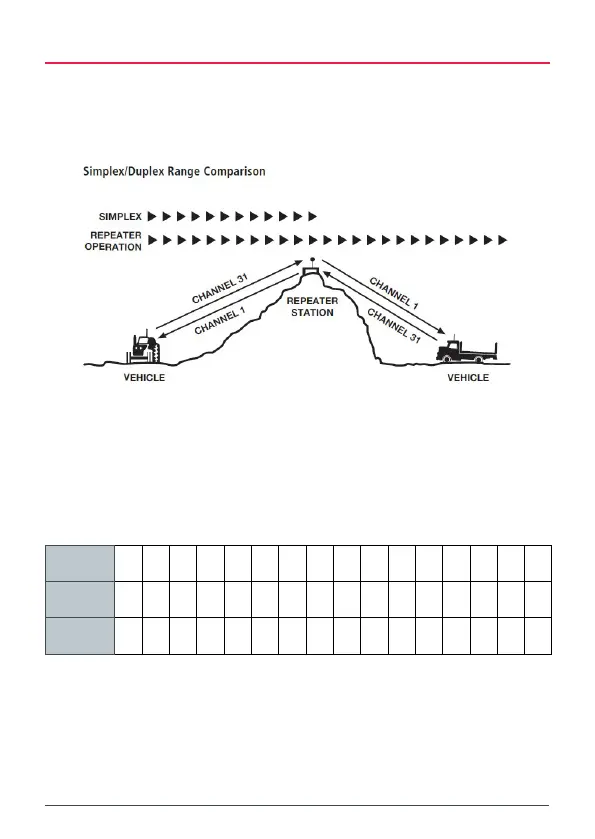
The DUP key is used to enable duplex operation, allowing the TX6600PRO to
operate through a repeater. Repeaters are usually installed in a high location
and automatically re-transmit your signal over a wider area, providing greatly
increased range.
The Duplex function operates only on designated repeater channels. These are
channels 1 – 8 and 41 – 48. When Duplex is enabled on one of these channels,
the TX6600PRO will receive on the selected channel but will transmit 30 channels
higher. i.e. if channel 1 is selected the TX6600PRO will receive on channel 1 but
transmit on channel 31.
See the table below.
Selected
Channel
1 2 3 4 5 6 7 8 41 42 43 44 45 46 47 48
Receive
Channel
1 2 3 4 5 6 7 8 41 42 43 44 45 46 47 48
Transmit
Channel
31 32 33 34 35 36 37 38 71 72 73 74 75 76 77 78
You can enable or disable Duplex on individual channels. This allows you to use
Duplex only on repeater channels that are allocated in your area while the rest
of the channels can be used as normal simplex channels for direct radio-to-radio
communications.



 To Next Page