TX6600PRO INSTRUCTION MANUAL
51
RECEIVING A SELCALL
When someone calls your radio using SelCall, your radio will beep to alert you
to the call and the Ident or Name of the caller will be displayed on the LCD. In
addition, it will cancel the QUIET mode (if selected). The radio will remain in this
state until you cancel the alarm.
Cancelling the alarm
To cancel the alarm and clear the display, press the
MENU
F
key. You can now have
a normal conversation on the channel. When you have nished, briey press the
QUIET
PWR
key if you wish to return to quiet operation.
If you wish to ignore the alarm and return directly to QUIET mode, briey press
the
QUIET
PWR
key. The alarm will be cancelled and the channel will return to quiet
operation.
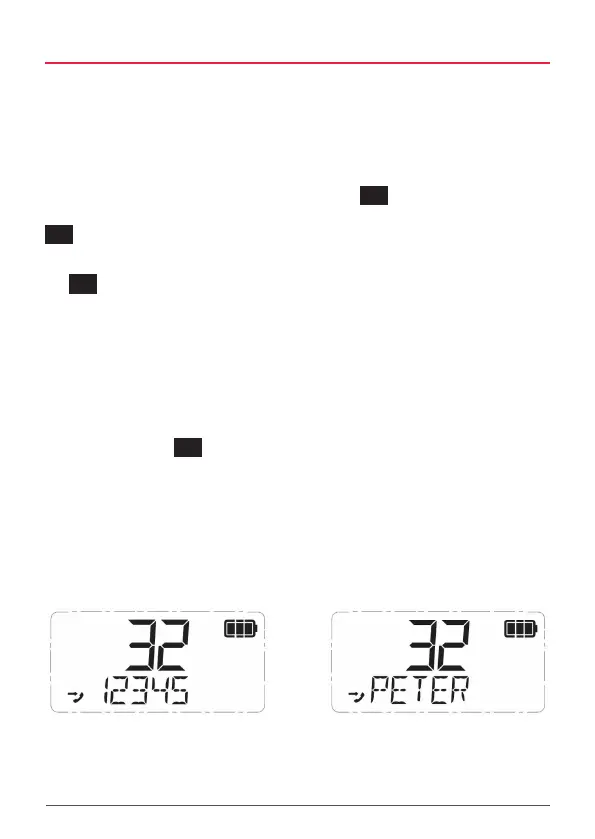
Displaying the incoming SelCall contact
If the incoming SelCall is from a person in your contact list, you can choose to
display either their Ident or their Name on the LCD. Displaying their name makes it
much easier to identify them from other contacts.
To switch between Alpha Name or SelCall Ident:
1. Hold the
PRO
DUP
key.
2. SCALPH ON or SCALPH OFF will be displayed briey.
• SCALPH ON (SelCall Alpha On) indicates the Alpha mode is on.
If the incoming SelCall is in your contact list, the associated
Alpha Name will be displayed.
• SCALPH OFF (SelCall Alpha O) indicates the Ident mode is on.
All incoming SelCalls will display their Ident.
NOTE: The SelCall Alpha/Ident toggle option described above is the default setting when holding
the PRO key. However the PRO key is user programmable and can be changed. If so, the HOLD
function on your PRO key may have a different operation. In this case follow the steps below to
switch between the Alpha and Ident modes.
1.
Press to enter the CALL Menu.
2.
Rotate the Channel knob or press the keys to cycle to the SAVED option then
press to select.
3.
While displaying a contact (it doesn’t matter which one), press to toggle between
the Ident and the Alpha Name. The option you select will determine how incoming SelCall
contacts will be displayed on the LCD.
4.
When finished, press several times to exit the CALL menu.
NOTE: If an Alpha Name has not been programmed for the incoming contact, ‘– – – – – ’ will be
displayed.
QUIET MODE
The QUIET mode mutes the TX6600S’s receiver to prevent any incoming signals from being heard
in the speaker until your SelCall Ident is received. This allows you to monitor a busy channel for
personal calls without being disturbed by unwanted signals.
If your SelCall Ident is received, the QUIET mode is cancelled and all incoming signals are heard in
the speaker.
Setting up the QUIET mode
To setup the QUIET mode you must first ‘tag’ the channels that you want to stay Quiet. You can
then activate the QUIET mode and only the channels you have tagged will remain Quiet to
incoming signals (unless your SelCall Ident is received). Channels that were not tagged will remain
open to all signals and will continue to operate normally.
To tag or un-tag a channel for QUIET operation
1. Rotate the Channel knob or press the keys to select the desired channel.
2. If the icon is visible to the right of the channel number, the channel is currently tagged
for quiet operation. If the icon is not visible, the channel is not tagged.
i. To tag the channel, hold the key. QT CH On will be displayed briefly and the
icon will appear to the right of the channel number.
SelCall Alpha OFF
SelCall Alpha ON



 To Next Page