TX6600PRO INSTRUCTION MANUAL
16
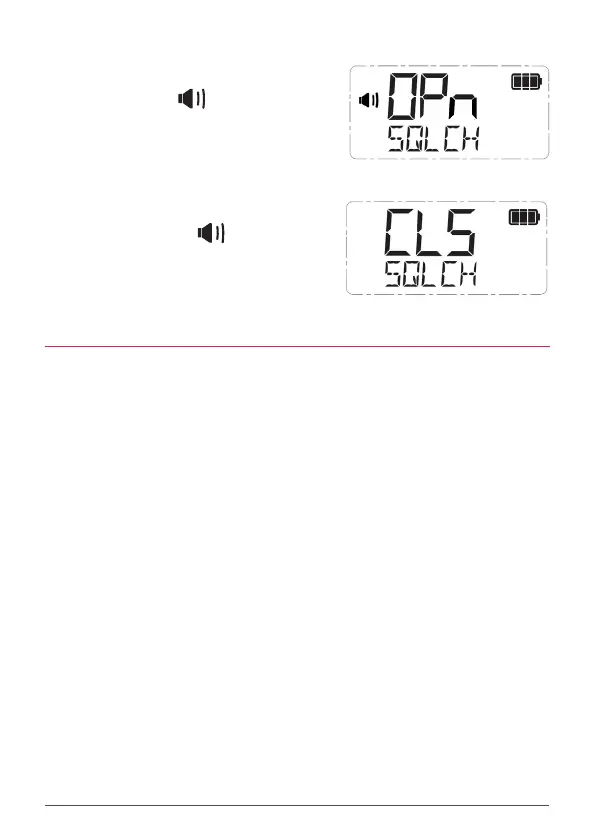
To Open the Squelch
Briey press the SQL key. SQLCH and OPn are
displayed briey, the icon appears and the
status LED lights green indicating the squelch
is open. If there are no signals present you will
hear the receiver’s background noise.
To Close the Squelch
Briey press the SQL key again. SQLCH and CLS
are displayed briey, the icon disappears
and the status LED is extinguished indicating
the squelch is closed. If there are no signals
present, the receiver will become quiet.
SQUELCH LEVEL
The Squelch level sets the sensitivity of the Squelch to incoming signals. The level
can be set to suit your operating environment. The TX6600PRO has nine preset
Squelch sensitivity settings from 1-9.
• Squelch level 1 is the most sensitive setting. It will allow the Squelch
to open on very weak signals but it will also be more sensitive to
unwanted signals or local interference.
• Squelch level 9 is the least sensitive setting. Your radio will be less
aected by local interference but incoming signals will need to be much
stronger to open the squelch.
The default setting is 3 which should suit most conditions.
The squelch level can be adjusted from either the Channel knob or the menu.
To adjust the Squelch level from the Channel knob:
1. Press the Channel knob. SQLCH will be displayed along with the
present squelch level setting.
2. Rotate the Channel knob to adjust the squelch level from 1 to 9.
3. When the desired setting is displayed, press the Channel knob or wait
a few seconds for the menu to time-out to save and return to normal
operation.



 To Next Page