TX6600PRO INSTRUCTION MANUAL
31
• IDNAME: Displays the alpha name associated with your radio’s
own SelCall Ident. If a name has not been applied, it displays the
radio’s own SelCall Ident instead.
• ID NO: Displays the radios own SelCall Ident.
• OFF: Displays nothing in the space below the channel number.
5. When the desired setting is displayed, press the
MENU
F
key to exit the
menu or wait a few seconds for the menu to time-out.
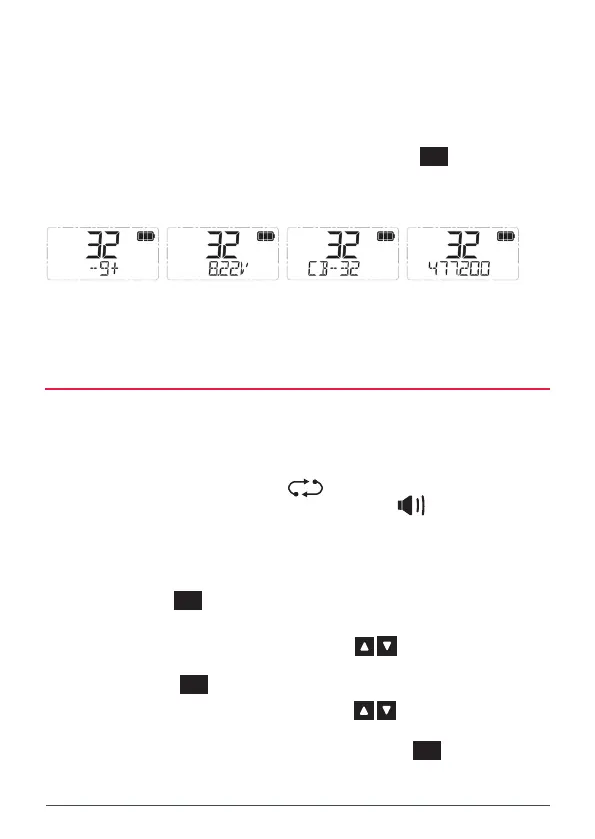
Examples
5. When the desired setting is displayed, press the key to exit the menu or wait a few
seconds for the menu to time-out.
Examples
NOTE: The display option can be set separately for CB and Receive-only channels by first selecting a
channel of the type you wish to edit, then using the DISPLAY menu as above.
MESSAGE TEXT
The Message Text option enables or disables verbose messages that appear on the display when
some functions are selected. Generally these options are also associated with an icon or some
other indicator.
For example, when adding the selected channel to the scan memory, the message SCANCH ON is
displayed alongside the icon. Similarly opening the squelch with the Squelch key displays
SQLCH OPn alongside the icon.
If desired these text messages can be switched off so that only the associated icon is displayed.
To enable or disable the Message Texts:
1. Hold the key to access the menu. The last selected menu item will be displayed.
2. Rotate the Channel knob or press the keys until MSGTXT is displayed.
3. Press the key.
4. Rotate the Channel knob or press the keys to select ON or OFF.
When the desired option is displayed, press the key to exit the menu or wait a few seconds
for the menu to time-out.
POWER SAVE
The Power Save function is designed to conserve power and extend the battery life by letting the
radio sleep during periods of inactivity. If you intend to use your TX6600S for long periods of time
between charges you should consider using the power saving mode.
The Power Save option is switched off by default.
To select the Power Save options:
1. Hold the key to access the menu. The last selected menu item will be displayed.
NOTE: The display option can be set separately for CB and Receive-only channels by
rst selecting a channel of the type you wish to edit, then using the DISPLAY menu as
above.
MESSAGE TEXT
The Message Text option enables or disables verbose messages that appear
on the display when some functions are selected. Generally these options are also
associated with an icon or some other indicator.
For example, when adding the selected channel to the scan memory, the message
SCANCH ON is displayed alongside the icon. Similarly opening the squelch
with the Squelch key displays SQLCH OPn alongside the icon.
If desired these text messages can be switched o so that only the associated
icon is displayed.
To enable or disable the Message Texts:
1. Hold the
MENU
F
key to access the menu. The last selected menu item
will be displayed.
2. Rotate the Channel knob or press the keys until MSGTXT is
displayed.
3. Press the
MENU
F
key.
4. Rotate the Channel knob or press the keys to select ON or
OFF.
5. When the desired option is displayed, press the
MENU
F
key to exit the
menu or wait a few seconds for the menu to time-out.



 To Next Page