TX6600PRO INSTRUCTION MANUAL
17
To adjust the Squelch level from the Menu:
1. Hold the
MENU
F
key to access the menu. The last selected menu item
will be displayed.
2. Rotate the Channel knob or press the keys until SQLCH is
displayed.
3. Press the
MENU
F
key.
4. Rotate the Channel knob or press the keys to adjust the
squelch level from 1 to 9.
5. When the desired setting is displayed, press the
MENU
F
key to exit the
menu or wait a few seconds for the menu to time-out.
PRIORITY CHANNEL
The Priority Channel feature allows you to store two channels as Priority Channels
that can be instantly recalled at the press of a key. These can be used to provide
instant access to your working channel, your local repeater channel or any other
favourite channel.
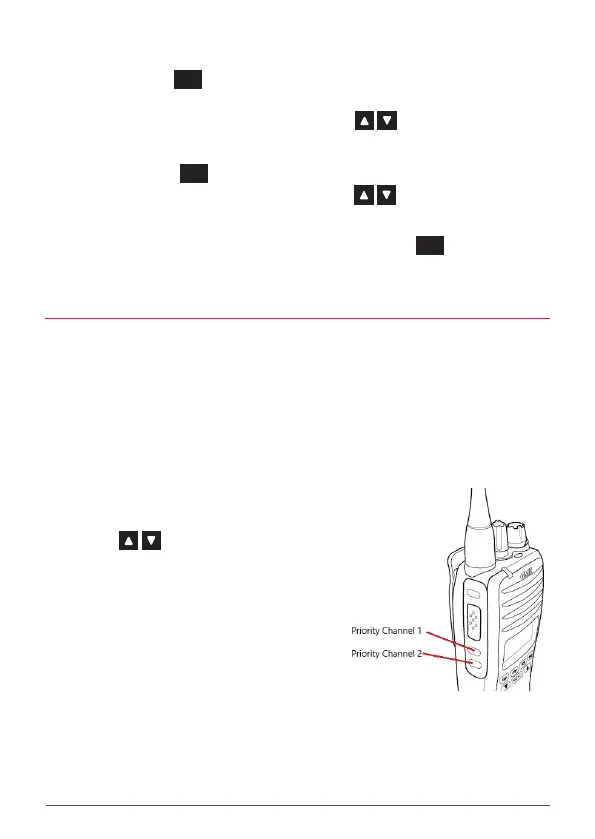
Priority Channels are programmed into the side keys below the PTT key. The upper
key holds Priority Channel 1 and the lower key holds Priority Channel 2.
To store the Priority Channel
1. Select the required channel using
the Channel knob or press the
keys.
2. Press and hold the desired Priority
Channel key. SET PRI1 or SET PRI2
will be displayed and the channel
number will ash. The radio will then
return to normal operation.
To recall the Priority Channel
Briey press the desired Priority Channel key. The TX6600PRO will immediately
switch to the selected Priority Channel and PRI1 or PRI2 will be displayed briey
to indicate the Priority Channel memory you have selected.



 To Next Page