TX6600PRO INSTRUCTION MANUAL
18
DUAL WATCH
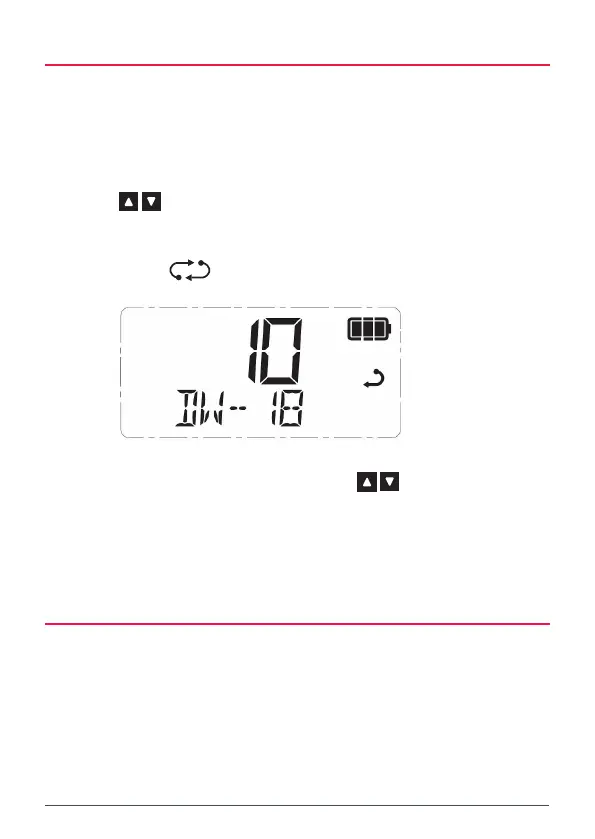
Dual Watch allows you to scan between the selected channel and the last selected
Priority Channel. Before using Dual Watch you will need to program a channel into
the Priority Channel memory (see Priority Channel description above).
To start Dual Watch
1. Choose your selected channel using the Channel knob or press the
keys.
2. Press the Red key on the top panel to activate Dual Watch.
3. DW – xx is displayed (where xx is your last selected Priority Channel)
and the icon will animate. The radio is now watching both the
selected channel and the last selected Priority Channel.
NOTE: When Dual Watch is active, you can change the selected channel at any
time by rotating the Channel knob or pressing the keys. Your radio will
continue to monitor the last selected Priority Channel and your newly selected
channel.
To exit Dual Watch
1. Press the Red key. Dual watch will stop and the radio will return to
normal operation.
TRIPLE WATCH
Triple Watch allows you to scan between the selected channel, Priority Channel
1 and Priority Channel 2. Before using Triple Watch you will need to program
channels into both the Priority Channel 1 and Priority Channel 2 memories (see
Priority Channel description above).



 To Next Page