TX6600PRO INSTRUCTION MANUAL
41
You should only include a designated repeater channel AFTER you have conrmed
that the channel is not allocated to an active repeater in your area. If you
inadvertently include an active repeater channel in your Network Scan, you or
others in your Network Scan group may cause interference to other repeater users
on that channel.
To Start Network Scan
Briey press the
SCAN
OS/GS
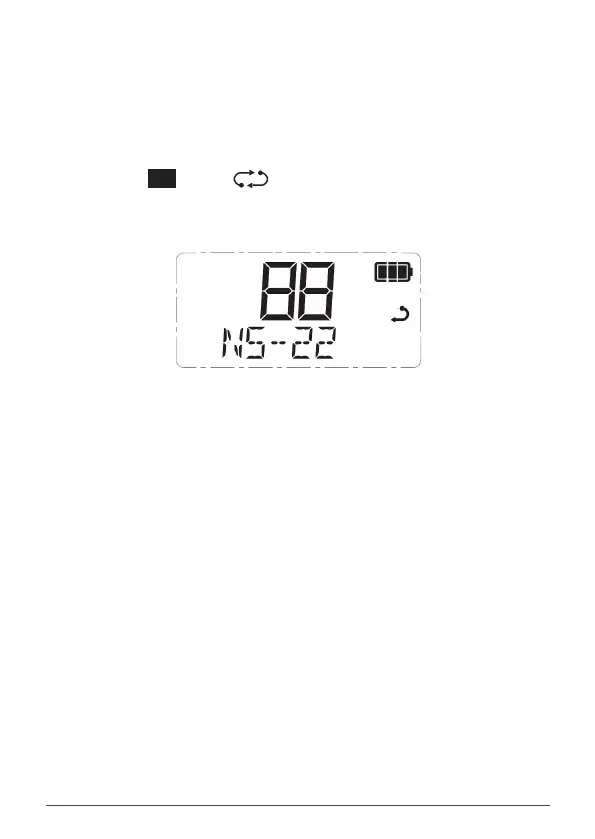
key. The icon will animate and the channel numbers
will change rapidly as the channels are scanned. During this time the display will
display ‘NS -xxx’ where xxx is the selected Network Scan CTCSS or DCS tone.
Network Scanning using CTCSS tone 22
Using Network Scan
When a member of the group transmits, their radio will automatically select a
clear channel to transmit on. Other radios scanning in the same Network Scan
group will locate the signal (identied by the group’s Network Scan CTCSS/
DCS code) and stop on the same channel allowing the transmission to be heard
across the entire group. When the transmission ends, all radios in the group will
immediately resume scanning.
Any member of the group who responds to the initial transmission will
automatically re-use the same channel as long as the channel remains free of
other signals. This allows the radios in the group to respond quickly to further
transmissions from others in the group.
If a signal from outside your Network Scan group appears on the same channel,
the channel will be discarded and a new clear channel will be selected at the next
group-member transmission. The other radios scanning in the group will then
locate the new channel, allowing the conversation to continue seamlessly without
any input from the user.



 To Next Page