TX6600PRO INSTRUCTION MANUAL
44
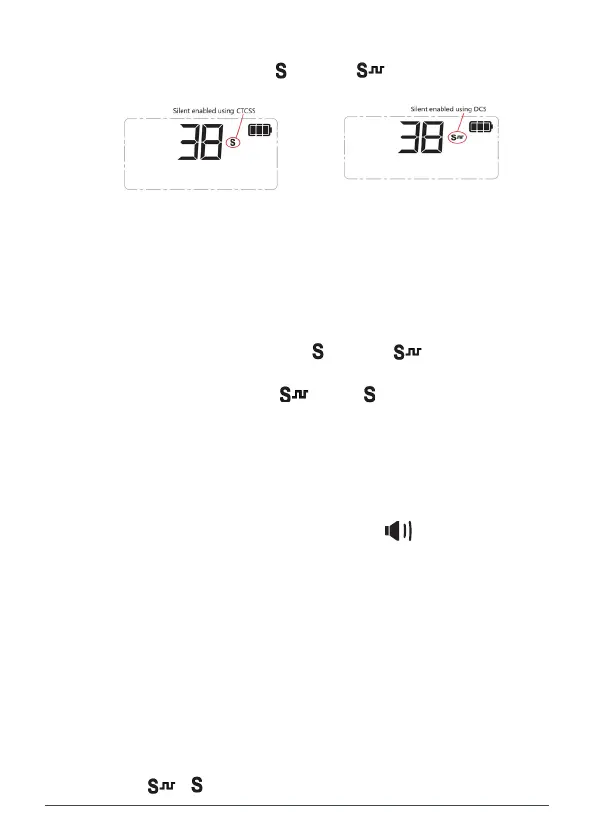
2. Hold the Squelch key (top-side key above the PTT key). SILENT ON
will appear briey and an (CTCSS) or (DCS) icon will appear to
indicate whether CTCSS or DCS is being used.
Silent Mode
Once you have selected a CTCSS or DCS code you can choose to enable Silent mode on selected
channels. Once enabled, your selected channels will remain closed to all signals except those that
are using the same code as your radio. Channels that do not have Silent mode enabled will remain
open to all signals.
To Enable Silent Mode on a channel
1. Use the Channel knob or keys to select the desired channel.
2. Hold the Squelch key (top-side key above the PTT key). SILENT ON will appear briefly and
an (CTCSS) or (DCS) icon will appear to indicate whether CTCSS or DCS is being used.
3. Repeat steps 1 & 2 to activate silent mode on other channels.
Channels that have silent mode enabled will now stay silent unless a signal containing your chosen
CTCSS or DCS code is received.
NOTE: You may activate CTCSS on any channel except the emergency channel 5/35.
To deactivate Silent mode on a channel
1. Select the desired channel. The (CTCSS) or (DCS) icon should be visible on that
channel.
2. Hold the Squelch key. The (DCS) or (CTCSS) icon will disappear from that channel.
The channel is now open to all incoming signals.
NOTE: Silent mode cannot be activated unless a CTCSS or DCS code has been selected via the menu.
If CTCSS/DCS tones are set to ‘OFF’, any attempt to activate the Silent mode will be ignored.
3. Repeat steps 1 & 2 to activate silent mode on other channels.
Channels that have silent mode enabled will now stay silent unless a signal
containing your chosen CTCSS or DCS code is received.
NOTE: You may activate CTCSS on any channel except the emergency channel
5/35.
To deactivate Silent mode on a channel
1. Select the desired channel. The (CTCSS) or (DCS) icon should be
visible on that channel.
2. Hold the Squelch key. The (DCS) or (CTCSS) icon will disappear
from that channel.
The channel is now open to all incoming signals.
NOTE: Silent mode cannot be activated unless a CTCSS or DCS code has been
selected via the menu. If CTCSS/DCS tones are set to ‘OFF’, any attempt to
activate the Silent mode will be ignored.
TIP: When operating in Silent mode, you might see the icon appear on the
display but nothing will be heard because your Squelch is controlled by a CTCSS
or DCS tone. During this time you can use the Squelch key to manually open the
squelch, allowing you to listen on the channel for all signals.
To open the squelch, press the SQUELCH key. If signals with CTCSS or DCS are
using the channel you will now be able to hear them in the speaker. If no signals
are present you will hear the background hiss of an empty channel. Press the
SQUELCH key again to close the Squelch.
Identifying another station’s CTCSS or DCS code
To identify a CTCSS code being used by another station operating on your channel,
use the following procedure:
1. Enable CTCSS/DCS on the selected channel by holding the SQUELCH
key. or will appear on the display.



 To Next Page