5 Control Elements
5.1 Lenses
The lenses shown in this example can, in some cases, dier from those len‐
ses delivered in practice. Then, apply the statements made here accord‐
ingly.
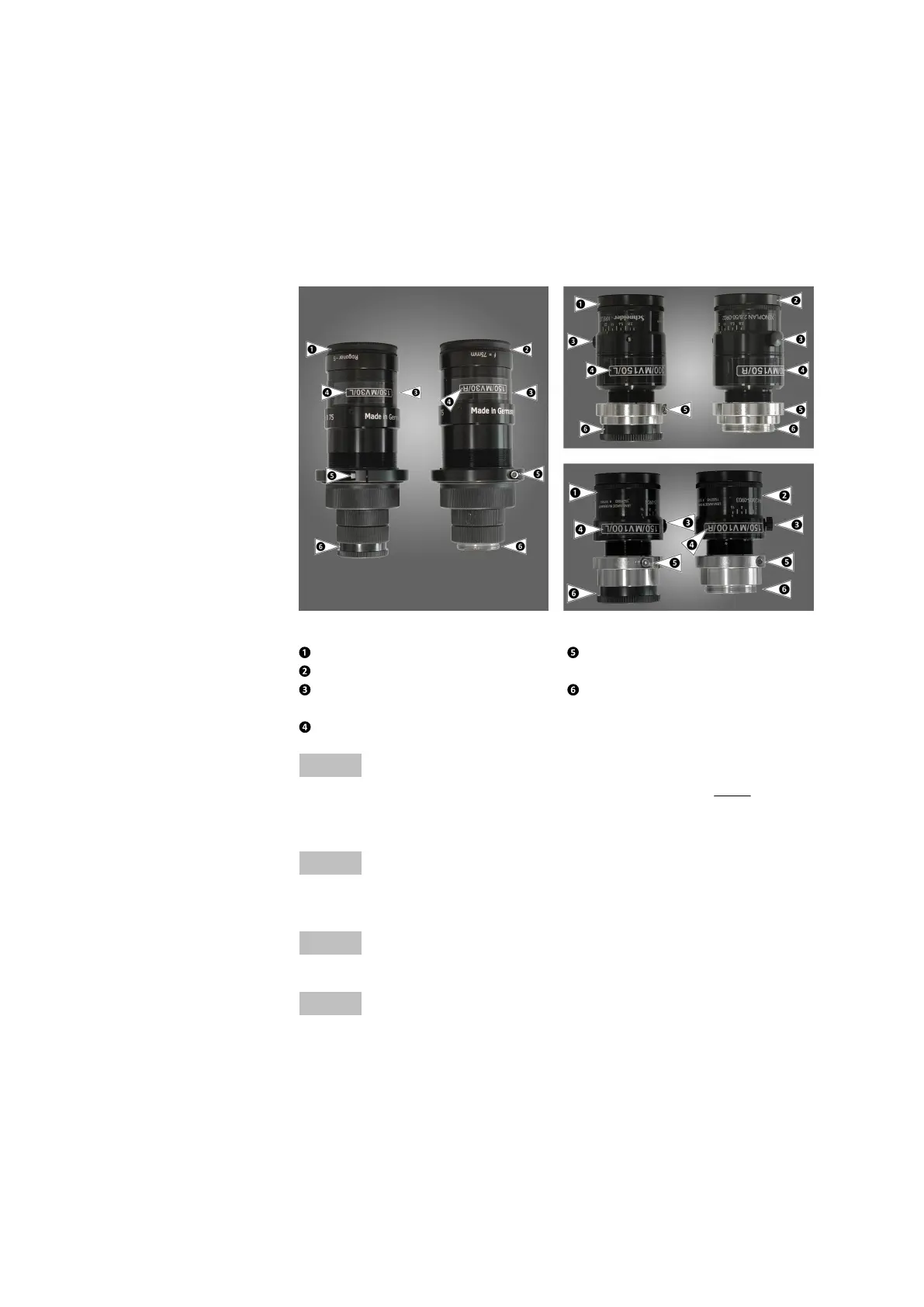
All lenses are marked with L (left) or R (right). The terms left and right
result from the sensor view in normal operating position.
Fig. 4: Examples of camera lenses
Left camera lens L
Right camera lens R
Aperture ring with manual
locking screw
Lens name
Focus locking ring with
Allen locking screw
Screw thread with and with‐
out protective cap
Info
The camera lenses can be equipped with distance rings (see Fig. 4, photo
on the left). Observe that you remove the complete camera lens, including
the distance rings, from the camera during a lens change.
Info
Screw in the camera lenses carefully and hand-tight in the housing. Fix the
focus locking ring first.
Info
After exchanging the camera lenses, you must calibrate the system again.
Info
Linear polarizing filters exist for the light sources. For the corresponding
camera lenses, linear polarizing filters are also available. How to adjust the
polarizing filters to each other is described later in this user manual.
Choose a set of lenses according to the required measuring volume and
the camera distances.
0000001503_002_EN_02-12-2019
Page 16 (56)


 To Next Page