NOTICE
▶
Avoid that the cameras get dirty from inside!
▶
Equip the cameras with lenses or blind caps even when they are
switched o!
▶
When you change lenses, immediately insert the new lenses!
5.2 Handling of Tommy Screws
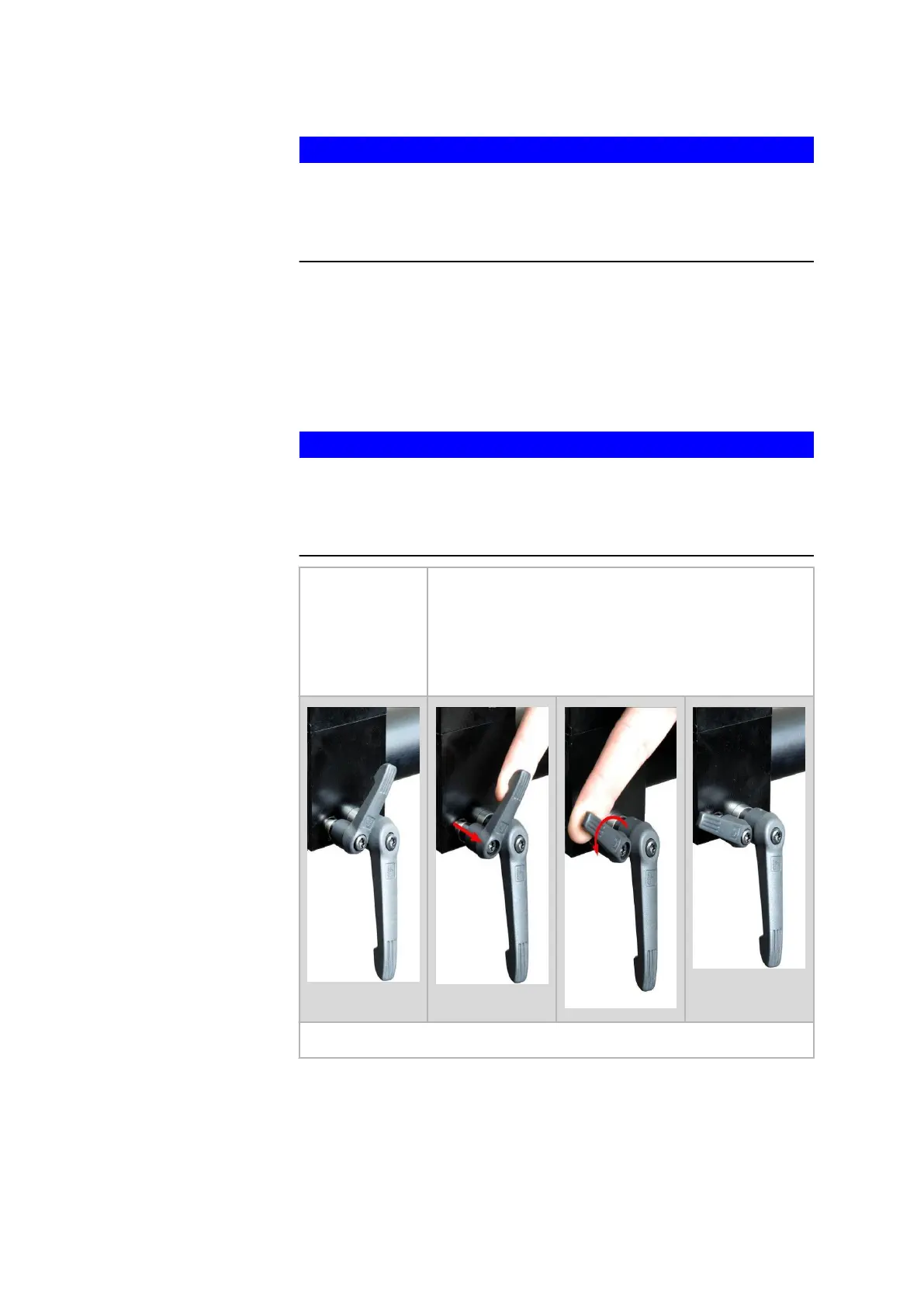
Each camera slider is equipped with a large and a small tommy screw.
Loosen the large handle. Then, the camera can be moved in radial direc‐
tion.
In addition, loosen the small handle. Then, the camera can be moved in all
directions.
NOTICE
Both handles of the camera fixture are loosened completely.
The camera bends downwards with the fixture. Thus, there is a tensile
load in the cabling.
▶
Hold the camera, including the fixture, with one hand.
Problem: The
freedom of
movement of
the small handle
is limited by the
large handle.
Remedy: Pull out the handle and displace it.
Vice versa, you can deal with the large handle in a similar way.
5.3 Handling of the Camera Locking Screws
In some rare cases it might be necessary to loosen or tighten again the
screws by which the cameras are connected to the sensor mechanics.
Control Elements
0000001503_002_EN_02-12-2019 Page 17 (56)


 To Next Page