Repair
Assemble the Packing Rod
NOTE: Before installing the fluid packing rod into the
gun barrel, make sure the internal surfaces of the
barrel are clean. Remove any residue with a soft
brush or cloth. Check the inside of the barrel for
marks from high voltage arcing. If marks are present,
replace the barrel.
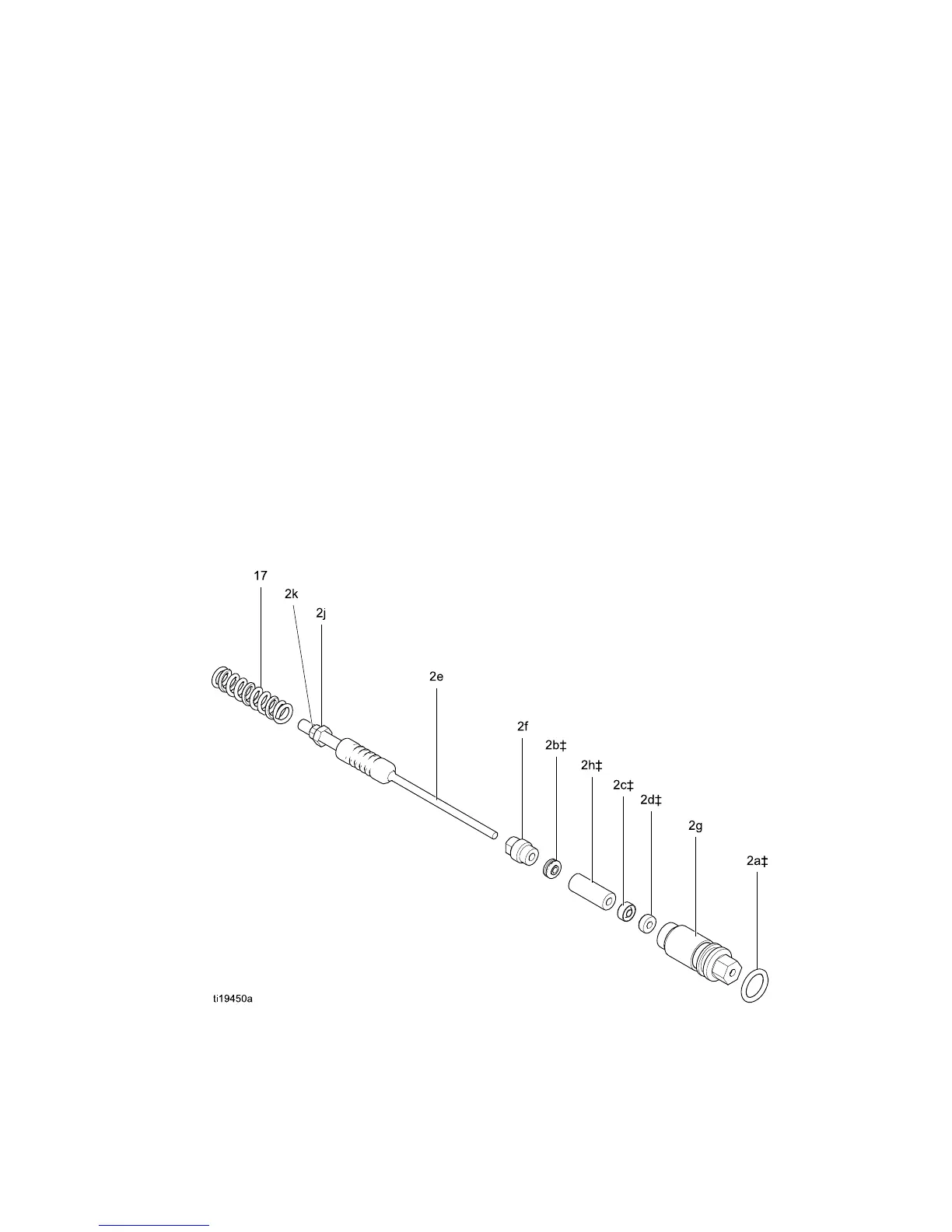
1. Place the pac
king nut (2f) and seal (2b‡) on the
fluid rod (2e)
. Flats on the packing nut must face
the back of t
he fluid rod. The seal o-ring must
face away fr
om the packing nut.
2. Fill the inn
er cavity of the spacer (2h‡) with
dielectric
grease (44). Place the spacer on the
fluid rod (2
e) in the direction shown. Generously
apply diel
ectric grease to the outside of the
spacer.
3. Place the fl
uid packing (2c‡) on the packing rod
(2e) with
its lips facing the front of the rod. Install
the needl
e packing (2d‡) with the male end
toward th
e fluid packing, then install the housing
(2g) .
4. Lightly tighten the packing nut (2f). The packing
nut is properly tightened when there is 3 lb (13.3
N) of drag force when sliding the packing housing
(2g) assembly along the rod. Tighten or loosen
the packing nut as needed.
5. Install the o-ring (2a‡) on the outside of housing
(2g). Lubricate the o-ring with non-silicone
grease, Part No. 111265. Do not over-lubricate.
6. Install the spring (17) against the nut (2j) as
shown.
7. Install the packing rod assembly (2) into the
gun barrel. Using the multi-tool (41), tighten the
assembly until just snug.
8. Install the electrode. See
Electrode Replacement, page 39.
9. Install the nozzle and air cap. See
Air Cap and Nozzle Replacement, page 38.
10. Install the trigger (12) and screws (13).
11. See Test G
un Resistance, page 31.
Figure 23 Packing Rod
3A2494E
41


 To Next Page