FC9000-UM-251-9370 8-52
8 Electrical Adjustment
8.18.2 Adjusting the 2nd Pen Exchange position
Preparation
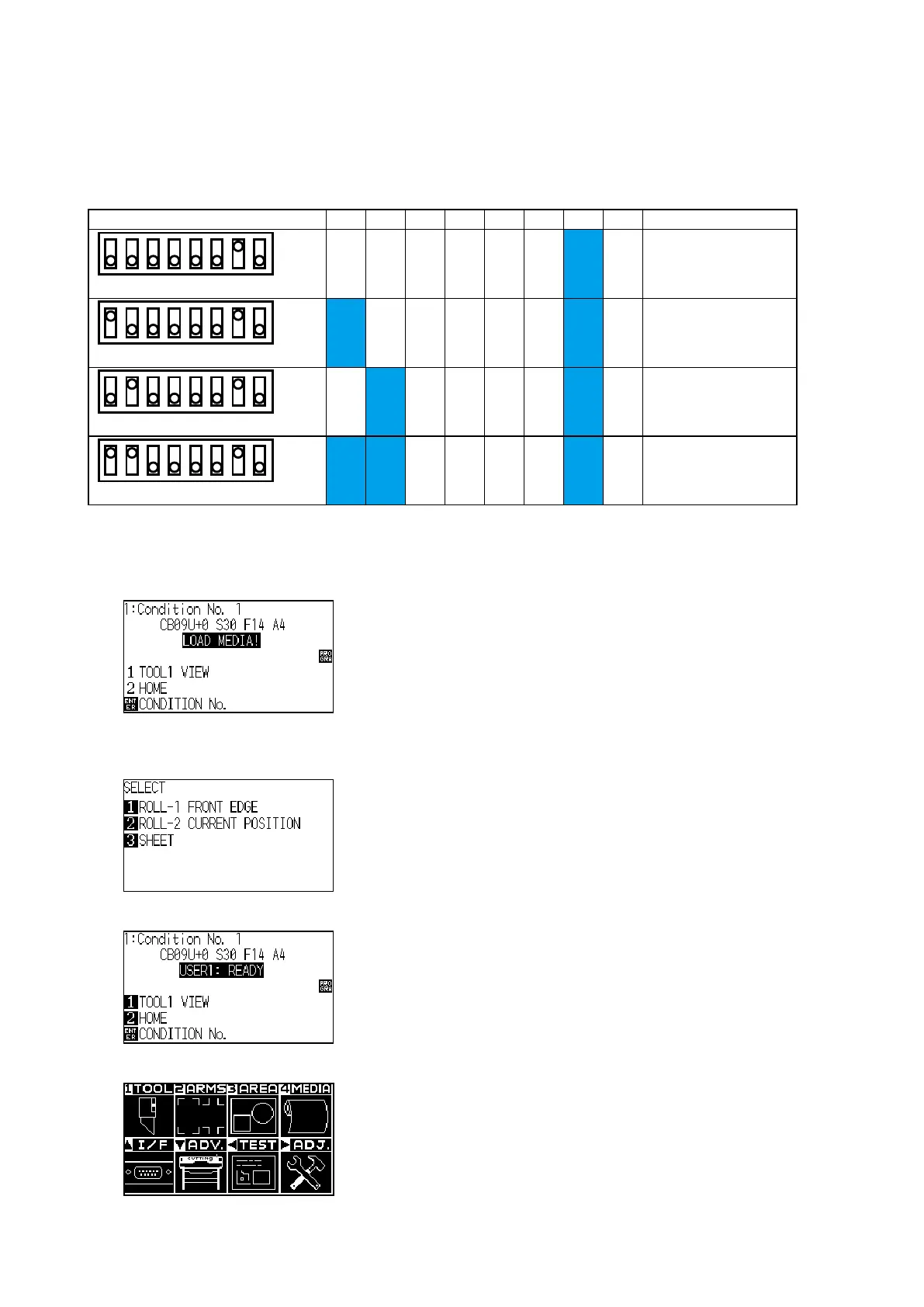
• Conrmthebit7ofSW1isONfor2nd Pen option.
This setting depends on the model.
Dip Switch (SW1) 1 2 3 4 5 6 7 8 Model
12345678
ON
OFF
OFF OFF OFF OFF OFF OFF ON OFF
FC9000-75
2nd pen option model
12345678
ON
OFF
ON OFF OFF OFF OFF OFF ON OFF
FC9000-100
2nd pen option model
12345678
ON
OFF
OFF ON OFF OFF OFF OFF ON OFF
FC9000-140
2nd pen option model
12345678
ON
OFF
ON ON OFF OFF OFF OFF ON OFF
FC9000-160
2nd pen option model
How to adjust the 2nd Pen Exchange position
(1) Turn on the power while pressing the SLOW and the ENTER keys.
(2) The plotter displays the following menu.
(3) Load the sheet media to the plotter, and then the plotter displays the following menu.
(Media must to load to detect the home position at this adjustment.)
(4) Press the 3 key (SHEET) to display the following menu.
(5) Press the PAUSE/MENU key to display the following menu.












 To Next Page