Version 2.4 Page 17
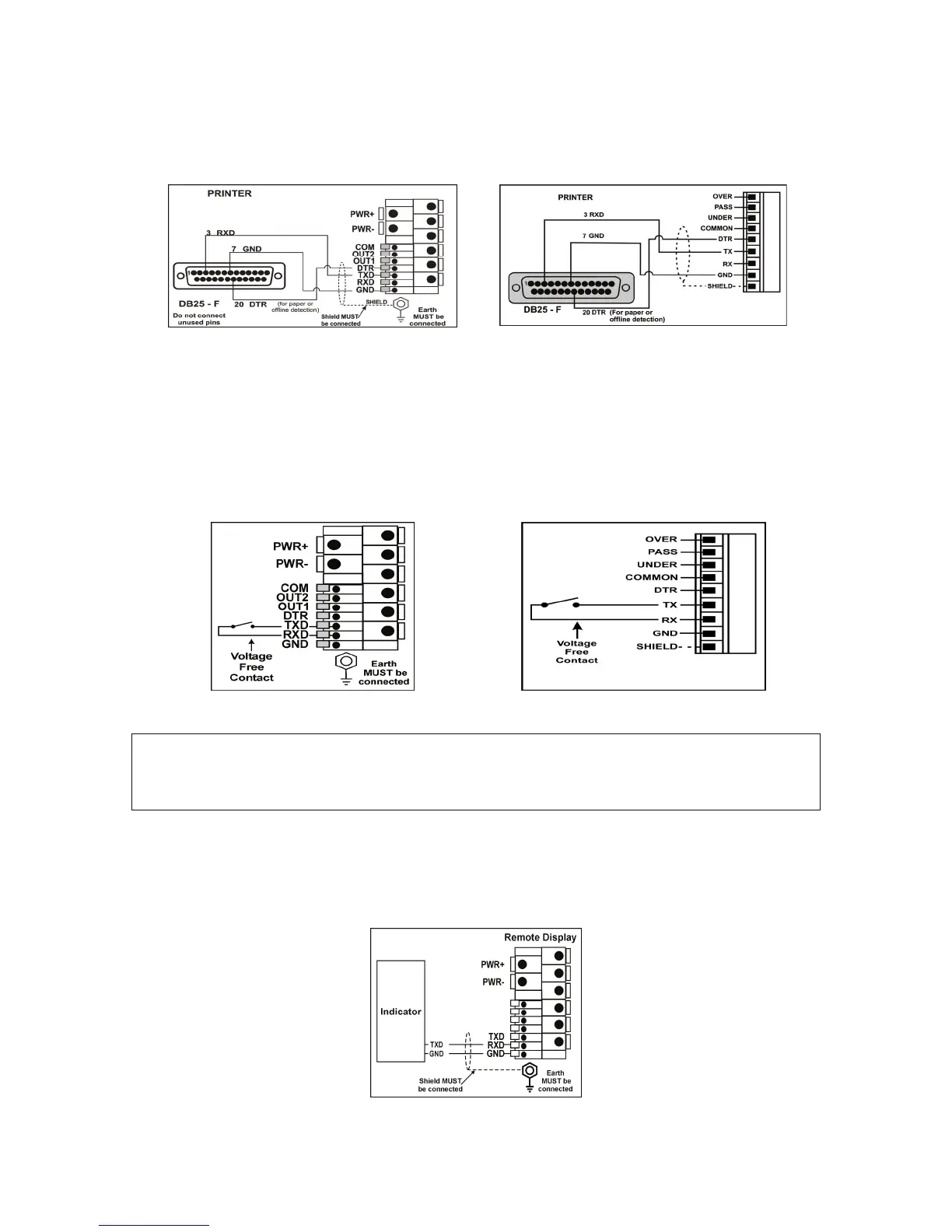
PRINTER CONNECTION
Connection between the indicator and printer DB25 serial port (RXD/TXD, GND and DTR))
REMOTE KEY
The indicator requires a voltage free contact between TXD and RXD to enable the remote key
input and the SPEC:REM.FN parameter must be set. Refer to page 34 for configuration details.
NOTE: The remote input will not function when in setup or when using the Opto-Link.
REMOTE DISPLAY
The remote display documentation should be referred to for connection details. Connect TXD to
RXD and GND to GND on the remote display.
Remote Display Connection
WARNING
Do not connect voltage to the remote key input switch or connection terminals. Connection of any
active circuitry may damage the indicator.
Remote Key Input Connection (250/250SS)
Remote Key Input Connection (250X)
DB25 RS-232 - Indicator to Printer
(250/250SS)
DB25 RS-232 - Indicator to Printer
(250/250SS)


 To Next Page