Version 2.4 Page 43
DIR.SPN (DIRECT SPAN CALIBRATION ENTRY)
Press the <OK> key to start. The display will show the current weight.
Press the <OK> key to enter the Direct Span setting. Change the mV/V setting to the correct full
scale value using the <SEL> and <EDT> keys.
Press the <OK> key to store the new span calibration. When the process is complete the display
will return to the weight to allow the new weight reading to be checked.
Press the <ITM> key to leave the Direct Span routine or <OK> to repeat the operation.
U
U
S
S
I
I
N
N
G
G
L
L
I
I
N
N
E
E
A
A
R
R
I
I
Z
Z
A
A
T
T
I
I
O
O
N
N
This section provides instructions on the use of the linearization. Linearization is used to
approximate the weight output to a non-linear scale.
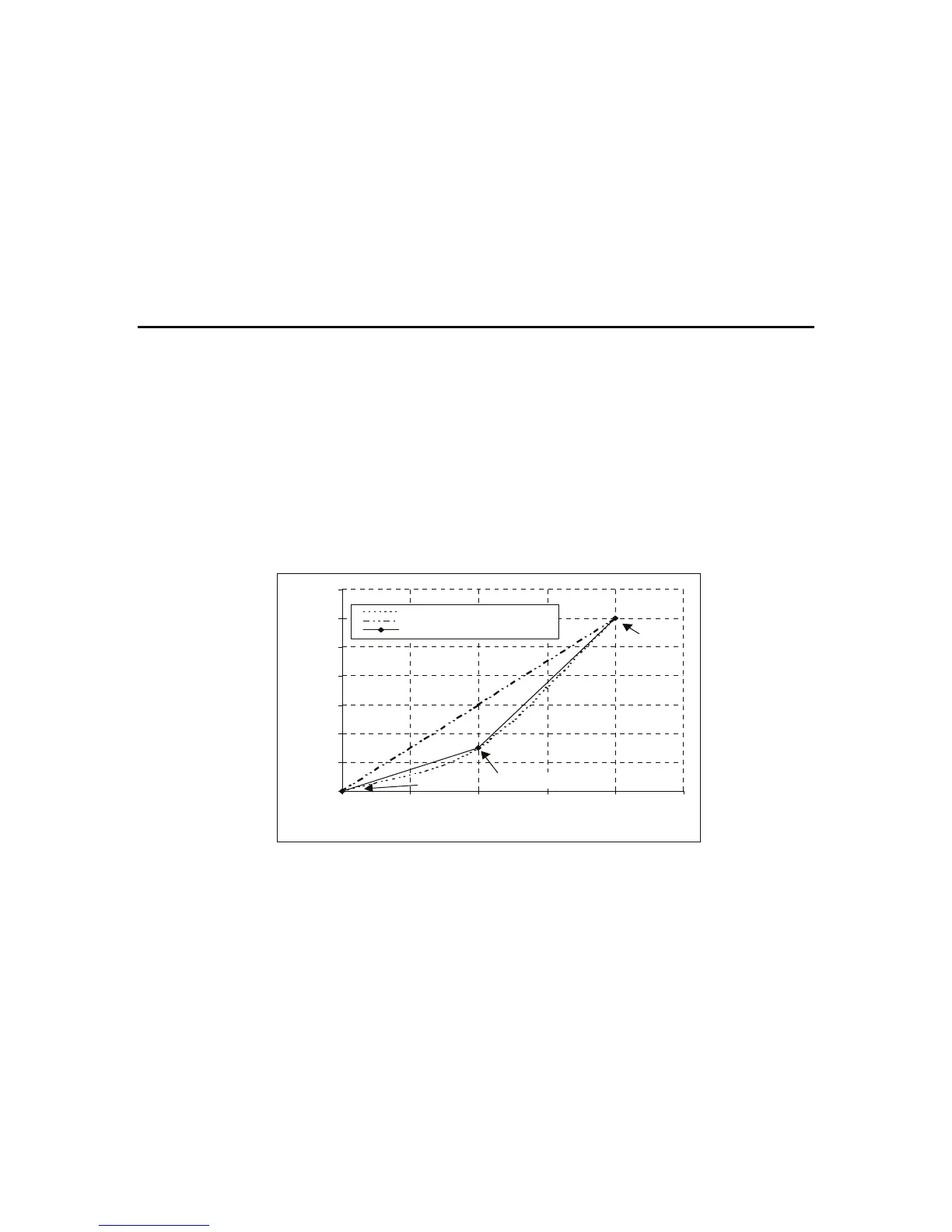
The chart below shows a non-linear characteristic for the load cell output. From the chart, it can
be seen that the trace with no linearization applied may not be linear at approximately 750 kg. By
applying one or more linearization points, more accurate weight readings can be achieved.
To perform a linearization, a calibration of the zero and full scale span points must have been
performed. Both the zero and full scale calibration points are used in the linearization of the scale
base. These two points are assumed to be accurately set and thus have no linearization error.
A maximum of five linearization points can be set independently between zero and full scale.
Unused or unwanted points may also be cleared. The maximum correction that can be applied
using a linearization point is + / - 2%.
ED.LIN (EDIT LINEARIZATION POINTS)
Press the <SEL> key to step through the list of points. Each point is shown as Ln.ppp where n is
the point number (1 to 5), and ppp is the approximate percentage of full scale where the
linearization is applied.
For example, L1.050 indicates that linearization point one is active and was entered at about 50%
of full scale. Unused linearization points are shown with a row of dashes (e.g. L2. - - -).
0
500
1000
1500
2000
2500
3000
3500
0246810
Load Cell Output (mV)
Weight (Kg)
Actual Load Cell Characteristic
No Linearisation
Linearisation Applied
Span Point
Zero Point
Linearisation Point


 To Next Page