Page 24 250 Technical Reference
Primary Function (Weigh Mode)
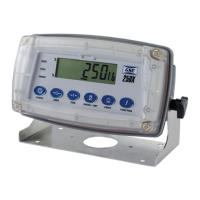
A single press of each key triggers the weighing operation printed on it. The Model 250 allows
individual keys to be disabled in the setup mode. All keys are enabled at the factory, but some
keys may have been intentionally disabled (locked) during installation. If a key has been locked,
a long beep sounds when it is pressed. If however, the key beeps normally, but does not appear
operate, it is possible the indicator is waiting for a stable condition.
Stability Considerations
Once the [ZERO], [TARE] or [PRINT] key is pressed the Model 250 waits for a stable valid
reading before performing the associated operation. If the weight readings remain unstable or
invalid due to a diagnostic error for longer than 10 seconds, the operation is cancelled and the
STABLE ERROR message is displayed.
To improve the stability of the weight reading, increase the filtering or decrease the motion
detection value. Refer to FILTER (Reading Average) and MOTION (Motion Detection) on page
30 for more information.
POWER Key
The [POWER] key is used to turn the Model 250 on and off. To initially turn the indicator
on, press and hold the [POWER] key. The display will show the following:
Display segments will light and then clear.
Software Version (i.e. V1.0).
Calibration Counter (i.e. C.00010).
The current weight will then display.
To turn the indicator off, press and hold the [POWER] key for three seconds. The Model 250 will
turn OFF followed by the three-second countdown.
When using batteries the backlight will automatically turn off to conserve battery power after a
short period of inactivity. A short press of the [POWER] key will turn the backlight on again.
Refer to B.LIGHT (Backlight Operation) page 33 for more information.
Note: The [POWER] key can be locked to prevent the indicator from being turned off through the
front keypad. Refer to KEY.LOC (Front Panel Key Locking) page 33 for more information.
ZERO Key
When an empty scale has drifted away from a true zero reading, this key is used to
perform a zero adjustment on the scale display. The zero adjustment is stored when
power is removed and is re-used when next powered up.
The amount of weight that may be cancelled by the [ZERO] key is limited to the setting at
parameter Z.RANGE (Allowable Zero Operating Range). Refer to page 31 for more information.
When the indicator is set to Industrial mode a long press of the [ZERO] key will remove any
stored zero adjustment. Refer to Chapter 6: Approvals on page 45 for more information on
modes.
TARE Key
This key is used to temporarily set the scale to zero (such as cancelling the weight of a
carton before performing a filling operation). The display will show the Net weight and the
NET annunciator will be lit.


 To Next Page