8
System Settings
Operation figures:
Back
Enter
Place: Fire
Armed: Enable
Zone 1
Back
Enter
Place: GAS
Armed: Enable
Zone 1
Zone
Enter
Exit
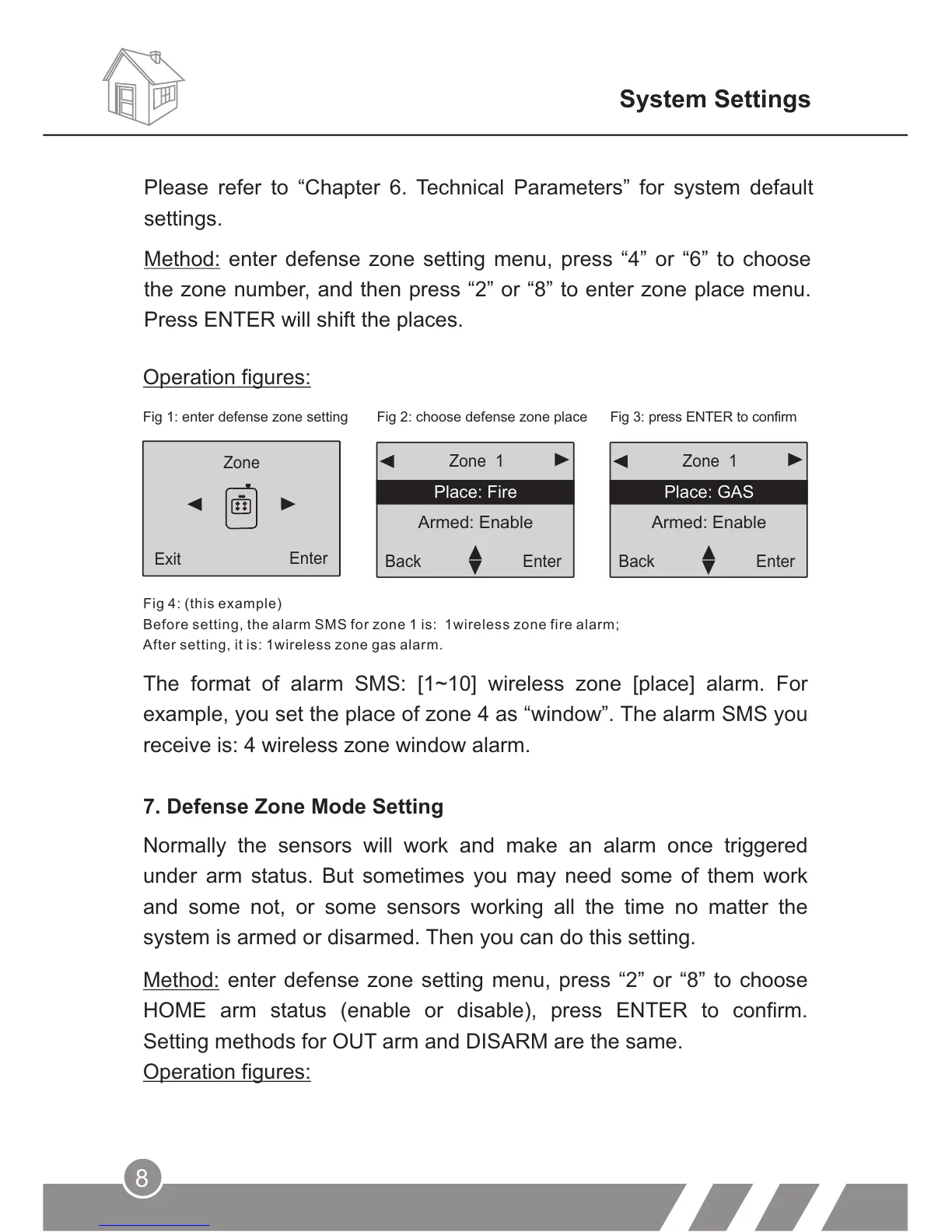
Fig 1: enter defense zone setting Fig 2: choose defense zone place Fig 3: press ENTER to confirm
Fig 4: (this example)
Before setting, the alarm SMS for zone 1 is: 1wireless zone fire alarm;
After setting, it is: 1wireless zone gas alarm.
The format of alarm SMS: [1~10] wireless zone [place] alarm. For
example, you set the place of zone 4 as “window”. The alarm SMS you
receive is: 4 wireless zone window alarm.
7. Defense Zone Mode Setting
Normally the sensors will work and make an alarm once triggered
under arm status. But sometimes you may need some of them work
and some not, or some sensors working all the time no matter the
system is armed or disarmed. Then you can do this setting.
Method: enter defense zone setting menu, press “2” or “8” to choose
HOME arm status (enable or disable), press ENTER to confirm.
Setting methods for OUT arm and DISARM are the same.
Operation figures:
Please refer to “Chapter 6. Technical Parameters” for system default
settings.
Method: enter defense zone setting menu, press “4” or “6” to choose
the zone number, and then press “2” or “8” to enter zone place menu.
Press ENTER will shift the places.



 To Next Page