24
Send SMS
AC Power ON/ OFF
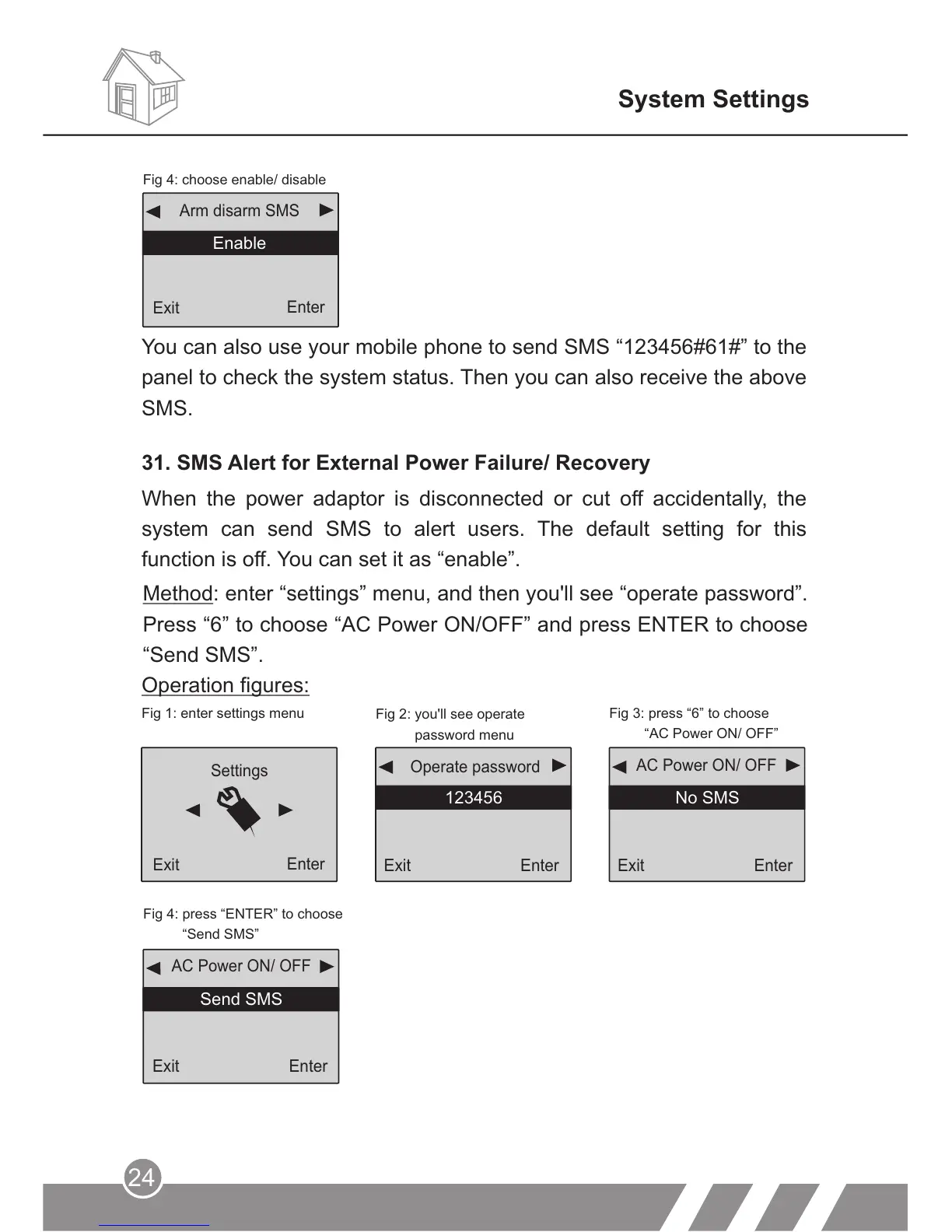
Fig 4: press “ENTER” to choose
“Send SMS”
System Settings
31. SMS Alert for External Power Failure/ Recovery
Back
Enter
Method: enter “settings” menu, and then you'll see “operate password”.
Press “6” to choose “AC Power ON/OFF” and press ENTER to choose
“Send SMS”.
Operation figures:
Exit
Enter
AC Power ON/ OFF
No SMS
Exit
Enter
123456
Operate password
Settings
Exit
Enter
Fig 1: enter settings menu
Fig 2: you'll see operate
password menu
Fig 3: press “6” to choose
“AC Power ON/ OFF”
Fig 4: choose enable/ disable
EnableEnable
Arm disarm SMS
You can also use your mobile phone to send SMS “123456#61#” to the
panel to check the system status. Then you can also receive the above
SMS.
When the power adaptor is disconnected or cut off accidentally, the
system can send SMS to alert users. The default setting for this
function is off. You can set it as “enable”.
Exit
Enter
Exit
Enter



 To Next Page