23
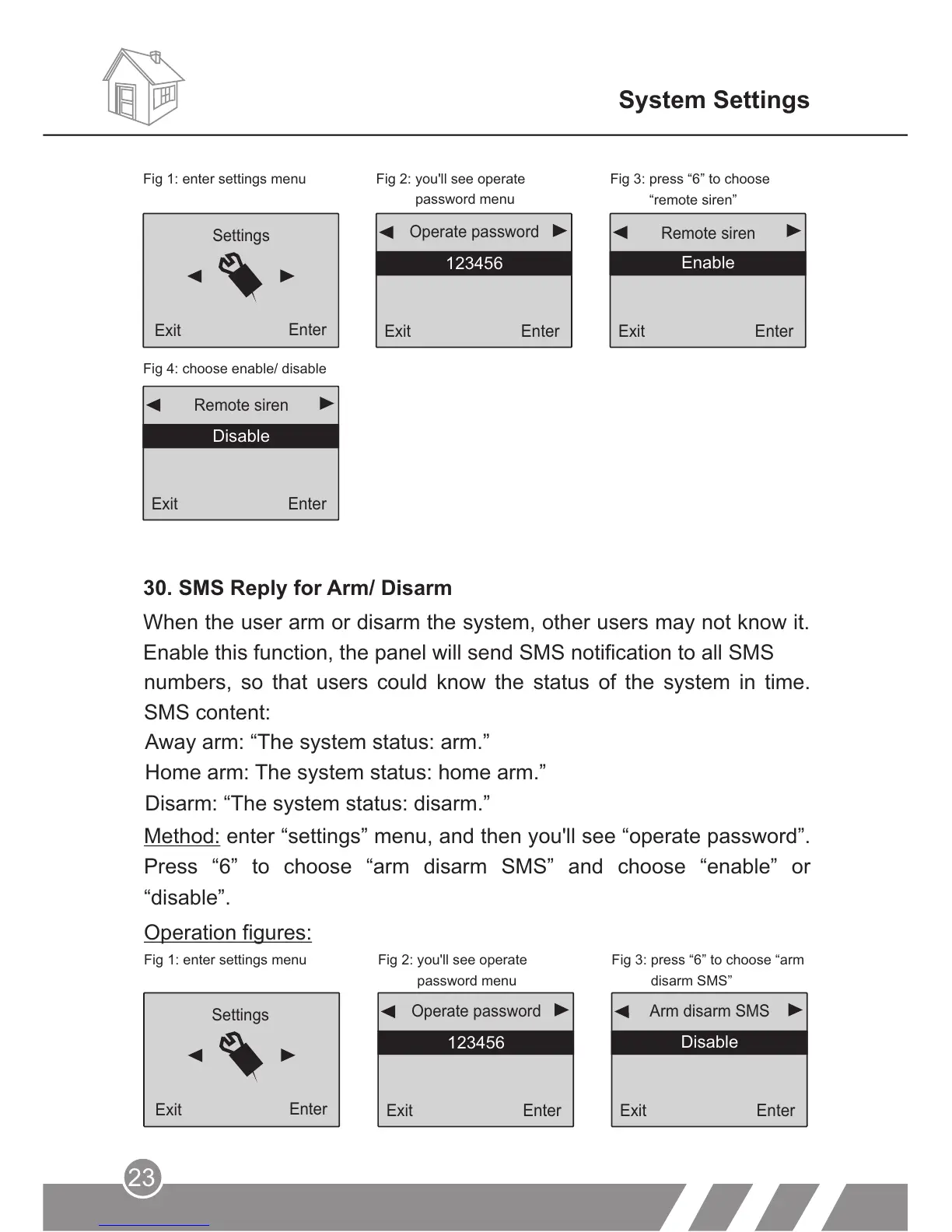
Method: enter “settings” menu, and then you'll see “operate password”.
Press “6” to choose “arm disarm SMS” and choose “enable” or
“disable”.
Operation figures:
Fig 1: enter settings menu Fig 2: you'll see operate
password menu
Fig 3: press “6” to choose “arm
disarm SMS”
Exit
Enter
123456
Operate password
Exit
Enter
Arm disarm SMS
Disable
Settings
Exit
Enter
System Settings
numbers, so that users could know the status of the system in time.
SMS content:
Enable
Exit
Enter
Disable
Remote siren
30. SMS Reply for Arm/ Disarm
When the user arm or disarm the system, other users may not know it.
Enable this function, the panel will send SMS notification to all SMS
Exit
Enter
Remote siren
Enable
Exit
Enter
123456
Operate password
Settings
Exit
Enter
Fig 1: enter settings menu Fig 2: you'll see operate
password menu
Fig 3: press “6” to choose
“remote siren”
Fig 4: choose enable/ disable
Away arm: “The system status: arm.”
Home arm: The system status: home arm.”
Disarm: “The system status: disarm.”



 To Next Page