Exit
Enter
Enable
Voice prompt
Exit
Enter
123456
Operate password
Settings
Exit
Enter
20
Back
Save
15
Please input
Delay alarm
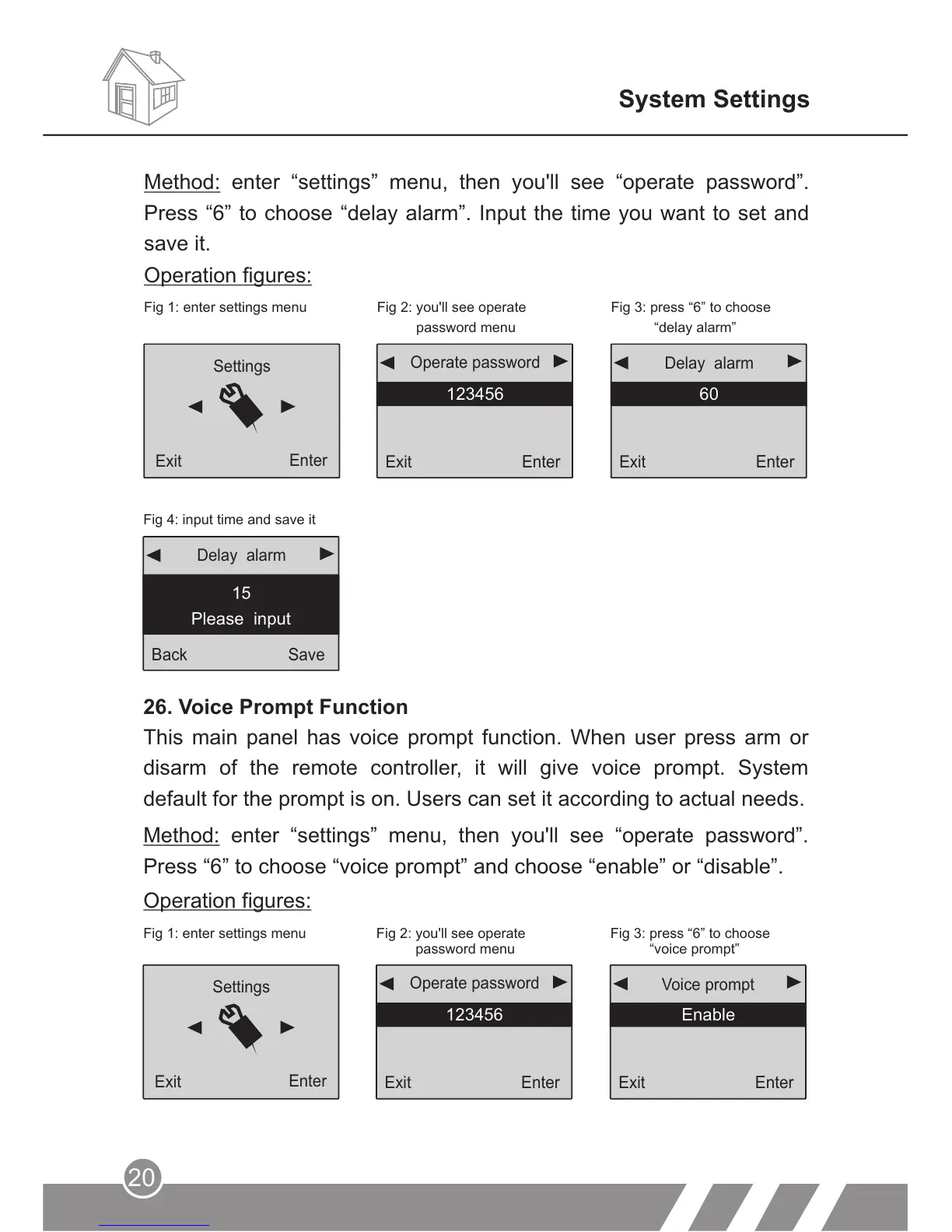
Fig 4: input time and save it
26. Voice Prompt Function
This main panel has voice prompt function. When user press arm or
disarm of the remote controller, it will give voice prompt. System
default for the prompt is on. Users can set it according to actual needs.
Fig 1: enter settings menu Fig 2: you'll see operate
password menu
Fig 3: press “6” to choose
“voice prompt”
Method: enter “settings” menu, then you'll see “operate password”.
Press “6” to choose “voice prompt” and choose “enable” or “disable”.
Operation figures:
System Settings
Exit
Enter
60
Delay alarm
Exit
Enter
123456
Operate password
Settings
Exit
Enter
Fig 1: enter settings menu Fig 2: you'll see operate
password menu
Fig 3: press “6” to choose
“delay alarm”
Operation figures:
Method: enter “settings” menu, then you'll see “operate password”.
Press “6” to choose “delay alarm”. Input the time you want to set and
save it.



 To Next Page