3. Delete Remote Controls
If the remote control is lost or damaged, it should be deleted. After
deletion, it cannot control the main panel.
6
System Settings
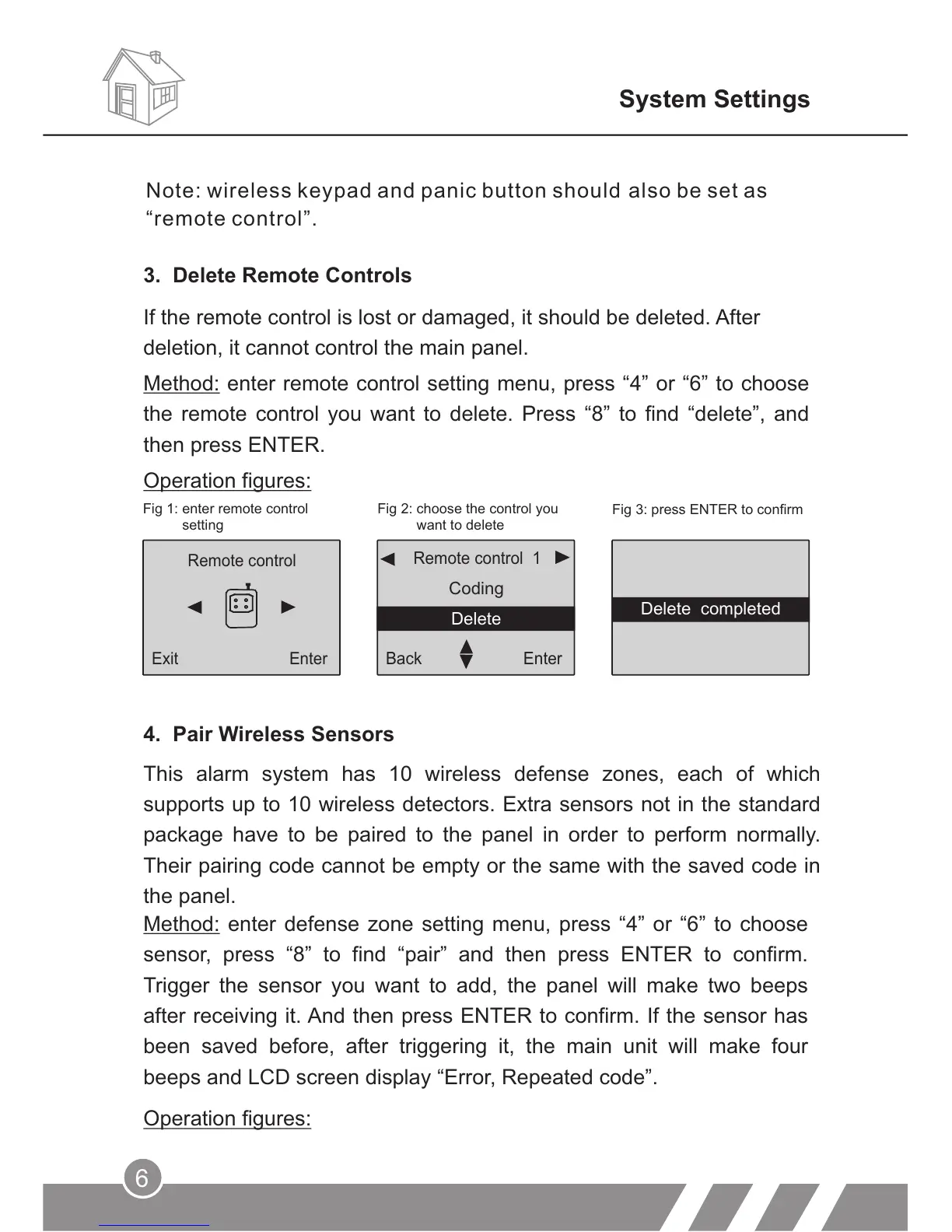
Fig 1: enter remote control
setting
Fig 2: choose the control you
want to delete
Fig 3: press ENTER to confirm
Method: enter remote control setting menu, press “4” or “6” to choose
the remote control you want to delete. Press “8” to find “delete”, and
then press ENTER.
Operation figures:
Remote control 1
Back
Enter
Coding
Delete
Remote control
Exit
Enter
This alarm system has 10 wireless defense zones, each of which
supports up to 10 wireless detectors. Extra sensors not in the standard
package have to be paired to the panel in order to perform normally.
Their pairing code cannot be empty or the same with the saved code in
the panel.
Method: enter defense zone setting menu, press “4” or “6” to choose
sensor, press “8” to find “pair” and then press ENTER to confirm.
Trigger the sensor you want to add, the panel will make two beeps
after receiving it. And then press ENTER to confirm. If the sensor has
been saved before, after triggering it, the main unit will make four
beeps and LCD screen display “Error, Repeated code”.
Operation figures:
4. Pair Wireless Sensors
Note: wireless keypad and panic button should also be set as
“remote control”.
Delete completed



 To Next Page