System Settings
26
1. Away Arm
Away arm means all the defense zones are in arm status. When there
System disarmed
95175308246
Enter:
System disarmed
Please wait
password
Return to default
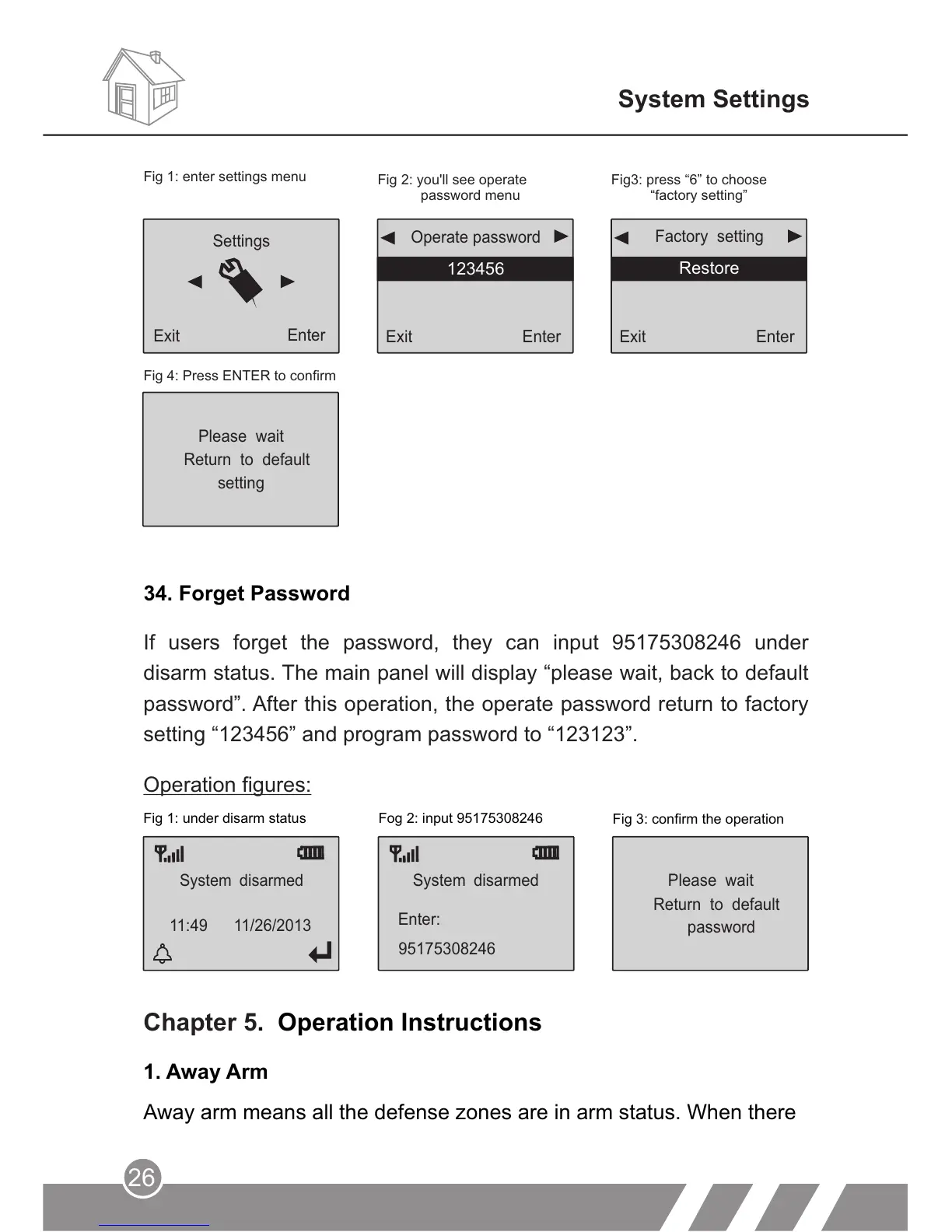
Fig 1: under disarm status Fog 2: input 95175308246
Fig 3: confirm the operation
Chapter 5. Operation Instructions
Operation figures:
34. Forget Password
Settings
Exit
Enter
Exit
Enter
Factory setting
Restore
Exit
Enter
123456
Operate password
Fig 1: enter settings menu
Fig 2: you'll see operate
password menu
Fig3: press “6” to choose
“factory setting”
Fig 4: Press ENTER to confirm
Please wait
setting
Return to default
If users forget the password, they can input 95175308246 under
disarm status. The main panel will display “please wait, back to default
password”. After this operation, the operate password return to factory
setting “123456” and program password to “123123”.
11:49 11/26/2013



 To Next Page