15
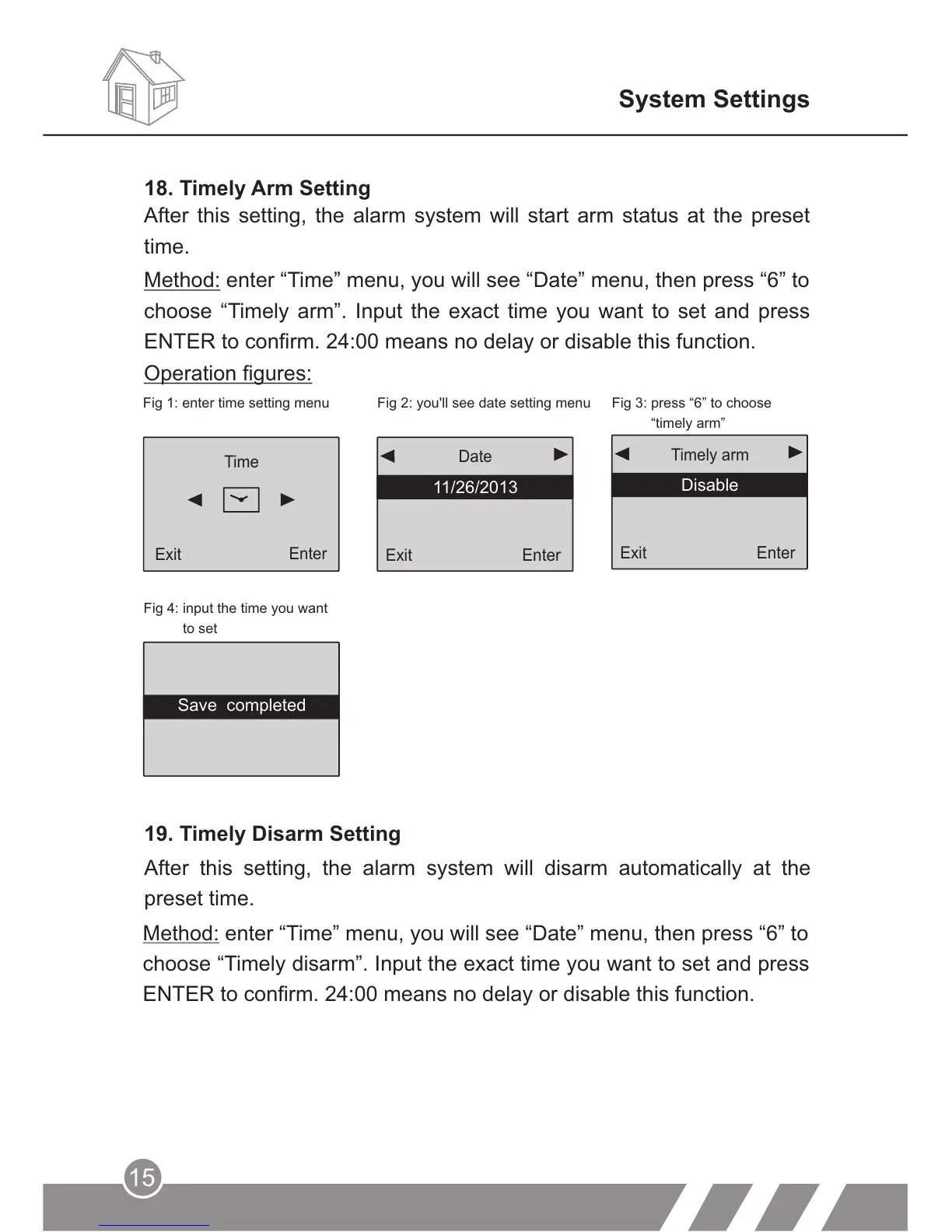
Fig 4: input the time you want
to set
19. Timely Disarm Setting
After this setting, the alarm system will disarm automatically at the
preset time.
System Settings
Method: enter “Time” menu, you will see “Date” menu, then press “6” to
choose “Timely disarm”. Input the exact time you want to set and press
ENTER to confirm. 24:00 means no delay or disable this function.
Exit
Enter
11/26/2013
Date
Exit
Enter
Timely arm
Disable
Operation figures:
Fig 1: enter time setting menu Fig 2: you'll see date setting menu
Fig 3: press “6” to choose
“timely arm”
Enter
Time
Exit
After this setting, the alarm system will start arm status at the preset
time.
Method: enter “Time” menu, you will see “Date” menu, then press “6” to
choose “Timely arm”. Input the exact time you want to set and press
ENTER to confirm. 24:00 means no delay or disable this function.
18. Timely Arm Setting
Save completed



 To Next Page