Settings
Exit
Enter
Exit
Enter
123456
Operate password
Exit
Enter
40
Delay arm
Back
Save
08
Please input
Delay arm
19
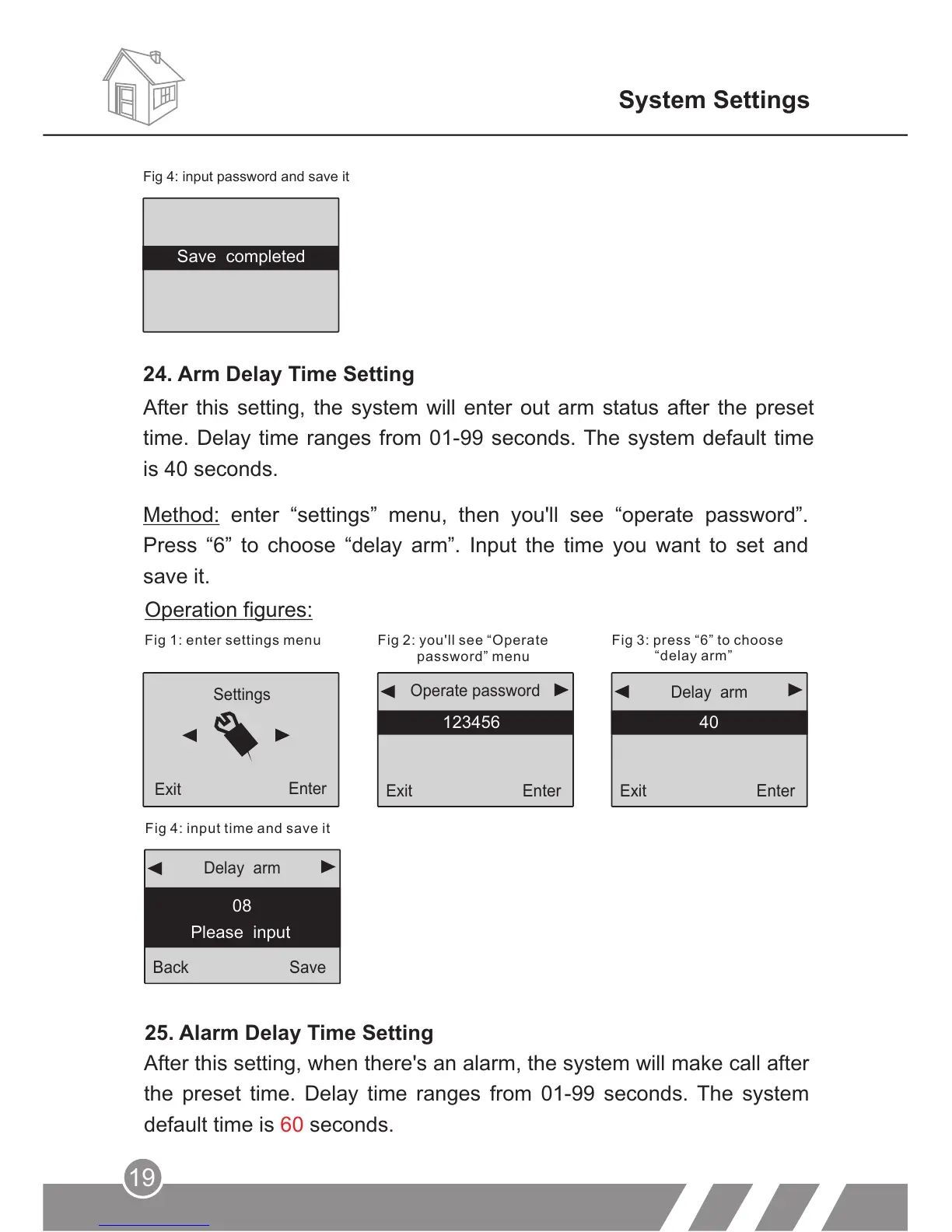
Method: enter “settings” menu, then you'll see “operate password”.
Press “6” to choose “delay arm”. Input the time you want to set and
save it.
Fig 1: enter settings menu
Fig 2: you'll see “Operate
password” menu
Fig 3: press “6” to choose
“delay arm”
Fig 4: input time and save it
Operation figures:
25. Alarm Delay Time Setting
After this setting, when there's an alarm, the system will make call after
the preset time. Delay time ranges from 01-99 seconds. The system
default time is seconds.60
System Settings
After this setting, the system will enter out arm status after the preset
time. Delay time ranges from 01-99 seconds. The system default time
is 40 seconds.
Fig 4: input password and save it
24. Arm Delay Time Setting
Save completed



 To Next Page