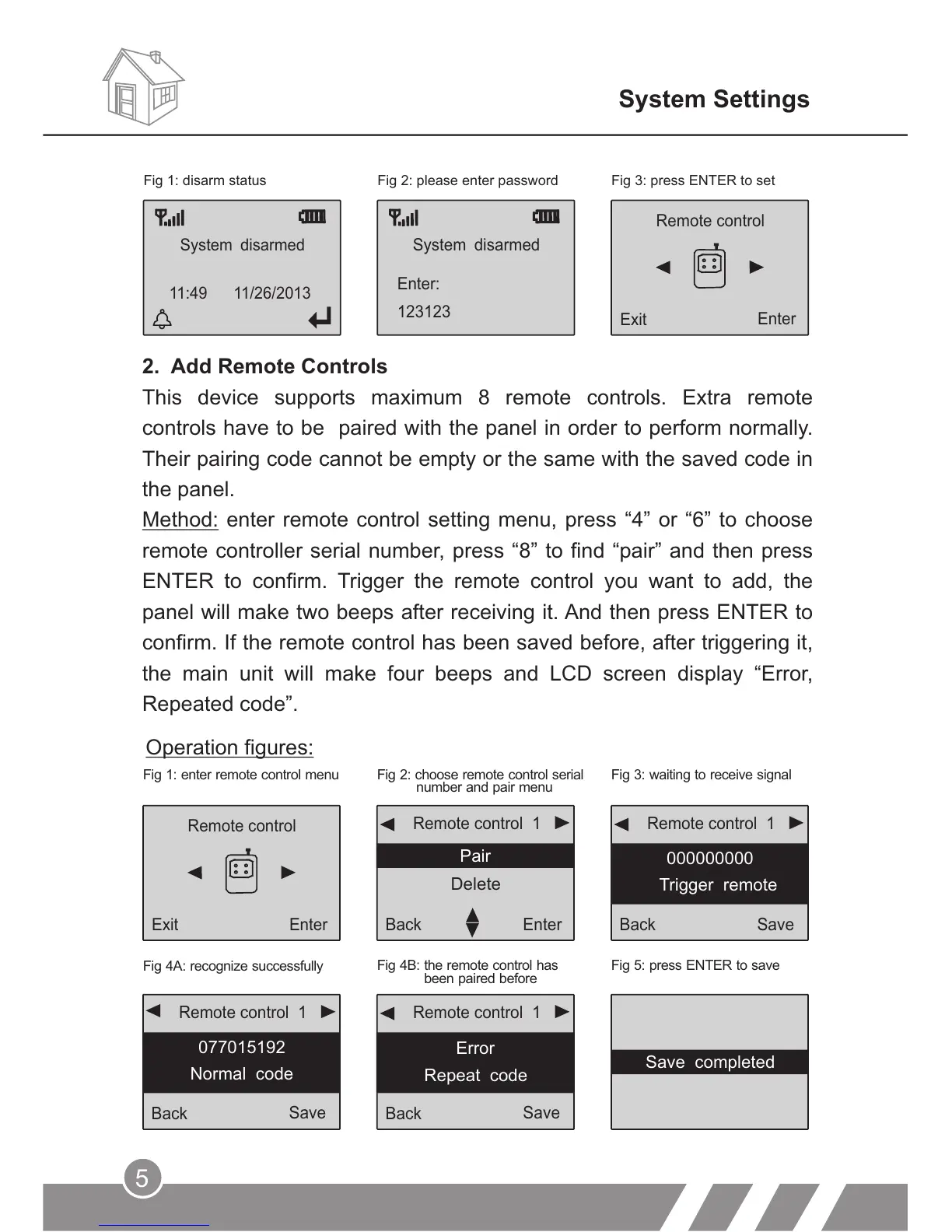
2. Add Remote Controls
This device supports maximum 8 remote controls. Extra remote
controls have to be paired with the panel in order to perform normally.
Their pairing code cannot be empty or the same with the saved code in
the panel.
Method: enter remote control setting menu, press “4” or “6” to choose
remote controller serial number, press “8” to find “pair” and then press
ENTER to confirm. Trigger the remote control you want to add, the
panel will make two beeps after receiving it. And then press ENTER to
confirm. If the remote control has been saved before, after triggering it,
the main unit will make four beeps and LCD screen display “Error,
Repeated code”.
Fig 1: enter remote control menu Fig 2: choose remote control serial
number and pair menu
Fig 3: waiting to receive signal
Fig 4A: recognize successfully
Fig 4B: the remote control has
been paired before
Fig 5: press ENTER to save
Remote control
Exit
Enter
Operation figures:
Remote control 1
Back
Enter
Pair
Delete
Remote control 1
Back
Save
000000000
Trigger remote
Remote control 1
Back
Save
077015192
Normal code
Remote control 1
Back
Save
Error
Repeat code
System Settings
Fig 1: disarm status
System disarmed
123123
Enter:
System disarmed
11:49 11/26/2013
Remote control
Exit
Enter
Fig 2: please enter password Fig 3: press ENTER to set
5
Save completed



 To Next Page