EasyManua.ls Logo

GW Instek APS-1102A - Page 113

GW Instek APS-1102A
285 pages
Print Icon
To Next Page IconTo Next Page
To Previous Page IconTo Previous Page
Loading...
4 ADVANCED OPERATION EXAMPLE
APS-1102A
4-41
The operation steps are described below.
Operation steps using control panel
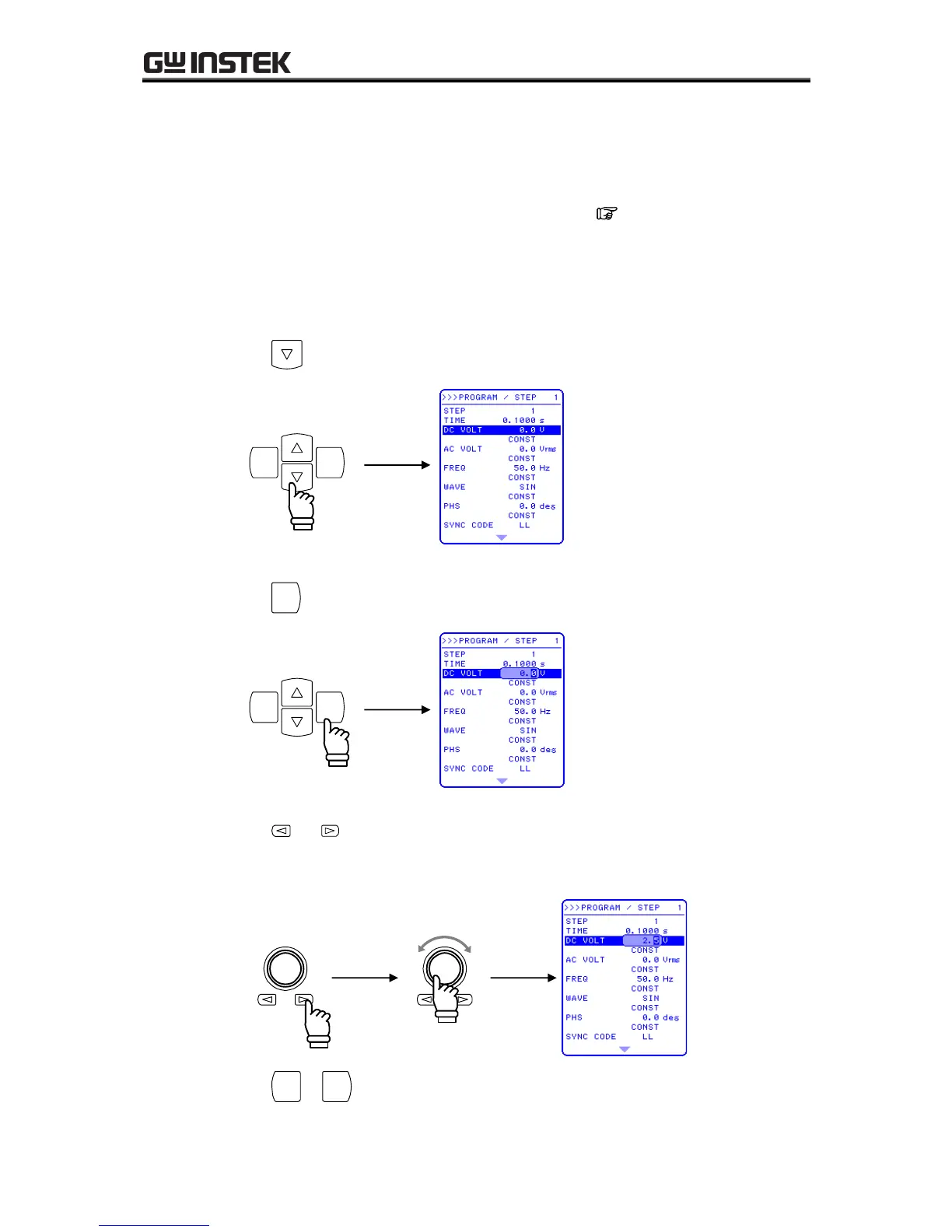
1. Open the PROGRAM screen.
The steps for opening the PROGRAM screen are described in 4.4.2 Sequence
settings.
Setting step 1
2. Press the key to move the cursor to “DC VOLT”.
ENTERCANCEL
3. Press the
ENTER
key to display the modification box.
ENTERCANCEL
4. Press the and keys to move the cursor to the 10’s place, then turn the MODIFY dial to set
“2”. Next, move the cursor to the 1’s place and turn the MODIFY dial to set “5”.
This sets “25.0 V”.
Increase
Decrease
5. Press the
CANCEL
or
ENTER
key to close the modification box.

Table of Contents