EasyManua.ls Logo

GW Instek APS-1102A - Setting Output Voltage; Table3-10. Output Voltage Settings

GW Instek APS-1102A
285 pages
Print Icon
To Next Page IconTo Next Page
To Previous Page IconTo Previous Page
Loading...
APS-1102A User Manual
APS-1102A
3-24
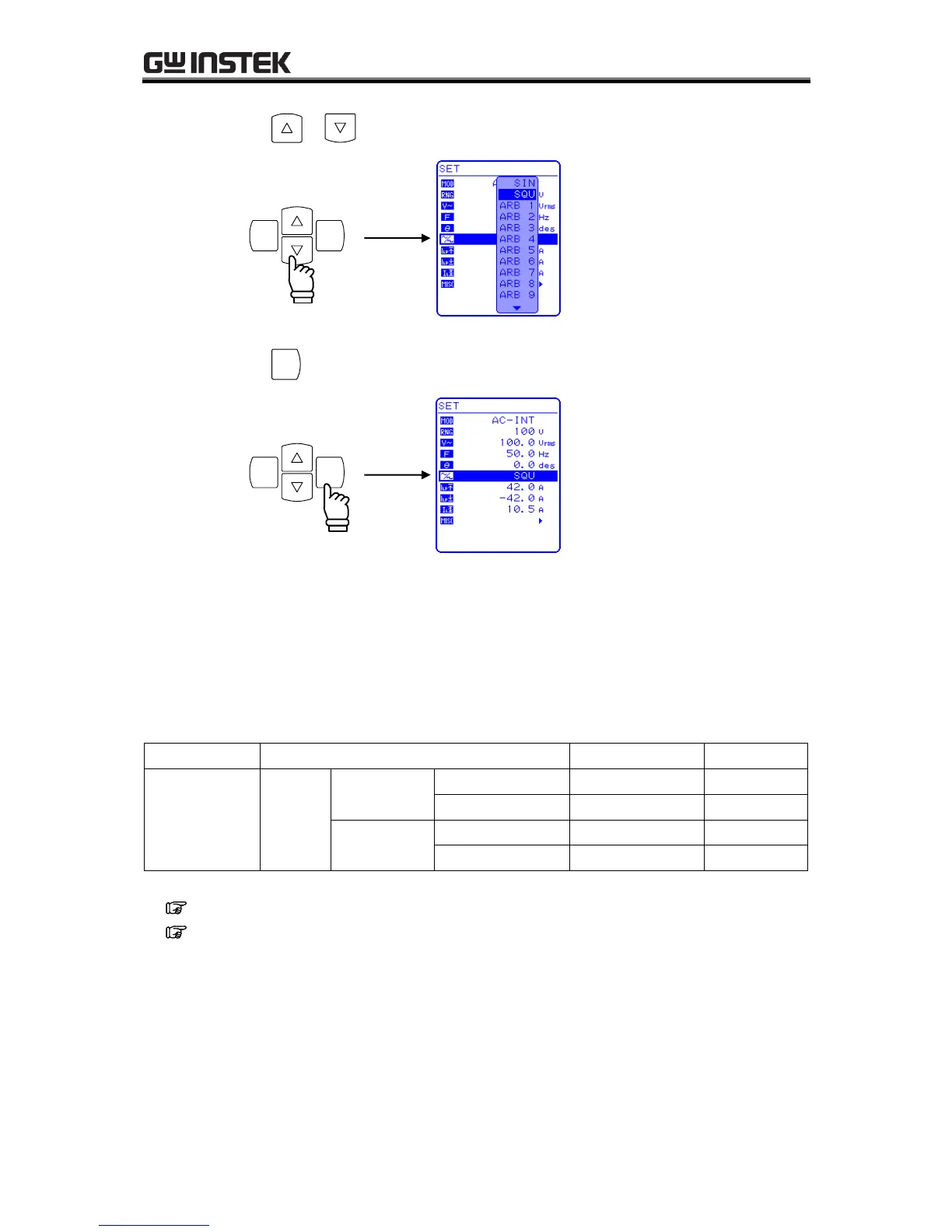
3. Press the or key to move the cursor to the waveform to be output.
ENTERCANCEL
4. Press the
ENTER
key to set the selected waveform.
ENTERCANCEL
3.4.5 Setting output voltage
For AC-INT mode, the output voltage settings listed below can be selected.
Table3-10. Output Voltage Settings
Output Mode
Setting
Setting Range
Resolution
AC-INT
(AC mode)
AC
voltage
100 V range
SIN/SQU
0.0 to 155.0 Vrms
0.1 Vrms
ARB1 to ARB 16
0.0 to 440.0 Vp-p
0.1 Vp-p
200 V range
SIN/SQU
0.0 to 310.0 Vrms
0.1 Vrms
ARB1 to ARB 16
0.0 to 880.0 Vp-p
0.1 Vp-p
See “3.4.7 Using limiter functions, when using a setting range limit for output voltage.
See 5.3.3 Setting output voltage, for output voltage setting ranges for other output modes.

Table of Contents

Related product manuals